Home
Broadcast Pix
Switch
BPswitch
Page 377 (Audio Mixer Overview)
Broadcast Pix BPswitch - Audio Mixer Overview; Configuring Audio Inputs
413 pages
Manual
Save Page as PDF
To Next Page
To Next Page
To Previous Page
To Previous Page
Loading...
BPswitch Opera
tors Manual
377
/
413
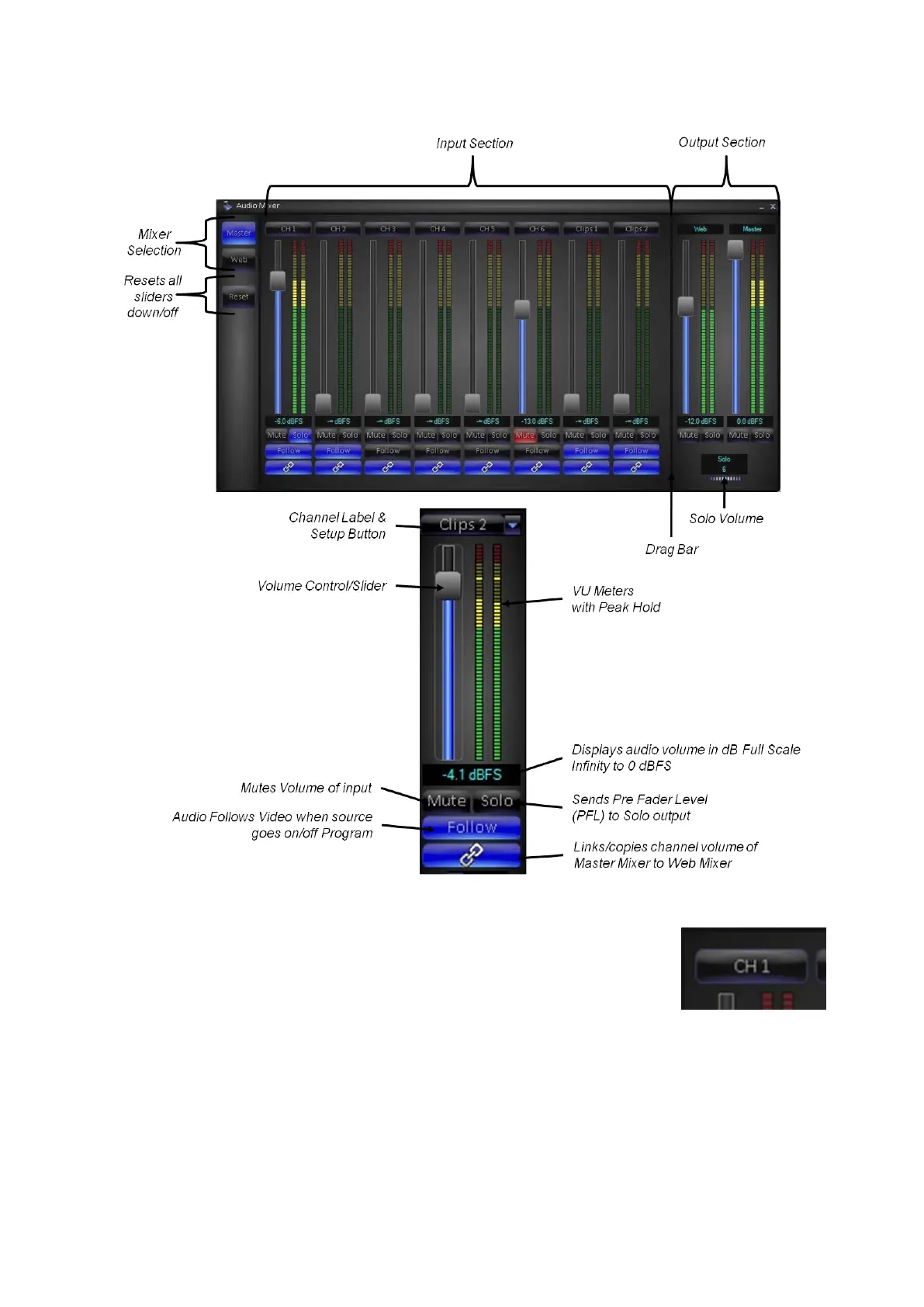
Audio Mixer Overview
Configuring Audio Inputs
1.
Once the Audio Mixer has been
opened,
each of the 8 input channels may be
configured. Click on the
Input Label
button
for the desired input, as shown o
n the right.
The Audio Input Setup window will appear.
376
378
Table of Contents
Main Page
Table of Contents
2
Warranty Information
9
Installation and Getting Started
10
Optional Tally Box
10
Installing Optional 8 Port Tally Box
11
Installing Optional 24 Port Tally Box
12
Activating the Optional Tally Box Drivers
13
Installing Multiple Tally Boxes
14
Audio I/O
15
Clip Audio Advance
16
Running a Show
19
System Status
21
System Settings
22
Changing the Startup Show
22
Selecting between 60 and 50 Hz
23
Changing the Switching Boundary
24
Control Panel Installation
25
Back-Up Software
28
Broadcast Pix Concepts
34
Broadcast Pix Switcher Features
34
Pixbuttons for Executing with Confidence
34
Devices
37
Device Controls
39
Assigning the Device Controls
40
Keyboard Shortcuts
42
Enabling Keyboard Shortcuts
43
Using Keyboard Shortcuts
44
Multi-View Pixpad
45
Pixpad Navigation
47
Pixpad Order Controls
51
Floating Pixpads
52
Multi-View
53
Overview of the Multi-View
53
Sources on the Multi-View
54
Keyer Windows on the Multi-View
55
Program/Preview Overlays on the Multi-View
56
Counters
56
Switching on the Multi-View
57
Multi-View System Settings
59
Floating Monitors
61
Labeling the Multi-View
65
Multi-Lingual Multi-View
66
Clocks on the Multi-View
68
Controlling Timer on the Multi-View
71
List of Screen Resolutions
75
Adjusting the Windows Desktop Screen Resolution
76
Pixmaster Show Editor
76
Creating a New Show
77
Selecting an Existing Show to Edit
79
Editing a Show
80
Editing a Show's Content
81
Editing a Show's Content from the Multi-View
82
Reordering, Adding, or Removing Content
83
To Reorder Content
84
To Reorder a Group of Content
84
Adding Content from the Central Library
85
Adding a Group of Content from the Central Library
87
Manually Importing Content
88
Importing Content into a Subfolder
90
Fluent Watch Folders
90
Cloud-Based Watch Folders
94
Resizing and Softening Images
97
Previewing Content
97
Renaming Content
99
Removing Content from a Show
100
Permanently Deleting Content from the Library
101
Searching for Content in the Library
102
Modifying Attributes
103
Show Content Summary
104
Edit Show Settings
105
Switcher Sources Assignments
107
Adding Wildcard Devices
108
Show Macros
109
Global Naming of Memories
110
Custom Images on Memory Pixbuttons
111
Macro Row Assignments
112
Tally Remapping
114
Show Linking
115
Restoring a Show
117
Restoring System Settings
117
Exporting a Show
118
Importing a Show
120
Exporting System Files
121
Importing System Files
122
Digital Production Switcher
123
Switcher Controls
123
Tally
124
Video Sources
125
Accessing Inputs 10-18 with Shift
126
Lock Shift
127
Transitions
127
Background Cut Transition
128
Background MIX Transition
129
Background Effects Transition
130
Transition Effects
131
Effects Styles and Pixbuttons
133
Selecting a New Effect by Number
135
Changing Effect Transition Rates
135
Reversing an Effect
137
Modifying an Effect
138
Fade to Black
138
Keys
140
Key Controls
141
Assigning a Source to Key 1-3
142
Direct Key Controls
143
Transitioning Keys with Multiple Keys or with the Background
144
Pro Transition Mode
145
Modifiers for Keyers
146
To Change the Key Fade Rate
148
Key Priority
148
DVE Boxes (Picture in Picture)
150
To Create a DVE Box
150
Modifying a DVE Box
152
Multiple DVE Boxes
153
Source Controls
153
Clearkey
157
Activating Clearkey from the Control Panel
158
Clearkey Settings
159
Adjusting Clearkey
160
Luma Key
162
Activating & Adjusting the Luma Key
162
Fluent Controls
163
Virtual Studios
166
Autoflags
174
Image Editor
175
Optional Remote Panels
178
Remote Panel Wiring
178
Remote Panel Configuration
178
Remote Panel Setup
180
Remote Panel Operation
182
Snapshot Memories
184
To Save a Mem
185
To Recall a Mem
188
To Recall a Mem by Number
189
Fluent Macros
189
Opening the Macros Interface
191
Recording a Macro
192
Editing a Macro
195
Inserting Actions
198
Reviewing a Macro
204
Assigning Macros in the Macro Player
205
Running Macros in the Macro Player
210
Playing Back Files Not in Shows
212
Alpha Wipes
213
Capture of Stills
213
To Capture an Output Image
214
To Capture an Input Image
214
Changing the Capture Folder Destination
215
Character Generator & Graphics
216
Clip Store
216
Clip Store Playout
217
To Select a Clip by Name
218
To Select a Clip by Number
218
Selecting a Clip with the Multi-View
219
Viewing more Clips in the Library
220
Creating Clip Thumbnails
220
Clip Motion Controls
222
Clip Counter
222
Clip Motion Controls on the Multi-View
222
Clip Control Modifiers
223
Mark in and out Points
223
Auto Start
225
Auto Stop
225
Auto Rewind
226
Loop Clips
226
Cut Points
227
Auto Transition
228
Auto Next
229
Autoaspect Controls
229
Scrubbing a Clip
230
Exporting Compressed Clips from Final Cut Pro
231
Optional Remote Control of an External DDR
235
Installing the External DDR Control Option
235
Verifying Installation of External DDR Software
240
Adding DDR Control to a Show
241
Selecting Clips to Access
242
Controlling External DDR
244
DDR Controls
247
Accessing more Channels
250
DDR Error Messages
250
Optional Device Controls
251
Camera Control Option
251
Installation of Sony Cameras
252
Sony/Lumens/Marshall Wiring Configurations
253
Vaddio Wiring Configurations
253
IP Configuration of Sony Cameras
254
IP Configuration of Vaddio Cameras
256
Installation of Hitachi Cameras
259
One Camera Installations
260
Multi-Camera Installations
261
Installation of Panasonic Cameras
262
Panasonic Wiring Configurations
263
IP Configuration of Panasonic Cameras
265
Installation of Telemetrics Camera Systems
269
Telemetrics Wiring Configurations
270
Telemetrics Dip Switch Settings
272
Adding the Camera Control Option to an Existing System
273
Changing Camera Control Device Settings
273
Sony Camera Control Settings
273
Hitachi Camera Control Settings
275
Setting Camera Numbers for Hitachi Camera Control
277
Panasonic Camera Control Settings
279
Telemetrics Camera Control Settings
282
Adding Camera Control to a Show
284
Selecting Camera Control in a Production
285
Controlling a Camera Manually
286
Motion Controls for Hitachi Cameras
287
Motion Controls for Panasonic & Sony Cameras
288
Motion Controls for Telemetrics Cameras
289
Setting Camera Preset Positions
291
Recalling Preset Camera Positions
294
Recall Speed for Hitachi Preset Positions
296
Camera Preset Thumbnails
297
Hitachi Camera Control Settings
298
Travel Limits of Tilt and Pan
299
Adjusting CCU Functions
300
Sony Camera Control Settings
304
Adjusting CCU Functions
305
Panasonic Camera Control Settings
307
Adjusting CCU Functions
307
Telemetrics Camera Control Settings
310
Adjusting CCU Functions
310
Optional Audio-Follow-Video Control
311
Enabling Audio-Follow
312
Audio-Follow Activation
312
Audio-Follow Setup
313
Audio-Follow Operation
316
Streamer Control
318
Installing Streamer Control
318
Adding Streamer Control to a Show
319
Streamer Control Settings
320
Selecting Streamer Control in a Production
321
Controlling a Streamer Group
322
Deck Control
322
Installing Deck Control
323
Adding Deck Control to a Show
323
Deck Control Settings - Topic Heading same
324
Selecting Deck Control in a Production
325
Controlling a Deck
326
Deck Control Settings - Topic Heading same
330
Pixplay
331
VOX Voice Automated Control
337
Installing VOX
337
Installing Host Override Panel
338
Installing Multiple VOX Units
339
VOX Software Editor
340
Running VOX
351
Adding VOX Control to a Show
353
Selecting VOX Control in a Production
354
Streaming
355
Creating a Flash Media Live Encoder Profile
356
Saving a Flash Profile
359
Creating a Microsoft Expression Job
360
Saving an Expression Job
361
Logging in with a Ustream Account
362
Logging in with a Livestream Account
363
Controlling the Matrox Monarch
364
Controlling the Streamer from the Multi-View
367
Adding Stream Control to a Show
367
Selecting Stream Control in a Production
368
Controlling a Stream
369
Recording
370
Controlling the Recorder from the Multi-View
371
Adding Record Control to a Show
372
Selecting Record Control in a Production
373
Controlling a Record
373
Audio Mixer
374
Enabling the Audio Mixer
375
Opening the Audio Mixer
375
Audio Mixer Overview
377
Configuring Audio Inputs
377
Controlling the Audio Mixer
379
Router Control
381
Installing Router Control
382
Router Control Setup
383
Router Control Panel Operation
385
Router Control Multi-View Operation
386
Multi-User Operation
386
Optional Multi-Panel Support
386
Opening a Softpanel
387
Locking Panels Together
388
Viewing Just a Portion of the Softpanel
389
Adding a Separate Graphics Operator
390
Two Operators with Separate Graphics Operator and 1 Panel
390
Two Operators with Separate Graphics Operator and 2 Panels
390
Two Operators with Two Computers
391
Remote Operator in the Back Room
394
Dual Panels for Back-Up Redundancy
394
Remote Control from a Distance
397
Remote Control from an Iphone/Ipod/Ipad
402
Appendix
406
Updating the Broadcast Pix Software
406
Installing System Options
409
Control Panel Internal Operation
410
Bpswitch System Specifications
411
Broadcast Pix Contact Information
413



 To Next Page