BPswitch Operators Manual
183 / 413
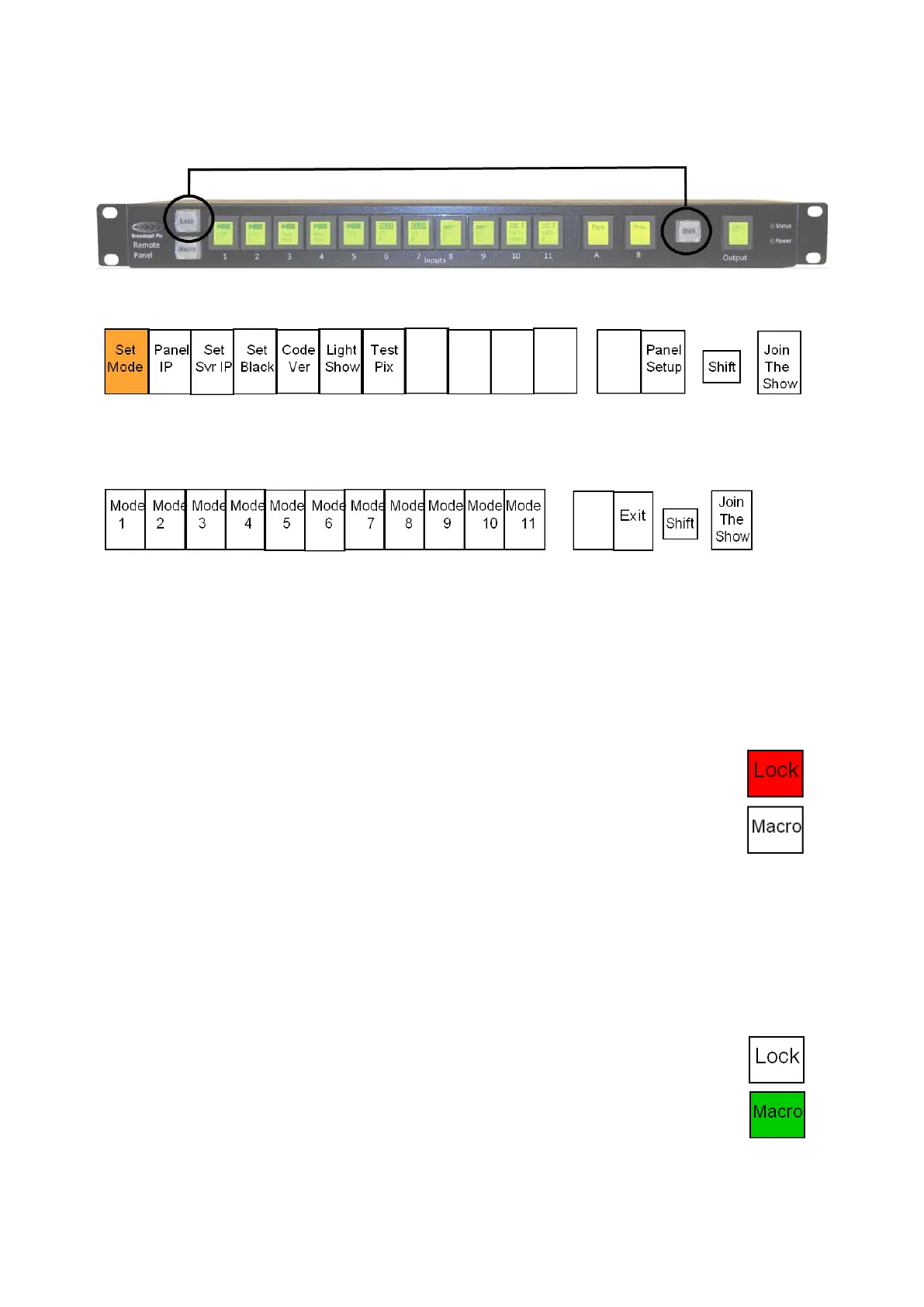
On the Remote Panel, select and hold down the [Shift] button, it will
illuminate yellow. Then select the [Lock] button, as shown below.
This will put the Remote Panel into an offline setup mode, as shown below.
Press the [1] input PixButton labeled Set Mode, and the PixButtons will
change showing the Modes 1- 11 and an Exit button, as shown below.
Select the desired [Mode] PixButton 1 through 11, to access modes 12-22
select the [Shift] button.
The Remote Panel will automatically connect to a running show with the
newly selected mode.
To Lock the Remote Panel:
On the Remote Panel, select the [Lock] button, it will
illuminate red, as shown on the right.
Now any button push will be ignored by the panel,
preventing any accidental switch.
To unlock the panel, select the [Lock] button, and it
will turn off. The Remote Panel is now back in it’s
normal operational mode.
To Run a Macro:
On the Remote Panel, select the [Macro] button, it
will illuminate green, as shown on the right.
The A PixButton will turn to a Stop button and the B
PixButton will turn to a Play button. Any assigned
memories will now appear on the input PixButtons.
The Output PixButton is disabled in the Macro mode.



 To Next Page