BPswitch Operators Manual
317 / 413
In addition, some Audio Mixers, like the Yamaha O1V, can send VU Audio Meters
back to the Multi-View to be displayed. This VU Meters can also active some of
the programming features of the full Audio Follow menu.
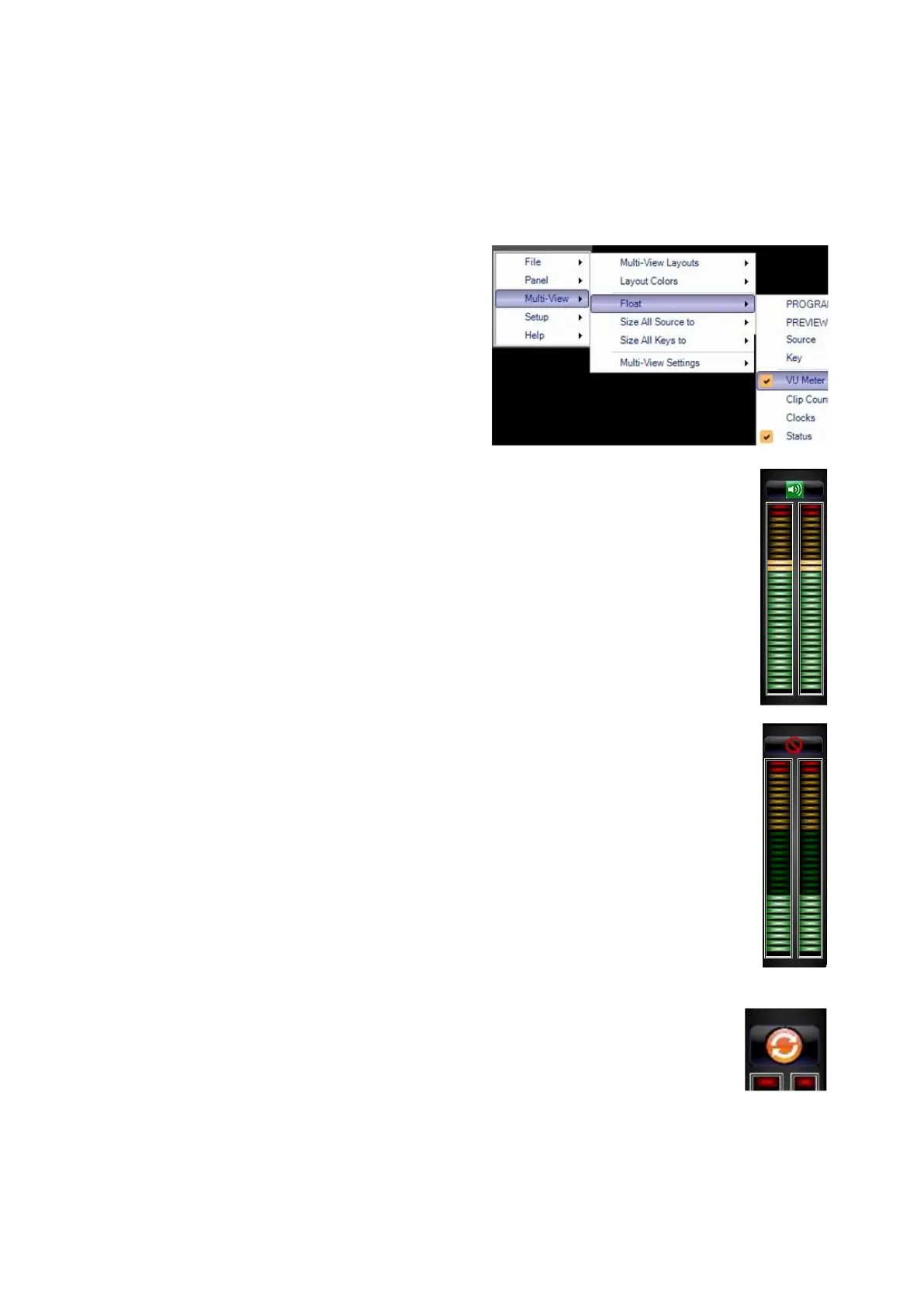
To float the VU Meters:
Click on the Broadcast Pix menu button
and select Multi-View, Float and then
VU Meter, as shown on the right.
The VU Meters window will appear. If
audio signals are active on the mixer,
and if the mixer is supports VU Metering
to Broadcast Pix, you will see the levels,
as shown on the right.
The green speaker icon represents that
Audio Follow Video is active and
enabled. To disable operation simply
click on the Speaker Icon button, and it
will turn to a red X, as shown on the
right.
Now Audio Follow Video has been
disabled.
Similarly when you click on the Disable
button in the Audio Follow window the
icon on the VU meter will also change.
To re-enable Audio Follow repeat this
step.
Similar to the Capture Mixer button in
the Audio Follow window, commands
can be updated through the VU Meter,
without having to open the Audio Follow
window.
When a command is triggered the
button on the VU Meter will change to
an update icon, as shown on the right. If



 To Next Page