BPswitch Operators Manual
60 / 413
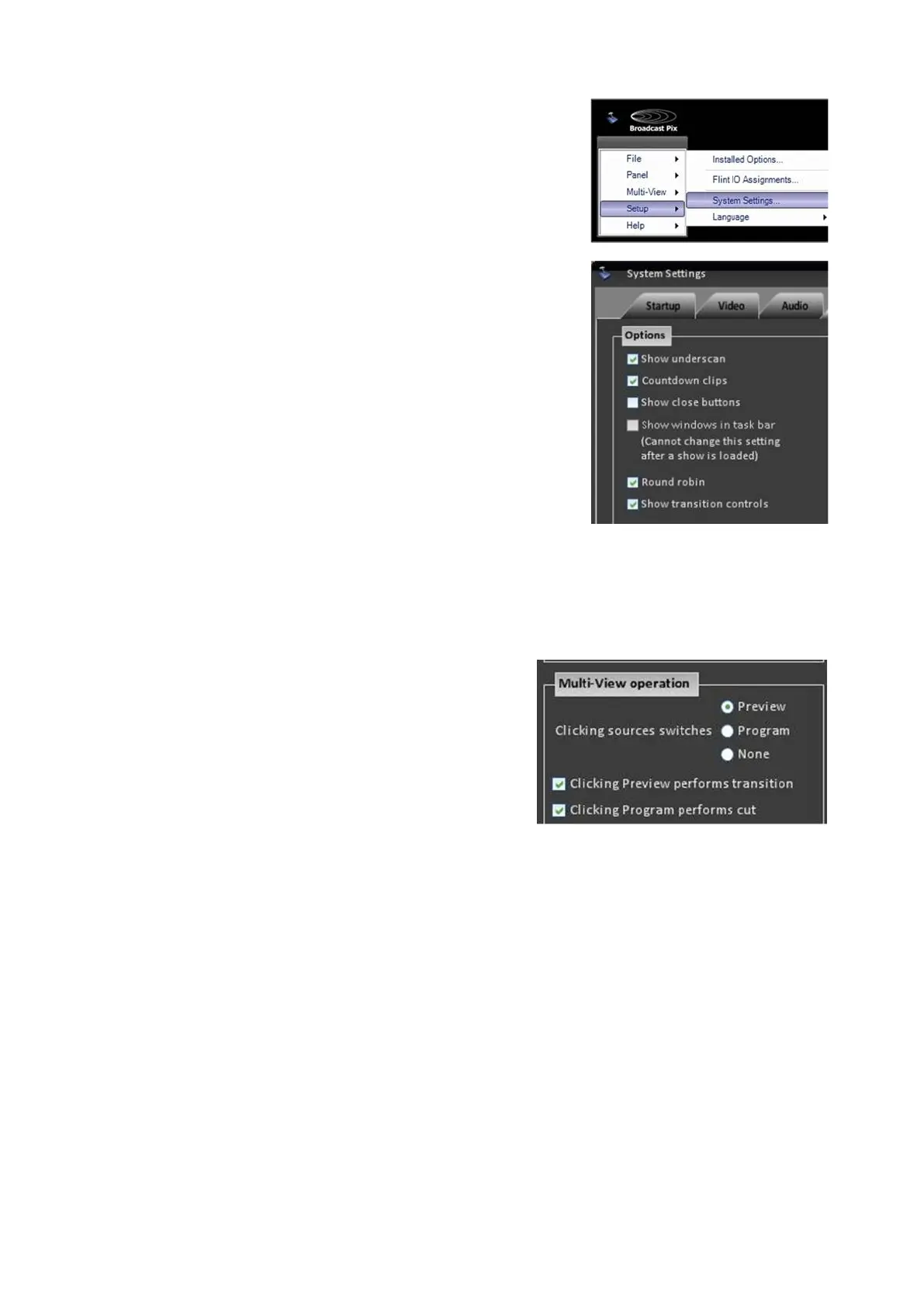
In System Settings window, click on the Multi-
View tab, which will bring up the various
video settings, as shown on the right.
Deselect the Show transition controls checkbox
under the Options section.
The Mix, Fx, Rate and BGR controls on the
Preview and Program output monitors will now be
hidden and disabled.
To enable the controls, repeats steps 1-4 above.
To modify switching control on the Multi-View:
Open the System Settings, Multi-View
tab, as described in steps 1&2 above.
Under the Multi-View operation section
you may modify what output is switched
when a source is selected, either
Preview, Program or None.
And, enable/disable the clicking on the
Preview and/or Program windows to
perform a transition.
Click on the OK button to apply the
changes.
To use green tally, instead of orange:
Open the System Settings, Multi-View tab,
as described in steps 1&2 above.
Under the Options section, place a check
next to Preview tally green
, as shown on the
right.
Click on the OK button to apply the changes.



 To Next Page