BPswitch Operators Manual
203 / 413
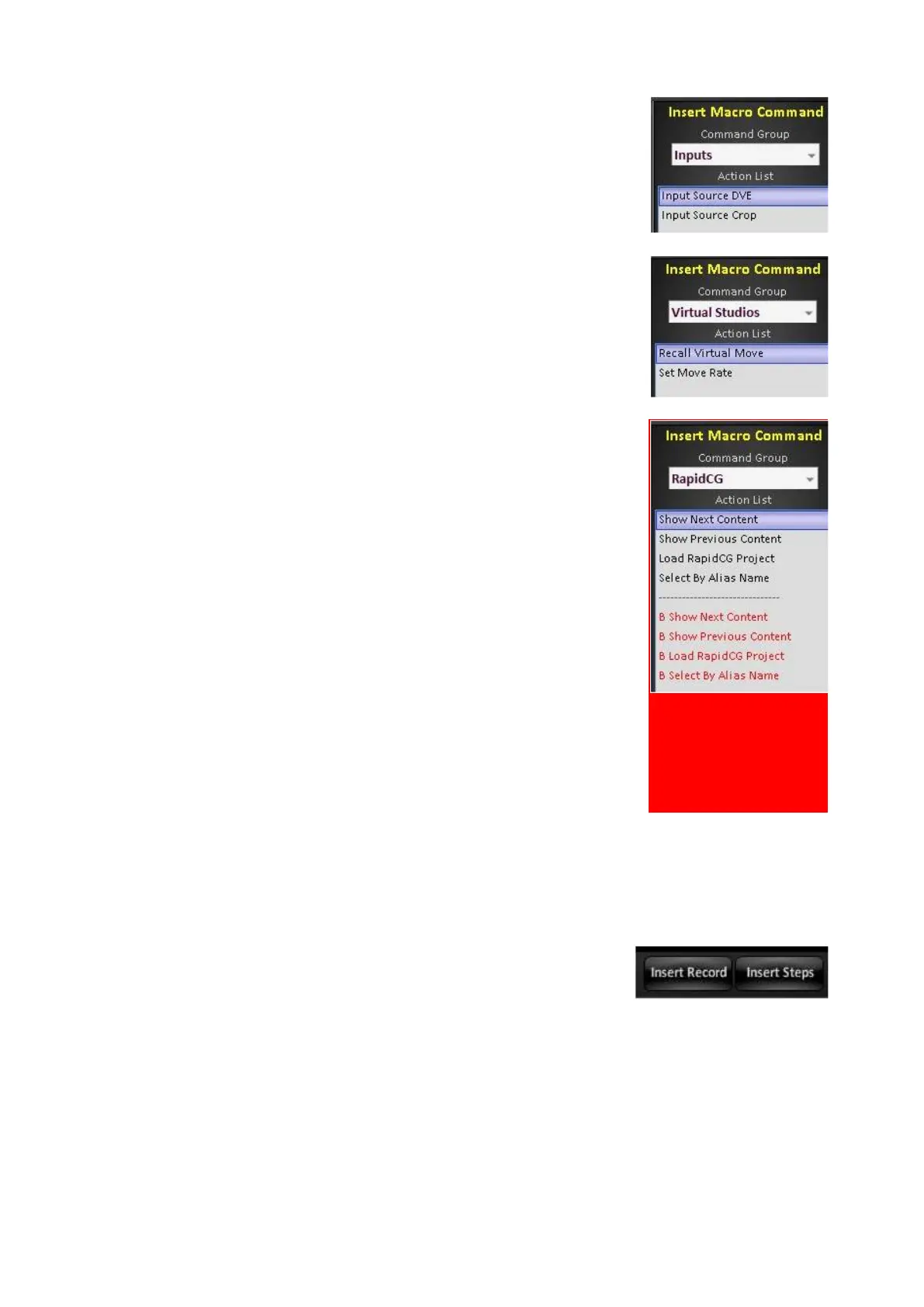
The Inputs command group allows the setting of source
settings for DVE and Crop, as shown on the right.
The Virtual Studios command group allows the recall of
Virtual Moves with a specified move rate, as shown on
the right.
The BPfusion command group allows for triggering of
commands in BPfusion, channel A and B. Useful for
further automating the BPfusion application, as
described below.
Show Next Content: Selects the next piece of content in
the Content Panel of BPfusion.
Show Previous Content: Selects the previous piece of
content in the Content Panel of BPfusion.
Load BPfusion Project: Loads a previously created and
saved project in BPfusion. The BPfusion application
must be previously open.
Select By Alias Name: Select a piece of content in the
Content Panel of BPfusion by the provided alias name.
To insert a new recording:
Select a step in the Action List, with the mouse. The
row will highlight white.
Click on Insert Record or Insert Steps in the Control
Bar, as shown on the right.
Similar to the Record button, the Insert Record will
remember every button/command selected and its
timing, but will start recording above the selected step.
Similar to the Record Steps button, Insert Steps will
remember a group of commands all in 0 (zero) frames,
similar to a SnapShot memory. When using Insert
Steps the recording will start above the selected step,



 To Next Page