BPswitch Operators Manual
266 / 413
browser, this can be done locally on the Broadcast Pix Server or on a remote
computer.
To change the IP address of a Panasonic Camera:
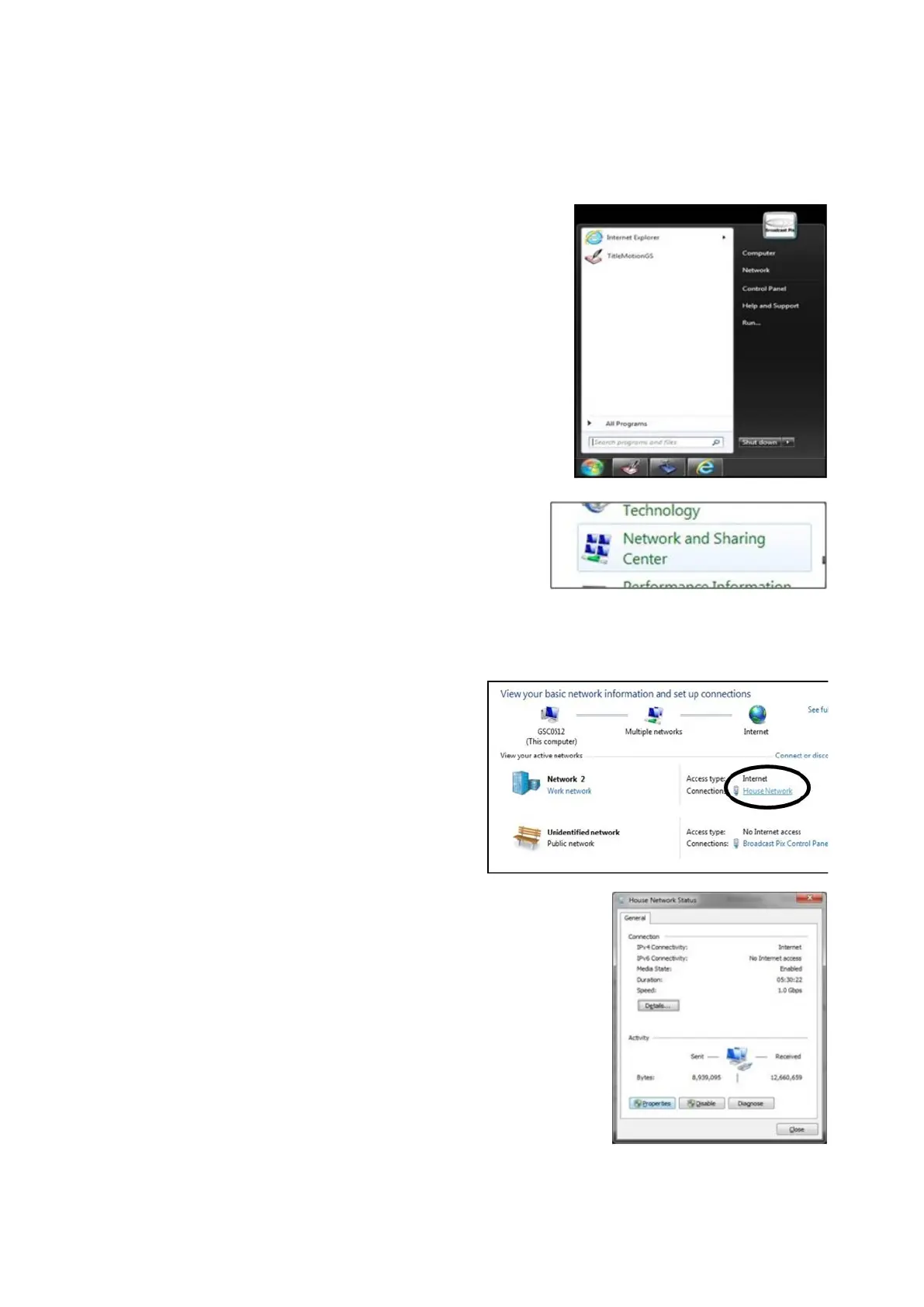
Navigate to the Windows Control
Panel, Start Menu, Control Panel,
as
shown on the right.
In the Windows Control Panel,
double-click the Network and
Sharing Center icon, as shown on
the right.
Note: These instructions follow a
Windows 7 Operating System.
In the Network and Sharing Center,
click on the ‘House Network’ link, as
shown on the right.
Note: This network may be renamed,
be sure to click on the network that is
not labeled ‘Broadcast Pix Control
Panel’.
These steps assume that the cameras
are connected the LAN port on the
Server. If the Panel port is being used
then the Broadcast Pix Control Panel
link can be used, but the settings
must be returned to the factory
settings after these steps have been
completed.
In the Status window that appears,
click on the Properties button, as
shown on the right.



 To Next Page