BPswitch Operators Manual
29 / 413
Quit all applications, including Broadcast
Pix Switcher.
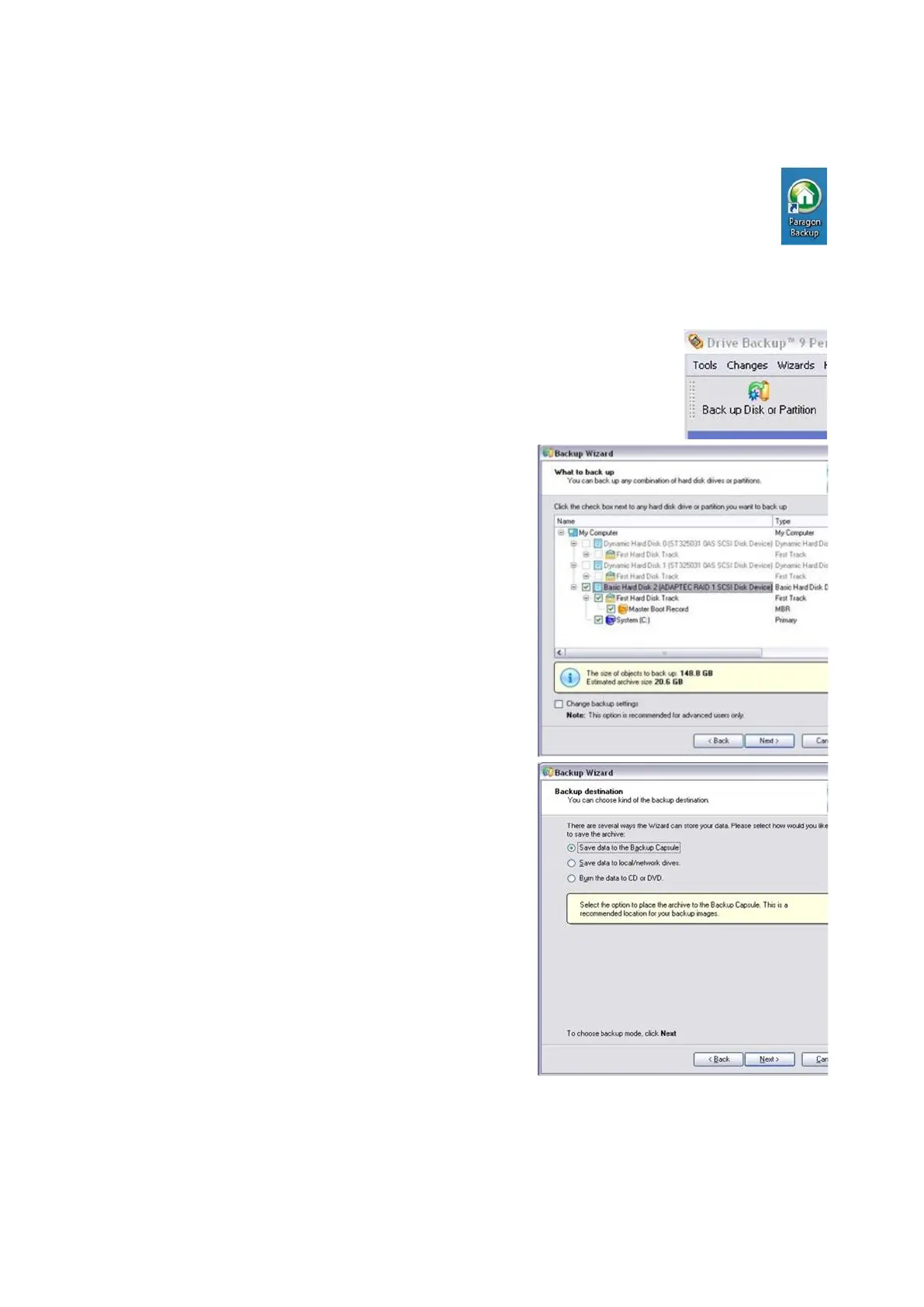
Double-click the green Paragon icon on
the desktop, to launch the application. If
the icon is not on the desktop navigate to
The Start Menu, All Programs, Paragon
Backup and Recovery 11 Home, Paragon
Backup and Recovery.
Once the software is open, click on Back
up Disk or Partition button, in the top left
corner of the application.
In the Backup Wizard window, click on
Next.
Place a check mark next to Basic Hard
Disk 2, First Hard Disk Track, Master
Boot Record and System C, as shown on
the right.
Click on the Save data to the Backup
Capsule radial button, as shown on the
right.
If desired you may save the back up onto
DVDs or a network drive, by selecting one
of the other radial buttons and following the
on screen menu options.
Click on the Next button.
Enter a backup name in the Archive name
text field and click on the Next button.
In the following window, select the Back
up now radial button and then click on the
Next button.
In the summary window click on the Next



 To Next Page