BPswitch Operators Manual
332 / 413
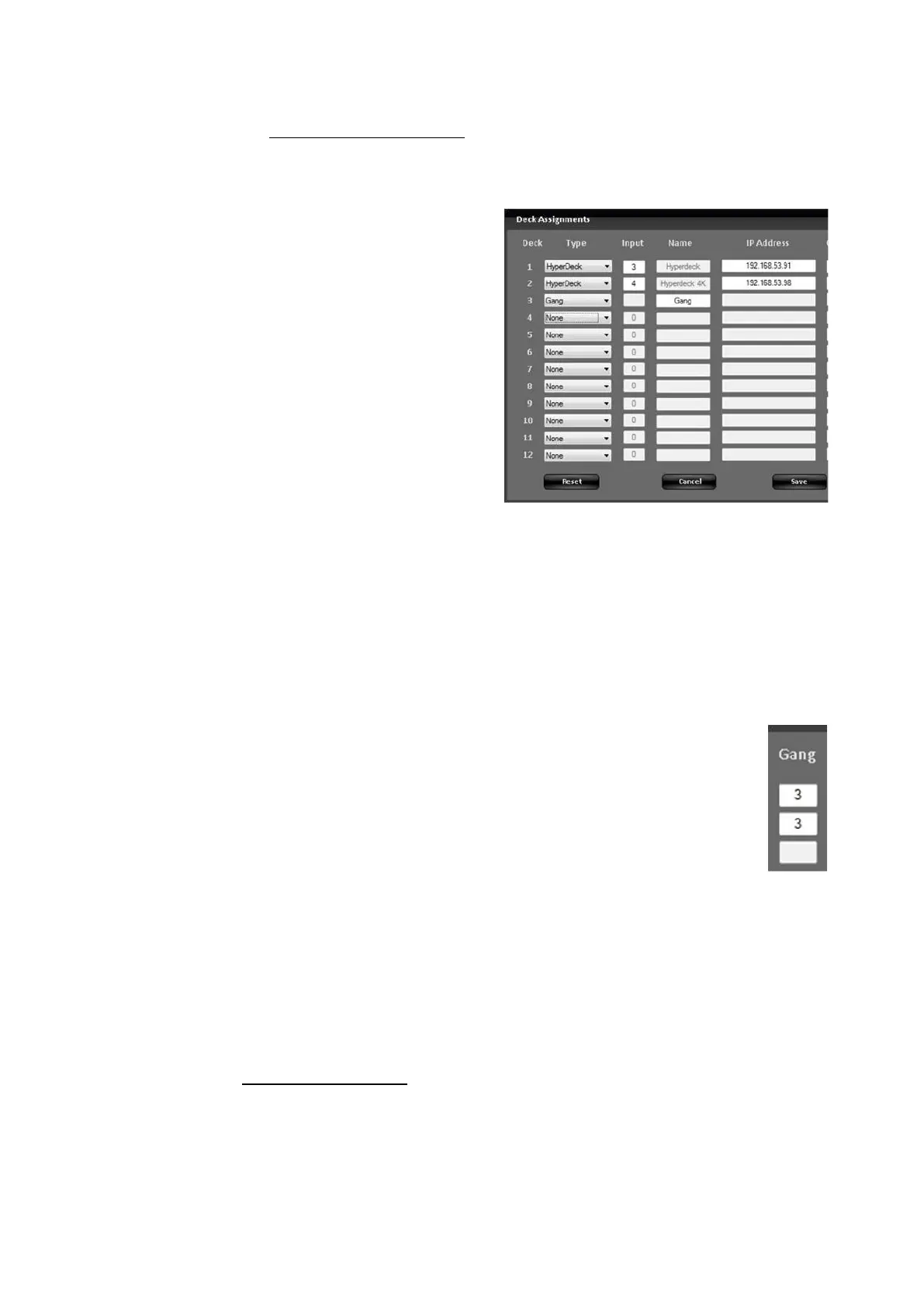
As described in Deck Control Settings,
open the Deck Assignments menu from
the Setup-System Settings-Devices tab.
The Deck Assignments menu will appear,
as shown on the right.
In a deck row that is empty, select the
Type drop down menu and select the
Gang option.
This example will assume Deck 3, as
shown on the right. Any deck row can be
used, however either the deck before or
after your individual decks is
recommended.
Note that you may have multiple gangs in
your list, however the more gangs the
fewer decks that may be connected as a
gang utilizes a deck position number.
In the Name text box enter a custom
name. This name will appear on the
PixPad. By default the name will be
Gang.
For each individual deck to be
associated with a gang group, enter the
Gang Deck number in the Gang text
box. Since this example used Deck 3 as
the gang, enter 3 for Decks 1 & 2.
Click on the Save button to apply and
close the Deck Assignment window.
If the System Settings window is open,
close it as well.
Recording & Marking:
Similar to recording a clip on an individual deck, as
described in Controlling a Deck, select the [Deck
Contrl] PixButton, it will illuminate orange, as shown on
the right.
In the PixPad, select the [Gang] group PixButton, as
shown on the right.



 To Next Page