BPswitch Operators Manual
357 / 413
it will appear here. If no profiles have
been made, select the startup profile,
which is shipped with every new
system.
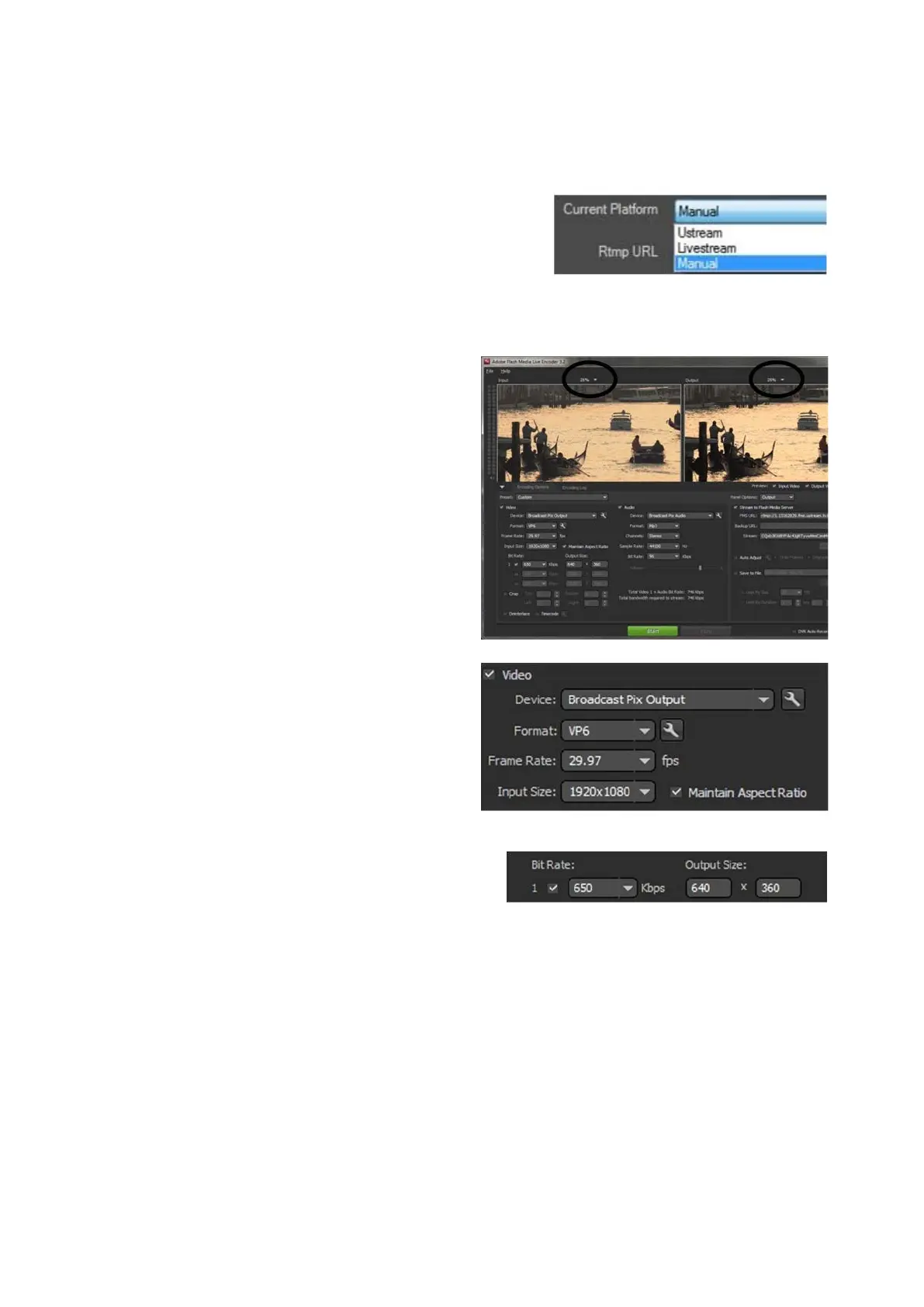
Under the Current Platform drop
down menu, select Manual, as
shown on the right. This selection
assumes you have a RTMP address
and a Stream Key from a CDN
provider.
Click on the Edit Settings button.
The Flash application will open, as
shown on the right. The left window is
the raw output of the Broadcast Pix
Program output
, and the right window
is the encoded version.
To adjust the size of each window,
select the % drop down menu above
each window.
Under the Video section, ensure that
the Device drop down menu is set to
Broadcast Pix Output, as shown on
the right. Selecting any other option
will not function and may display a
warning.
Under the Format drop down menu
select the desired codec to be used,
either H.264 or VP6. Check with your
CDN on the recommended setting.
Ustream recommends H.264.
Under the Bit Rate section, select the
desired bit rate (from 100-3000)
under the kbps drop down menu.
The higher the number the higher
quality and less pixelization the video
will have.
If your CDN is having issues with the
stream and frequently rebuffers,



 To Next Page