BPswitch Operators Manual
358 / 413
pauses, or disconnects, try reducing
the bit rate.
Under the Output Size section, enter
the desired dimensions (up to
1280x720) for the final stream.
Do not stream higher frame sizes
than what your CDN recommends.
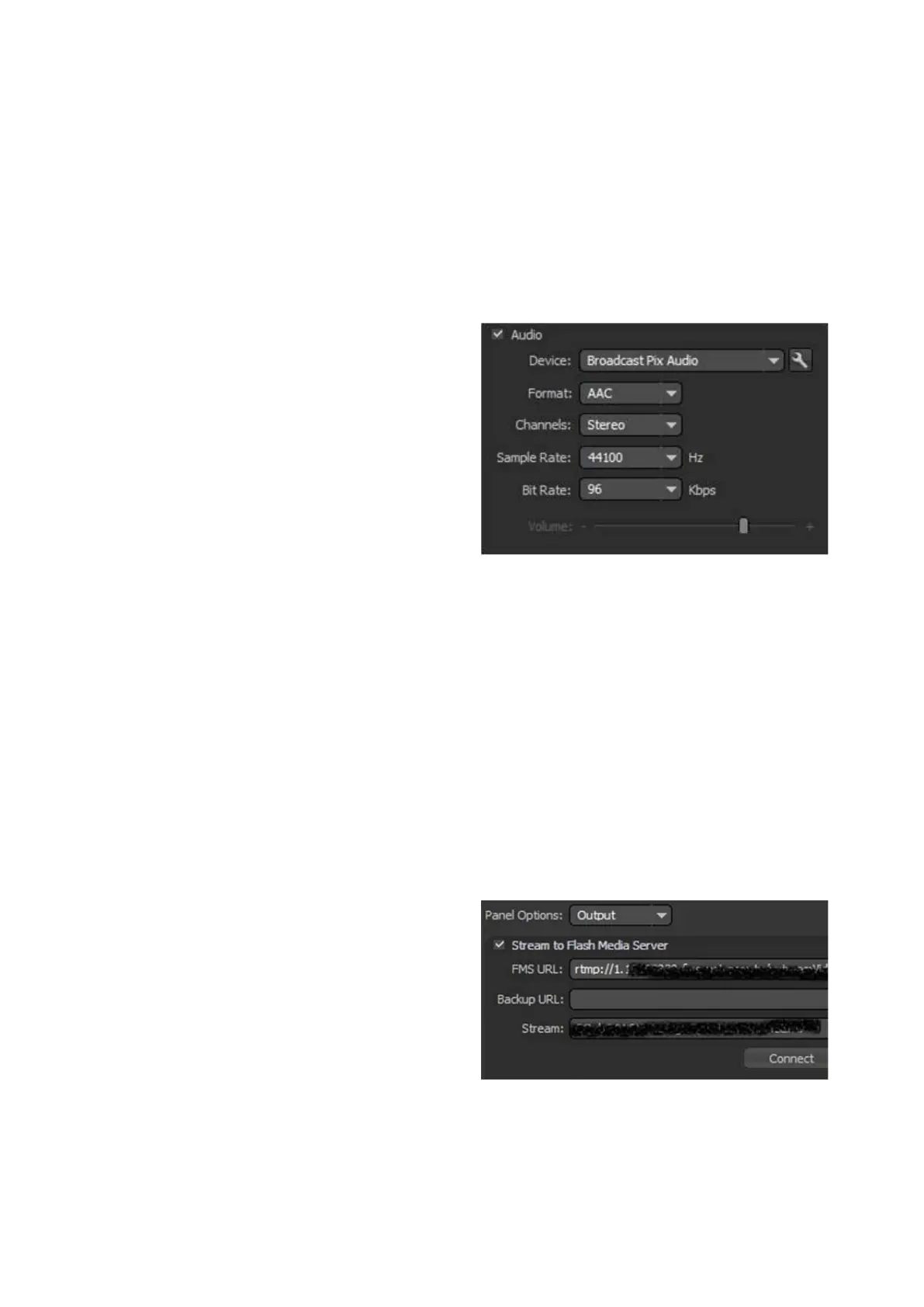
Under the Audio section, ensure that
the Device drop down menu is set to
Broadcast Pix Audio, as shown on
the right. Selecting any other option
will not function and may display a
popup message.
Under the Format drop down menu
select the desired audio format for
the stream, either AAC or MP3.
Check with your CDN on the
recommended setting. Ustream
recommends AAC.
Under the Sample Rate drop down
menu select 441000 Hz.
Under the Bit Rate drop down menu
select the desired bit rate for the
audio. A normal setting is 96 or 128
kbps. Check with your CDN on the
recommended setting. Ustream
recommends 128 for HD streams and
96 for SD streams.
Under the Output section, place a
check mark next to Stream to Flash
Media Server, as shown on the right.
In the Stream text field, enter the
stream key provided by your CDN.
To obtain the RTMP address and
Stream Key in Ustream, login to your
account, select Channel on the left
navigation bar, then select Remote.
The RTMP address and Stream Key
will be visible, as shown on the right.



 To Next Page