BPswitch Operators Manual
401 / 413
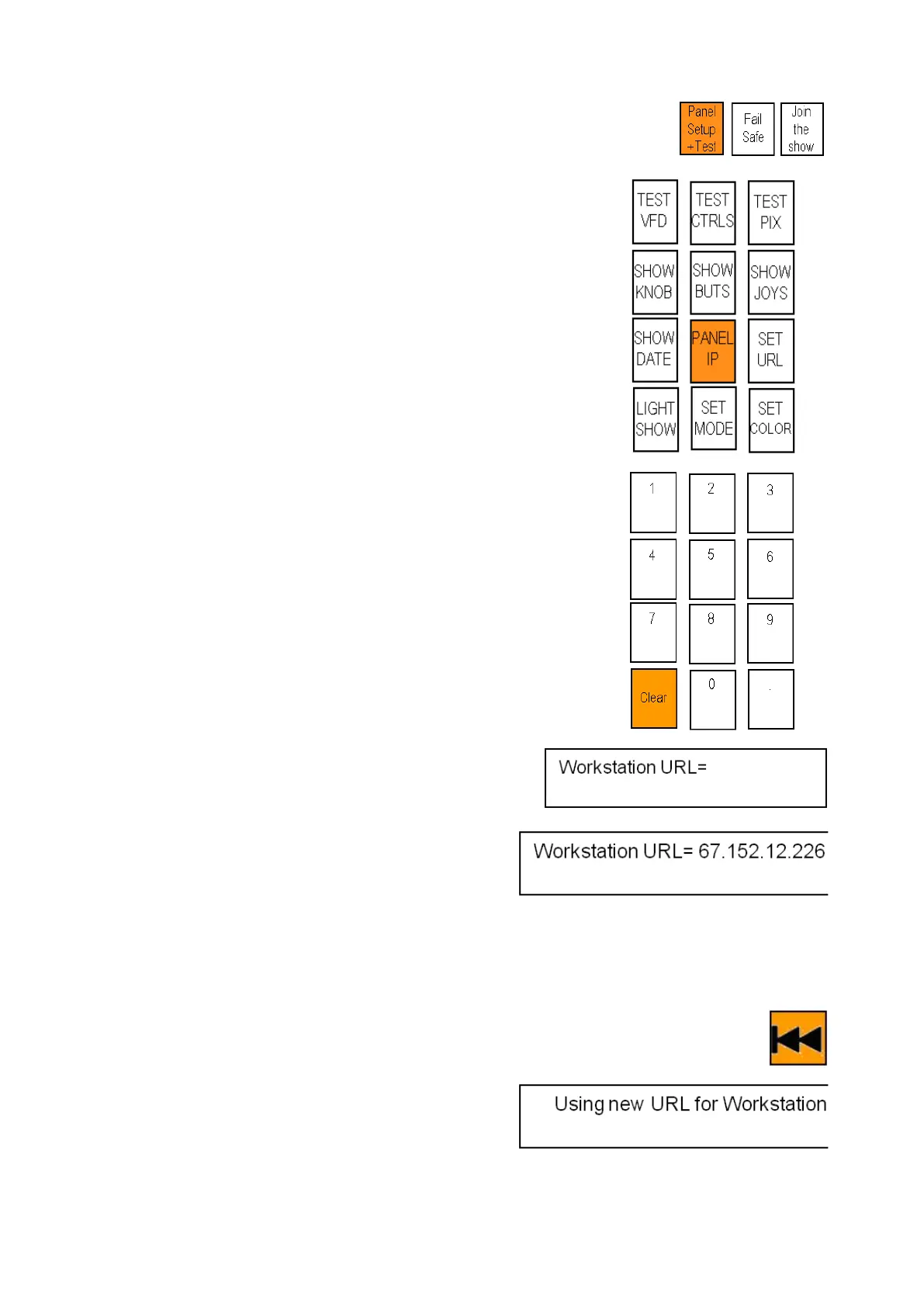
Control will illuminate, select the [Panel
Setup + Test] A
button and it will illuminate
orange, as shown on the right.
The PixPad will illuminate, select the
[Panel IP] PixButton, as shown on the
right. The PixPad will change to a numeric
PixPad.
Select the [Clear] PixButton 14 times, to
clear the existing IP address. The display
will update accordingly until ‘Workstation
URL=‘ is left, as shown on the right.
Enter the External IP address of the
remote Broadcast Pix system, using the
numeric PixButtons ensuring that the
period . is used.
The above example would be
[6] [7] [.] [1] [5][2] [.] [1] [2] [.] [2] [2] [6]
Press the back [|<<] motion control button
to save the new IP address and the display
will update.
If multiple panels are connected ensure
that the Panel IP addresses are different,



 To Next Page