-SCS Parameter Analyzer Reference Manual Section 10:
KPulse (for Keithley Pulse Cards)
4200A-901-01 Rev. C / February 2017 10-11
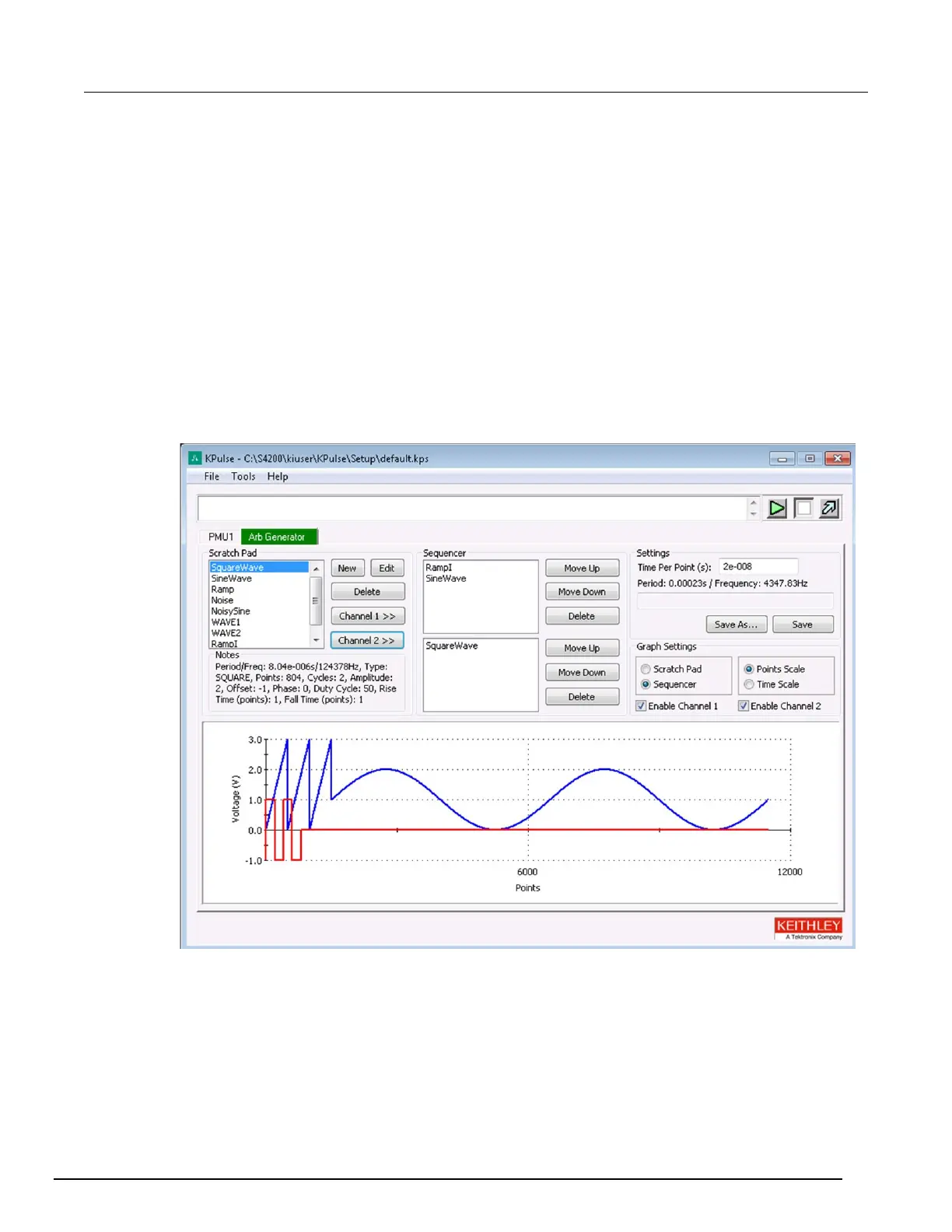
Custom Arb file operation: Copy waveforms into Sequencer
To copy waveforms into the Sequencer:
1. Select the Arb Generator tab.
2. Select Scratch Pad or Sequencer:
Scratch Pad previews the waveform that is selected in the Scratch Pad.
Sequencer previews enabled waveform sequences. To preview the waveforms in the
Sequencer, select Enable Channel 1 or Enable Channel 2.
3. Select the scale for the graph, Points Scale or Time Scale.
4. In the Scratch Pad, select a waveform to be copied into the Sequencer.
5. Select Channel 1 to copy the selected waveform onto the Sequencer for Channel 1 or select
Channel 2 to copy the waveform into the Sequencer for Channel 2. You can copy the same
waveform to both channels.
Figure 476: Custom File Arb operation: Copy waveforms into Sequencer



 To Next Page
 Loading...