H: Using a Micromanipulator 8860 Prober Model 4200A-SCS Parameter Analyzer
H-8 4200A-901-01 Rev. C / February 2017
Create a site definition and define a probe list
On the pcBridge computer, create a site definition for a single subsite for each die. To do this, use the
software to create a selection of dies to probe. If a single subsite for each die is to be probed, refer to
Probesites Clarius project example (on page H-17
). Creating a site definition for multiple subsites for
each die also uses the software to create a selection of dies to probe and create a selection of the
subsites on each die that will be probed. If multiple subsites for each die will be probed, refer to the
Probesubsites Clarius project example (on page H-23).
Use the following information to load a previously-defined and saved site definition.
Single subsite per die
To open the file:
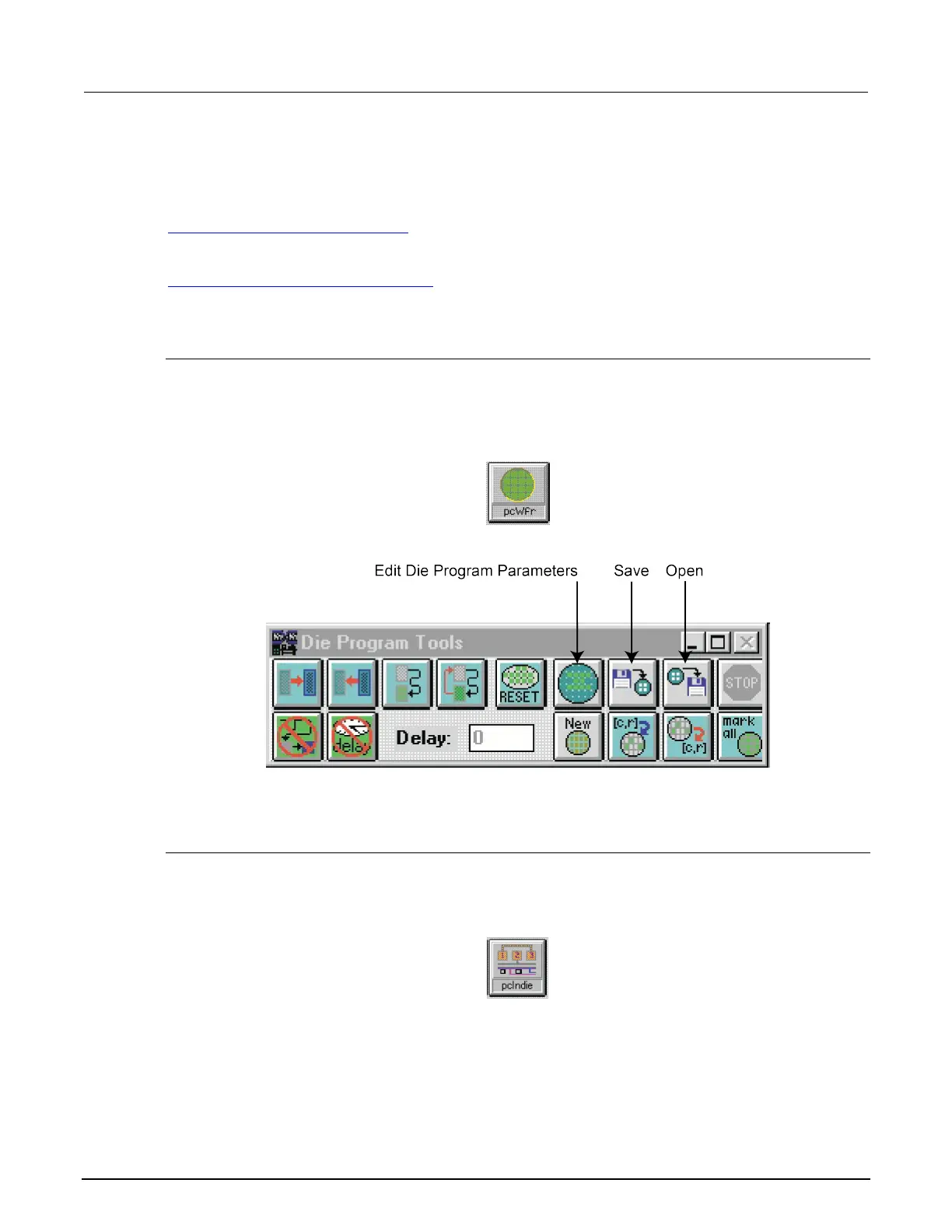
1. Start pcWafer by clicking the pcWfr button in the pcLaunch window. The pcWfr window is
displayed. See the following two figures.
Figure 684: pcWfr button
Figure 685: Die Program Tools window
2. Click Open on the Die Program Tools window to open an existing file or New to create a new file.
3. Select the file and click OK.
Multiple subsites per die
To open the file:
1. Click the pcIndie button in the pcLaunch window. The pcIndie window will appear.
Figure 686: pcIndie button



 To Next Page
 Loading...