-SCS Parameter Analyzer Reference Manual Appendix B: Using a Model 590 C-
4200A-901-01 Rev. C / February 2017 B-9
Clicking Cancel in a cable compensation dialog box aborts the cable compensation process. You
can start over by clicking Run.
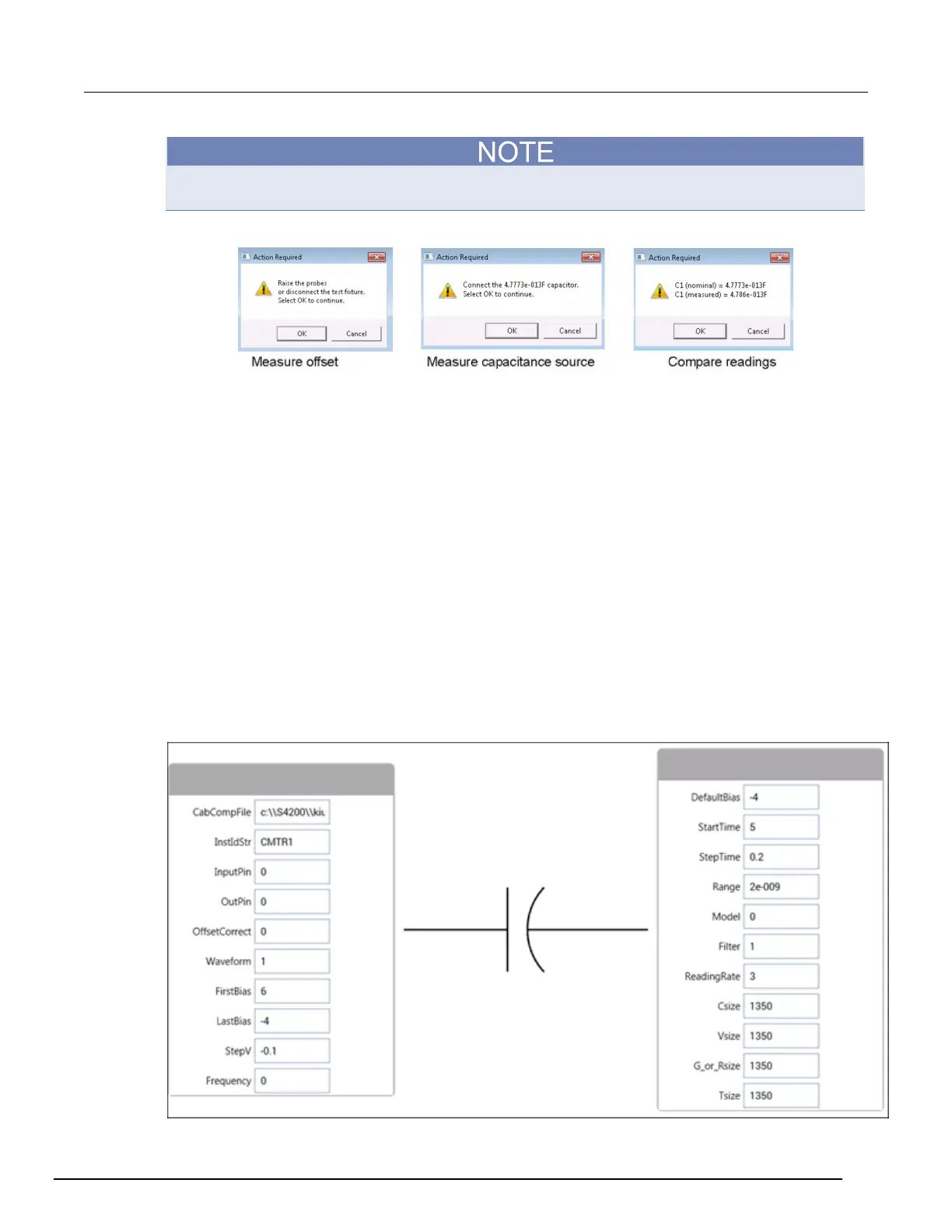
Figure 556: Cable compensation dialog boxes
C-V sweep example
This example demonstrates how to control a Keithley Instruments 590 C-V Analyzer to acquire
capacitance verses voltage (CV) data from a MOS capacitor. In this example, the C-V Analyzer
applies a linear staircase voltage sweep to a capacitor. A capacitance measurement is made on
every voltage step of the sweep.
This example assumes that the 590 is connected directly to the DUT. The DUT could be a device
installed in a test fixture or a MOS capacitor on a wafer.
To do a C-V sweep:
1. Choose Select.
2. Select Tests.
3. Search for 590.
4. Select Add for the 590 C-V Sweep (590-cvsweep) test.
5. In the project tree, select 590-cvsweep.
6. Select Configure. The parameters are displayed.
Figure 557: CvSweep590 user module (590-cvsweep UTM)



 To Next Page
 Loading...