BPswitch Operators Manual
208 / 413
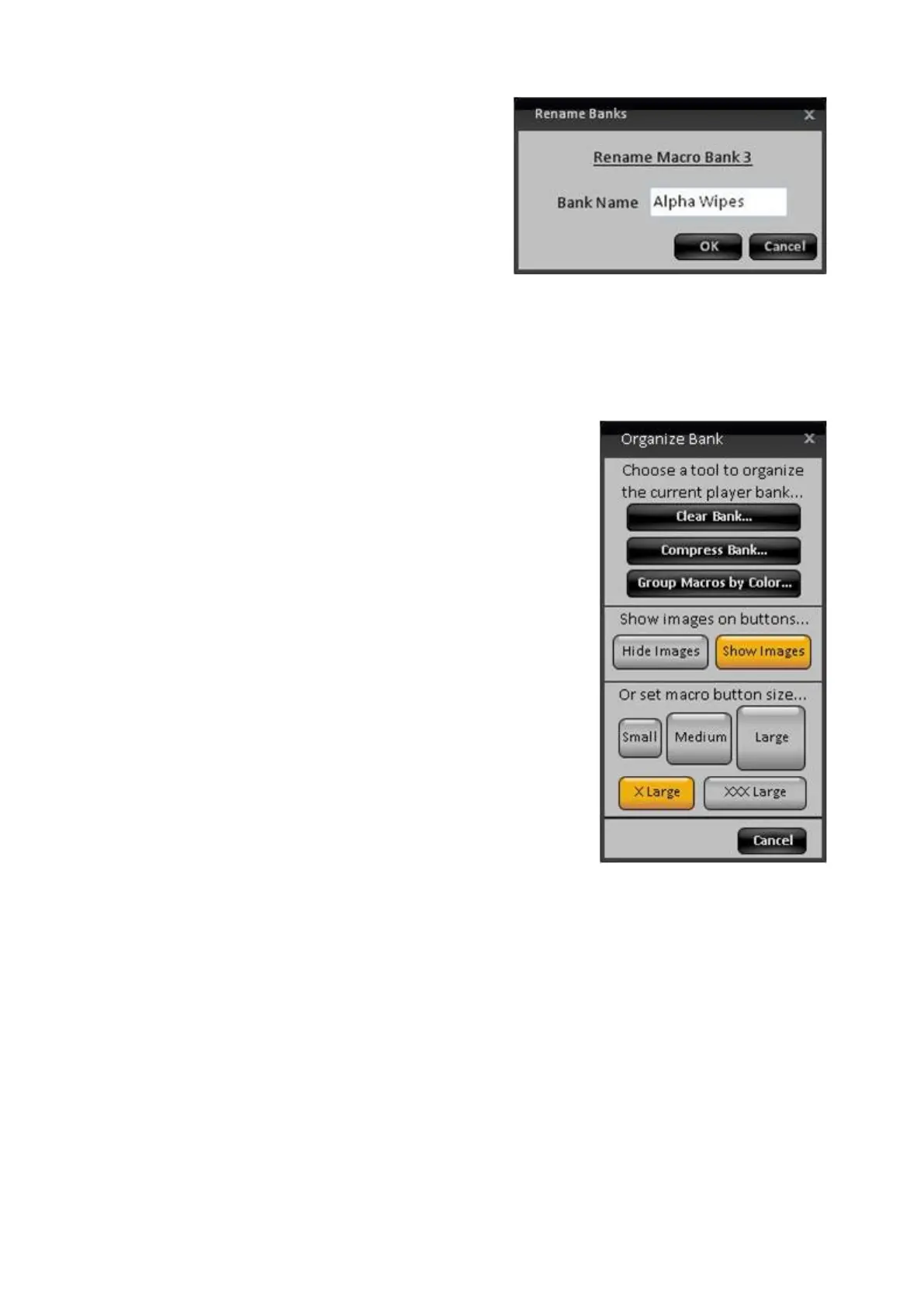
In the Rename Banks window, enter the
custom name in the Bank Name text
field, as shown on the right.
Only the first three banks, A/B/C, may
have a custom name. The fourth bank is
permanently named GPI.
Click on the OK button to assign the
custom name.
To change the button size of the Macro
bank, select the Organize Bank
button in
the Toolbar.
Under the button size section, select
either Small, Medium or Large, X Large
or XXX Large as shown on the right.
Now the entire bank of buttons will
change to the selected button size.
To reorganize the bank, click on the
Organize Bank button in the Toolbar.
Now select one of the following options:
Clear Bank…: un-assigns all the Macros
in the specified bank.
Clicking this button will open a
confirmation box, click on Yes or No.
Compress Bank…: reorganizes the
Macro buttons to the top of the bank.
Clicking this button will open a
confirmation box, click on Yes or No.
Group Macros by Color…: organizes
the buttons based on their assigned
button color.
Clicking this button will open a
confirmation box, click on Yes or No.
To show button images in a bank, click
on the Organize Bank button in the
Toolbar.



 To Next Page