-SCS Parameter Analyzer Reference Manual Section 9: Keithley External Control Interface (KXCI)
4200A-901-01 Rev. C / February 2017 9-23
FS
This command sets the offset value when VAR1' is a selected source function.
Usage
FS ±AAA.A
FS ±AAA.A,B
Offset value: −210 to 210
Available SMU channel (1 to 9); if this parameter is not included, offset applies to all
channels that are configured to VAR1'.
Details
When VAR1' is a selected source function, it does the VAR1 sweep with each step scaled by the ratio
(RT) value and offset (FS) value as follows:
VAR1' sweep step = (VAR1 sweep step x RT) + FS
The VAR1 sweep shown in the example in VR and IR (on page 9-17
) has five steps: 1 V, 2 V, 3 V,
4 V, and 5 V. The corresponding VAR' sweep has the following steps when RT=3 and FS = 2:
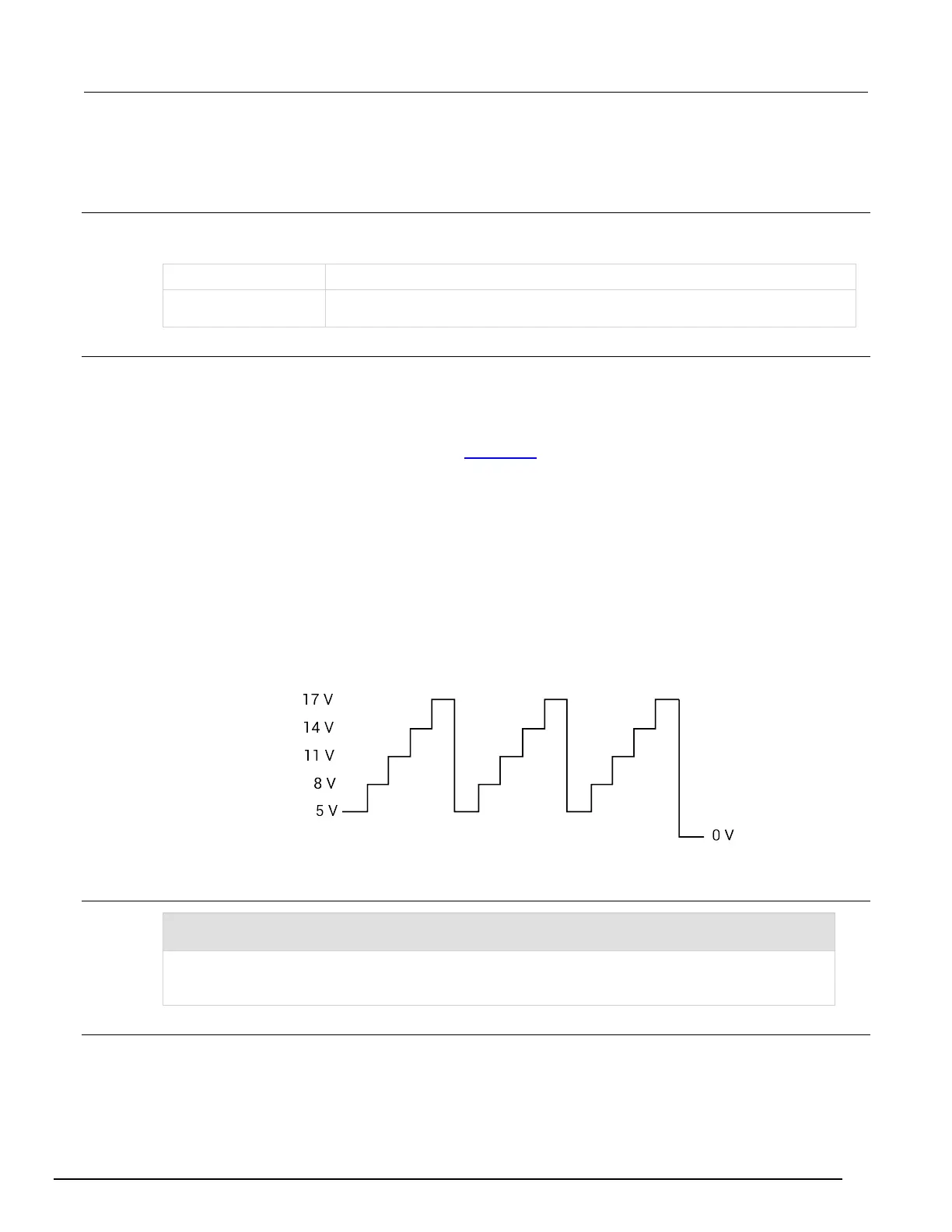
VAR1' step 1 = (1 V × 3) + 2 = 5 V
VAR1' step 2 = (2 V × 3) + 2 = 8 V
VAR1' step 3 = (3 V × 3) + 2 = 11 V
VAR1' step 4 = (4 V × 3) + 2 = 14 V
VAR1' step 5 = (5 V × 3) + 2 = 17 V
This VAR1' sweep (not drawn to scale) is shown in the following figure.
Figure 467: VAR' sweep when ratio = 3 and full-scale = 2
You can assign a unique offset value to any available SMU channel in the system.
Example
RT +3,2 Ratio
FS +2,2 Offset
These command strings set up the VAR1' sweep shown in the figure in the Details (ratio = 3, offset = 2).
The above commands set up VAR1' for SMU Channel 2. When Channel 2 is defined for a VAR1' sweep,
ratio is set to 3 and offset is set to 2.
Also see
None



 To Next Page
 Loading...