5-18
5
NFC (Till Drawer Tag) Reader
The NFC Reader is primarily used to scan tags applied onto the till drawers for check in/check out
tracking purposes.
Cleaning is limited to wiping the front marquee window with a damp cloth.
Do not use liquids, solvents or scraping devices to clean the lens surface.
Diagnostics
To verify functionality of the NFC Reader, a known working NFC Tag is required.
To perform an NFC Reader Test
Log In > Maintenance Menu > NFC Reader
Pass the tag directly in front of the NFC Reader window
If no response is provided when the test is performed, the NFC Reader may be
defective.
Access
The NFC Reader can be removed without dis-assembly of the marquee.
1) Release the (2) locking screws that secure the Electronics Bay cover and raise the cover.
2) Loosen the (2) 3/8” nuts on each side of the Electronics Bay Lid Hinge and re-position the
retainers to remove the lid.
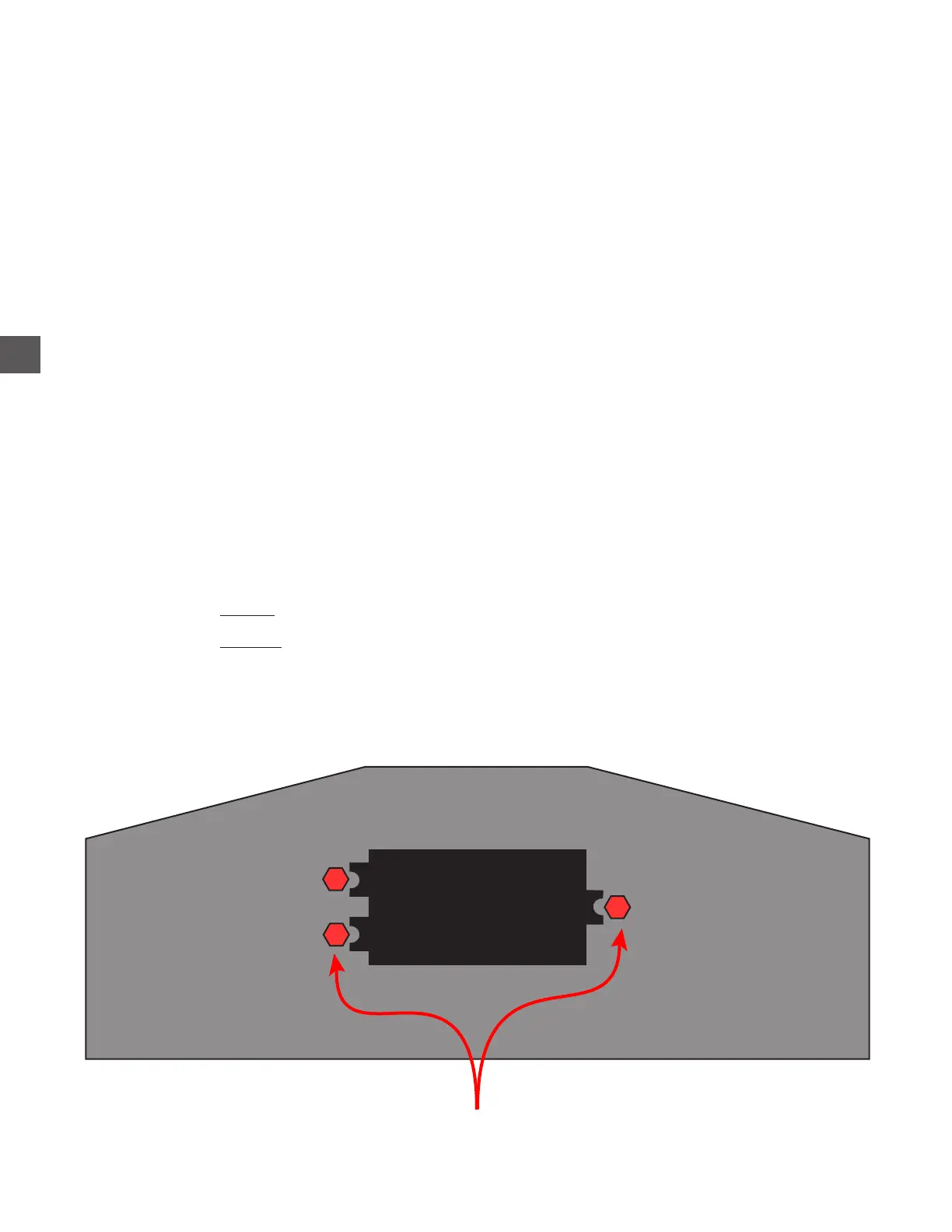
3) Locate and loosen the (2) 3/8” LEFT side nuts which secure the NFC Reader housing.
4) Locate and remove the (1) 3/8” RIGHT side nut which secures the NFC Reader housing.
The NFC Reader and housing can now be removed.
3/8” securing nuts are located
inside the marquee



 To Next Page