CMS32L051 User Manual |Chapter 12 Universal Serial Communication Unit
www.mcu.com.cn 347 / 703
(1) Register setting
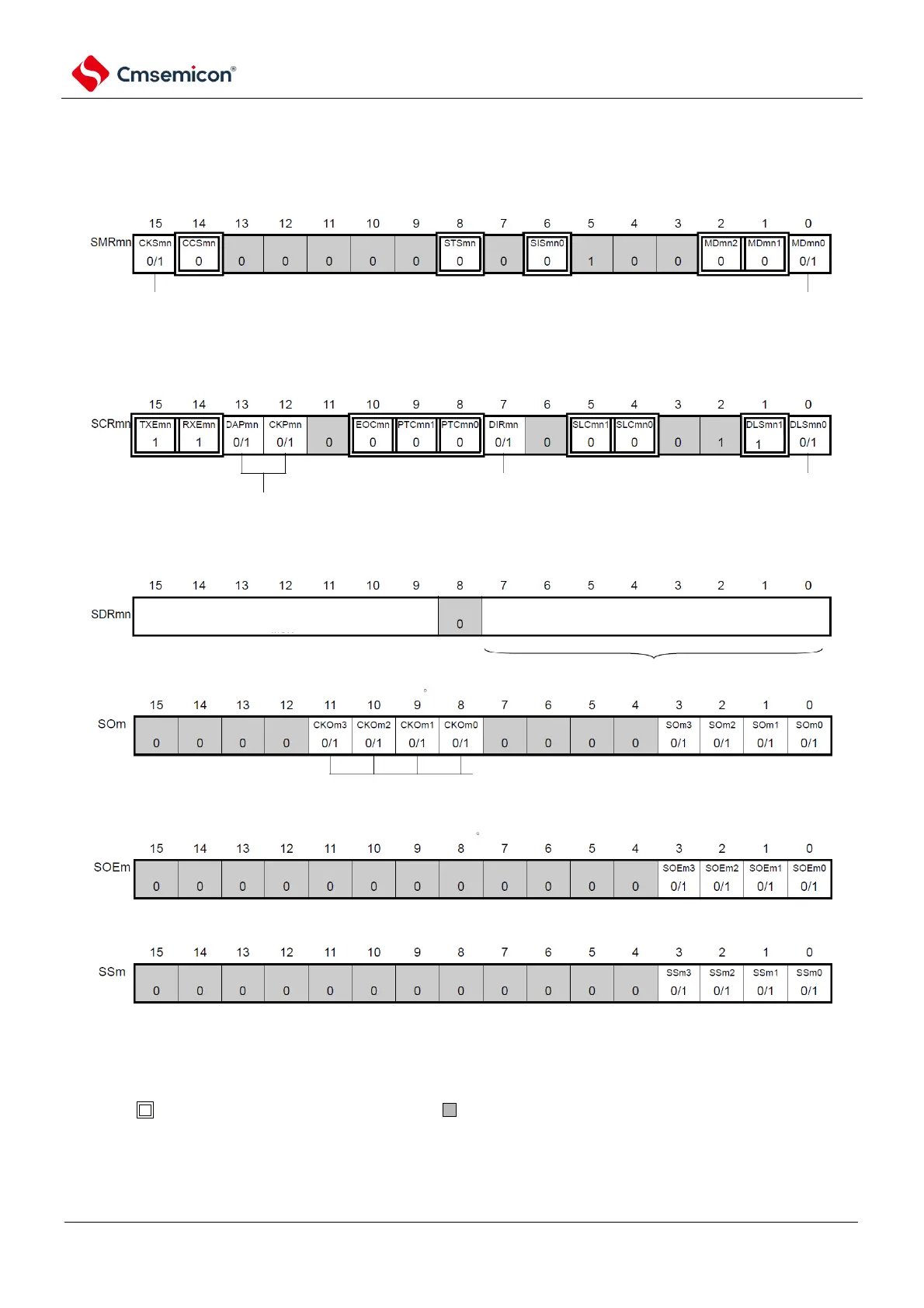
Figure 12-39 3-wire serial I/O(SSPI00, SSPI01, SSPI10, SSPI11, SSPI20, SSPI21)
Example of register settings when the master transmits and receives
(a) serial mode register mn (SMRmn)
(b) serial communication operation configuration registermn mn(SCRmn)
(c) serial data regsiter mn (SDRmn) (low 8 bit: SIOp)
(d) serial output register m(SOm) ...Only configure bit of target channel
(e) serial output enable registerm (SOEm)only set bit of target channel to 1.
(f) serial channel start register m (SSm) Only set bit of target channel to 1.
channel n operational clock (fMCK)
0: SPSm register configured pre-scaler output clock CKm0
1: SPSm register configured pre-scaler output clock CKm1
interrupt source of channel n
0: Transmit completion interrupt
1: Buffer empty interrupt
data transmit sequence selection
0: perform MSB first input/output
1: perform LSB first input/output
data length configuration
0: 7 bit data length
1: 8 bit data length
data and clock phase selection (details refer to "19.3
control universal serial communication unit registers)
when clock phase is "positive phase" (CKPmn of SCRmn register as 0), "1" means starting
communication;
when clock phase is "inverted phase" (CKPmn=1), "0" means starting communication.
SIOp
baud rate configuration (operation clock
(fmck) scaling configuration )
configuration of transmit data/received data register
Note
Note Limited to SCR00 register and SCR01 register, the others are fixed as 1.
Note 1.m: Unit number (m=0, 1) n: Channel number (n=0~3) p: SSPI number (p=00, 01, 10, 11, 20, 21)
mn=00~03, 10~11
2. : Fixed in SSPI master T&R modes. : Cannot be set (initial value).
0/1: Set 0 or 1 according to the user's purpose.



 To Next Page