CMS32L051 User Manual |Chapter 12 Universal Serial Communication Unit
www.mcu.com.cn 449 / 703
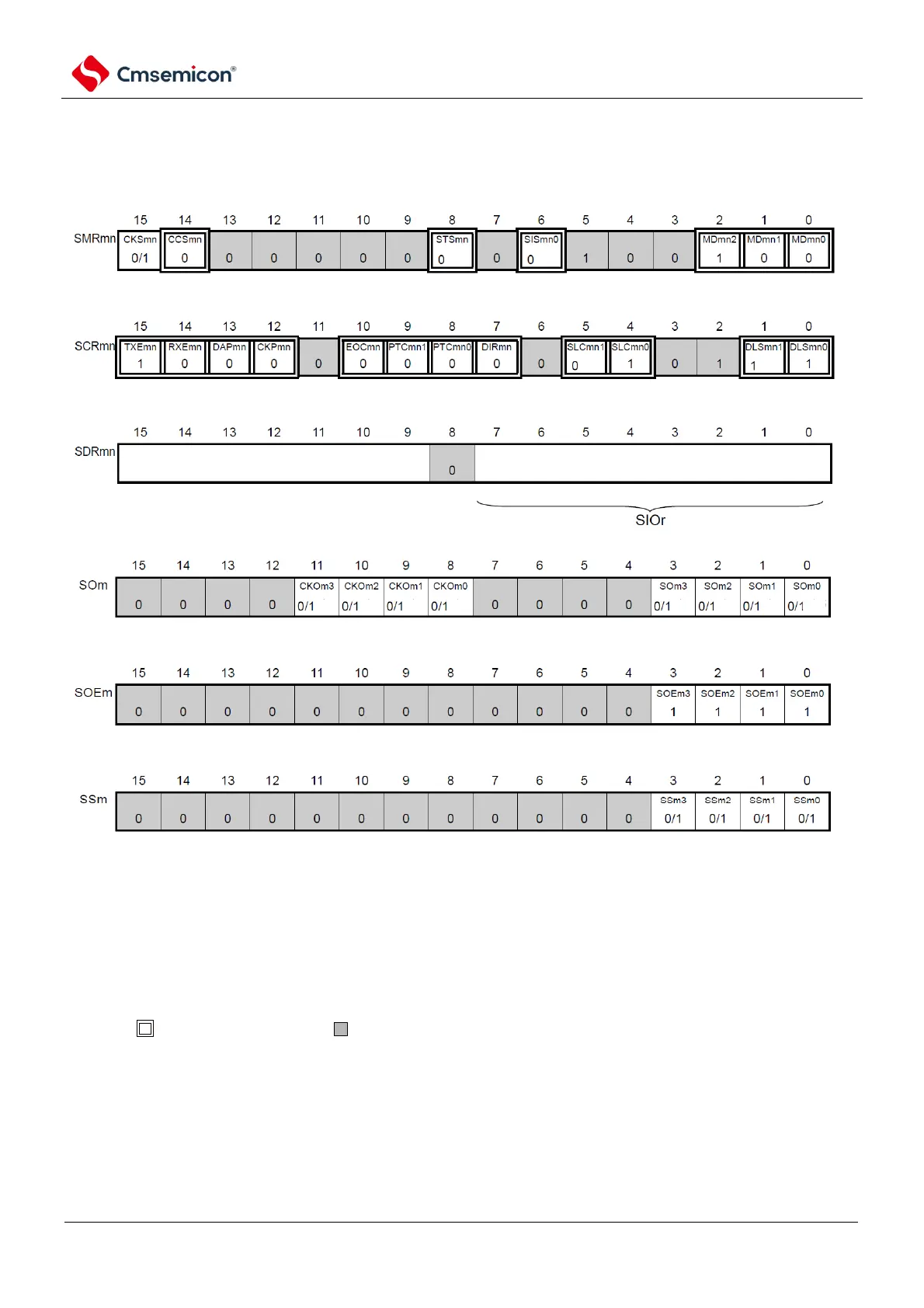
(1) Register setting
Figure12-122 Example of register setting contents for simple I2C data transmission
(IIC00, IIC01, IIC10, IIC11, IIC20, IIC21)
(a) serial mode register mn (SMRmn)do not operate this register wihle data is transmitting or receiving.
(b) serial communication operation configuration register mn (SCRmn)do not operate bits other than TXEmn and RXEmn
of this register wihle data is transmitting or receiving.
(c) serial data regsiter mn (SDRmn) (low 8 bit: SIOr) only lower 8 bits valid wihle data is transmitting or receiving.
(d) serial output register m (Som) do not operate this register wihle data is transmitting or receiving.
(e) serial otuput enable register m (SOEm) do not operate this register wihle data is transmitting or receiving.
(f) serial channel start register m (SSm) do not operate this register wihle data is transmitting or receiving.
baud rate configuration
Note4
configuration of transmit data
Note1 Note1
Note2 Note3
Note5Note5Note5Note5 Note5 Note5 Note5 Note5
Note 1. Limited to SMR01, SMR03, SMR11 registers.
2. Limited to SCR00, SCR02, SCR10 registers.
3. Limited to SCR00 register and SCR01 register, other fixed as 1.
4. Because it is already set when sending the address segment, it does not need to be set.
5. During the operation of communication, the value changes due to the communication data.
Note 1.m: Unit number (m=0, 1) n: channel number (n=0~3)r: IIC numbers (r=00, 01, 10, 11, 20, 21 )
mn=00~03, 10~11
2. : Fixed in IIC mode. : Cannot be set (set initial value).
×: This is the bit that cannot be used in this mode (set the initial value if it is not used in other modes either).
0/1: Set 0 or 1 according to the user's purpose.



 To Next Page