Chapter 13 Replacing Chassis Components 13-21
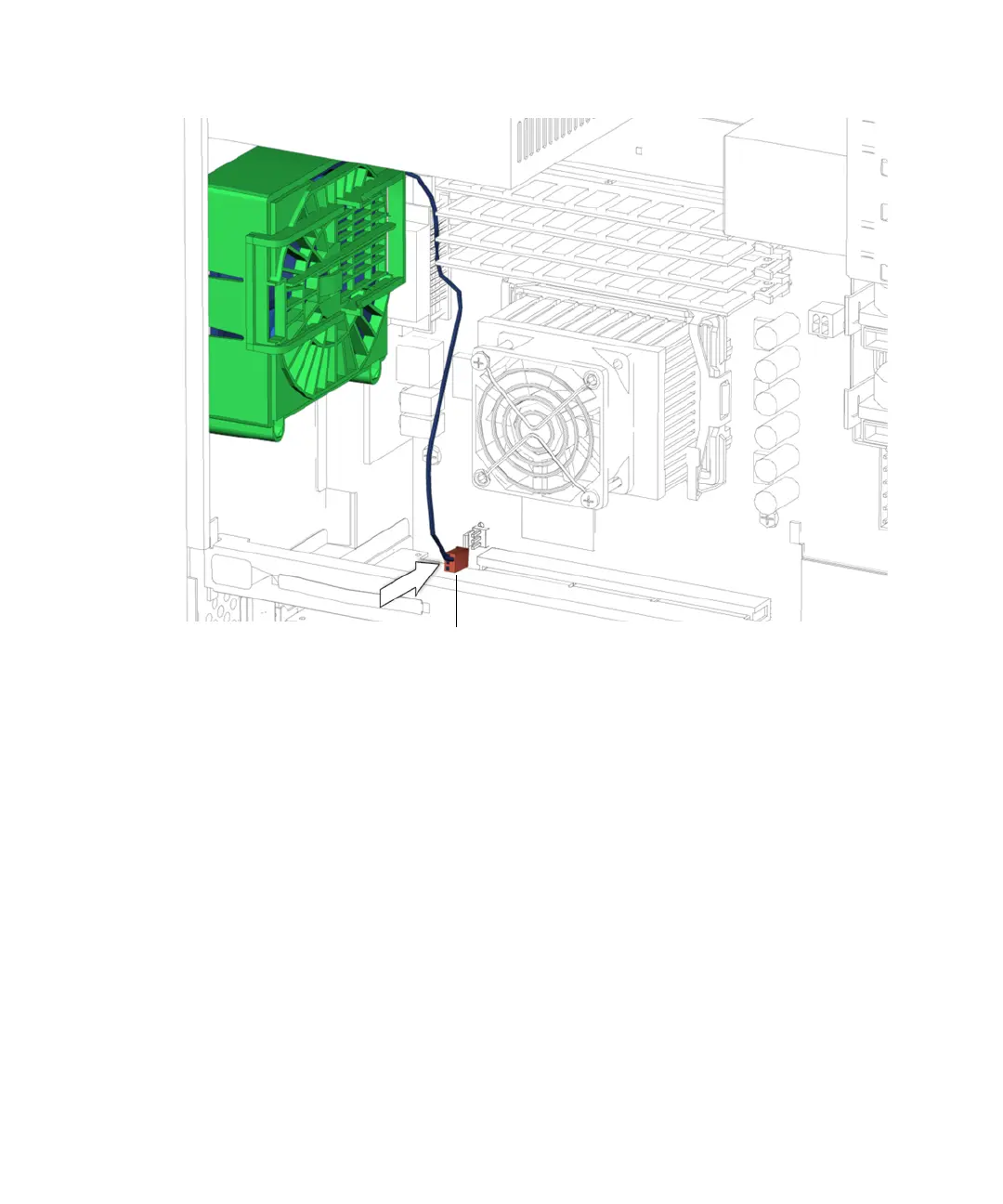
FIGURE 13-19 Connecting the Rear Fan Cable to FAN1 SYS
7. Install the DIMM cooling duct.
Refer to “Installing the DIMM Cooling Duct” on page 13-27.
8. Inspect the rear fan fasteners to verify that:
■ The rear fan bracket latch is locked into the chassis.
■ The rear fan bracket tabs are well seated in the chassis.
9. Inspect the rear fan cabling to verify that:
■ The rear fan cable is firmly connected to the motherboard at FAN1 SYS.
■ The rear fan cable is routed through the motherboard cable routing clip.
10. Choose your next step:
■ If you installed the rear fan after installing the CPU fan and heat sink assembly,
return to
Step 12 of “Installing the CPU Fan and Heat Sink Assembly” on
page 11-18.
■ If you installed the rear fan after installing the motherboard, return to Step 17 of
“Installing the Motherboard” on page 11-50.
Connector FAN1 SYS





 To Next Page