Chapter 13 Replacing Chassis Components 13-31
■ “Identifying the Audio USB Board” on page 13-31
■ “Removing the Audio USB Board” on page 13-31
■ “Installing the Audio USB Board” on page 13-35
13.5.1 Identifying the Audio USB Board
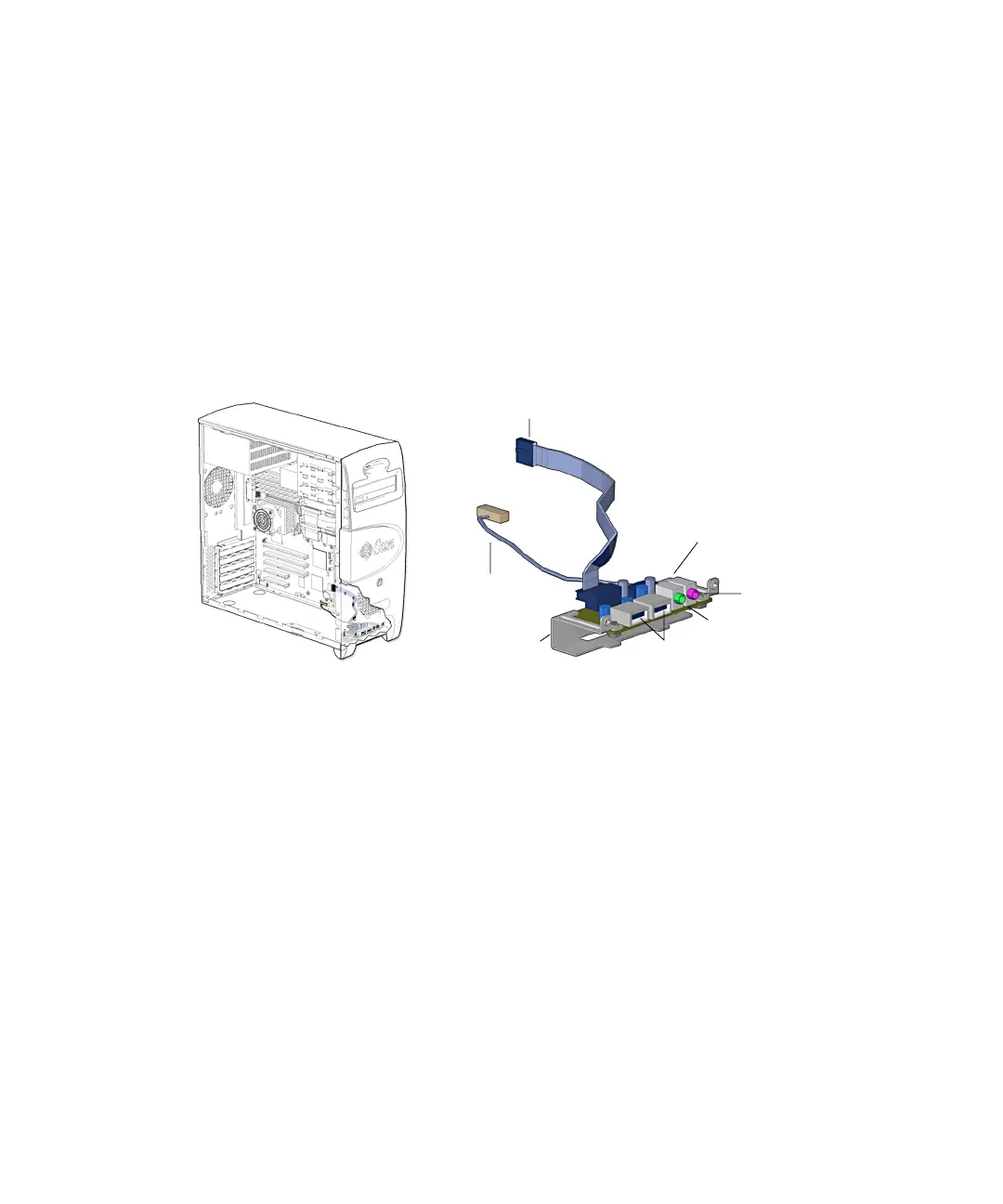
The audio USB board is installed on the audio USB bracket that is attached to the
front of the chassis. Two cables provide audio and USB signals. The chassis access
panel and the front bezel must be removed to access the audio USB board.
FIGURE 13-33 shows the location of and identifies the audio USB board.
FIGURE 13-33 Audio USB board Location and Identification
13.5.2 Removing the Audio USB Board
1. Power off the system, open the chassis, and remove the bezel.
Refer to:
■ “Powering Off the Workstation” on page 10-4
■ “Removing the Access Panel” on page 10-12
■ “Removing the Bezel” on page 10-14
2. Locate the audio USB board.
The audio USB board is installed on the audio USB bracket that is fastened to the
workstation chassis. See
FIGURE 13-33.
Connector
Connector J19 USB
USB ports (2)
Headphone jack
Microphone jack
J13 AUDIO
Audio USB board
Audio USB board
bracket














 To Next Page