Chapter 14 Replacing Internal Cables 14-11
14.3.2 Removing the Hard Drive Interface Cable
1. Power off the system and open the chassis.
Refer to:
■ “Powering Off the Workstation” on page 10-4
■ “Removing the Access Panel” on page 10-12
2. Locate the hard drive interface cable.
The hard drive is located in the mid-front portion of the chassis. The hard drive
cables are easily accessible. See
FIGURE 14-8.
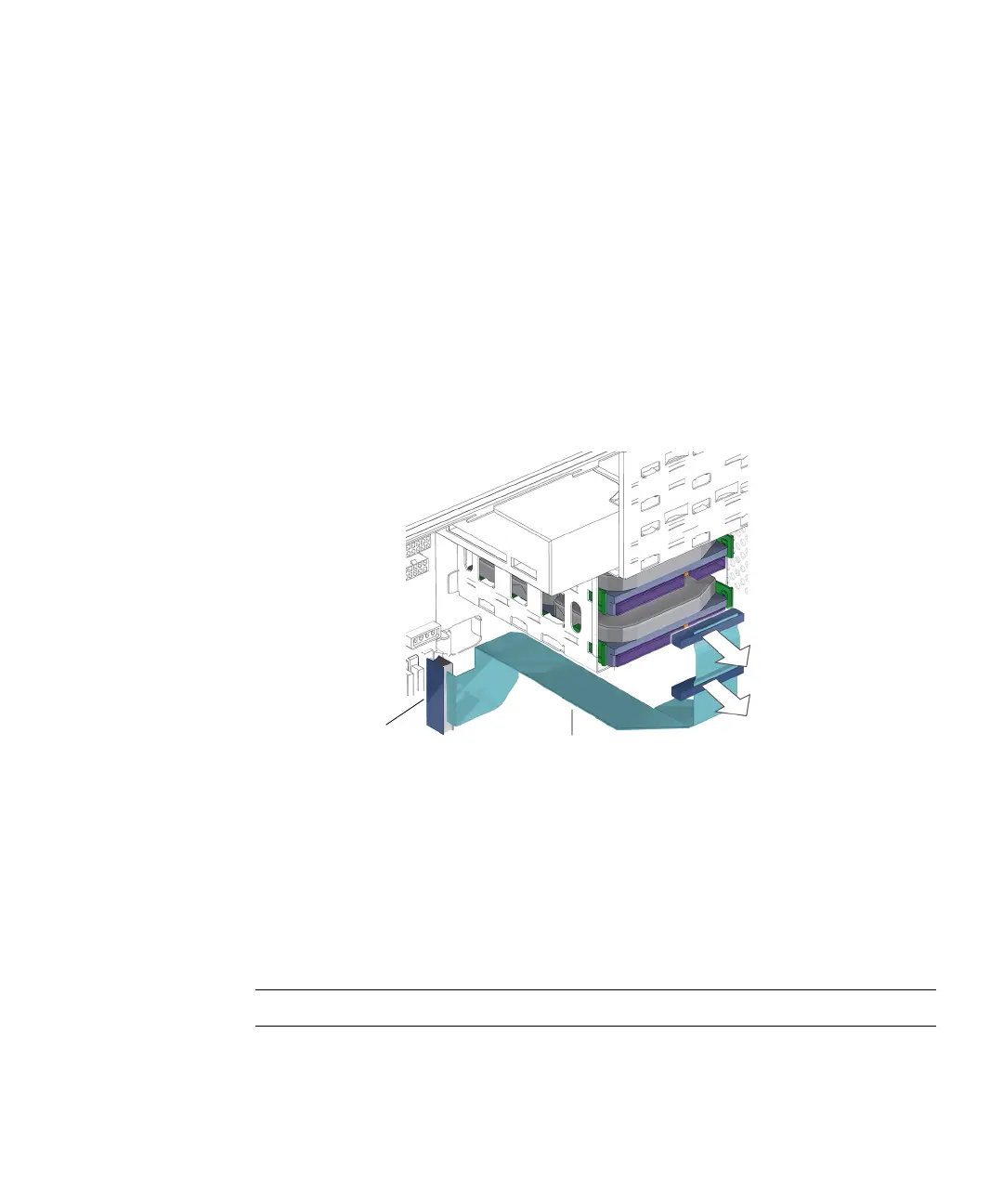
3. Disconnect the hard drive interface cable from the upper hard drive.
See FIGURE 14-9.
FIGURE 14-9 Disconnecting the Interface Cable From the Hard Drive(s)
4. Disconnect the interface cable from the lower hard drive (if installed).
See FIGURE 14-9.
5. Disconnect the hard drive interface cable from the motherboard at IDE PRI.
See FIGURE 14-1 and FIGURE 14-9.
Proceed to “Installing the Hard Drive Interface Cable” on page 14-12.
Note – The hard drive does not operate without the interface cable.
Connector
IDE PRI
Hard drive interface cable














 To Next Page