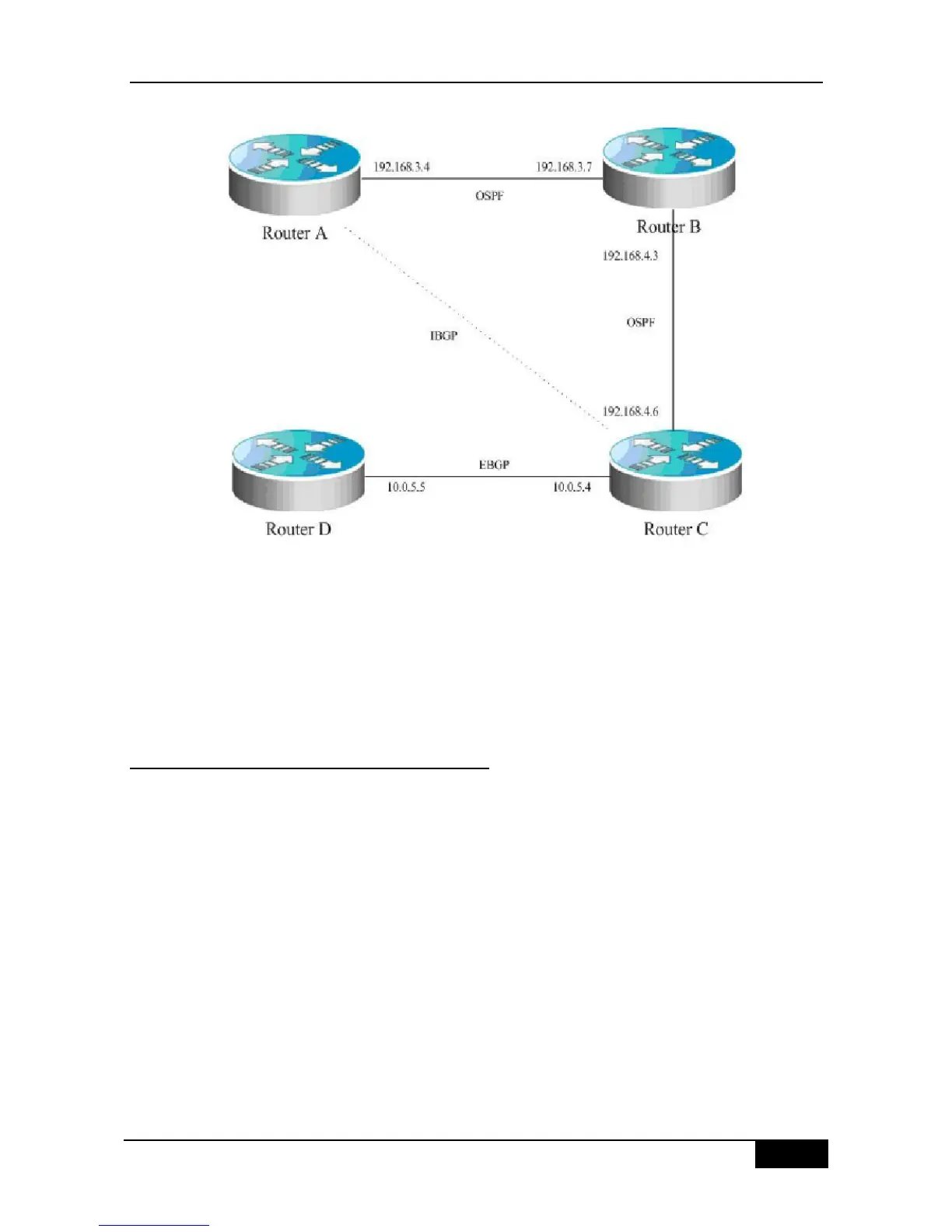
In the schematics, there is a route p in the router A, which is sent to router C by the IBGP
neighbor relationship. If the router C is configured with the BGP synchronization, it is
necessary for the router C to wait for the IGP (this example uses the OSPF protocol) to
receive the same route information p, so as to send the route p to the EBGP neighbor router
D. If the router C is configured asynchronously, it is not necessary for the BGP to wait for the
IGP to receive the route p, so as to send the route p to the EBGP neighbor router D.
29.18.3 Configuring Neighbors to Use aspath
Filter
Configure the as-path access-list used for the filter in the configuration mode firstly. The
configuration command is ip as-path access-list. Enter into the route configuration mode of
the BGP after configuration, and use the neighbor filter-list command to apply the
configured as-path access-list among the neighbors of the BGP, and carry out the as-path
filter among the neighbors.
The detailed configurations are as below:
router bgp 200
neighbor 193.1.12.10 remote-as 100
neighbor 193.1.12.10 filter-list 2 out
neighbor 193.1.12.10 filter-list 3 in
ip as-path access-list 2 permit _200$
ip as-path access-list 2 permit ^100$
ip as-path access-list 3 deny _690$
ip as-path access-list 3 permit .*












 To Next Page