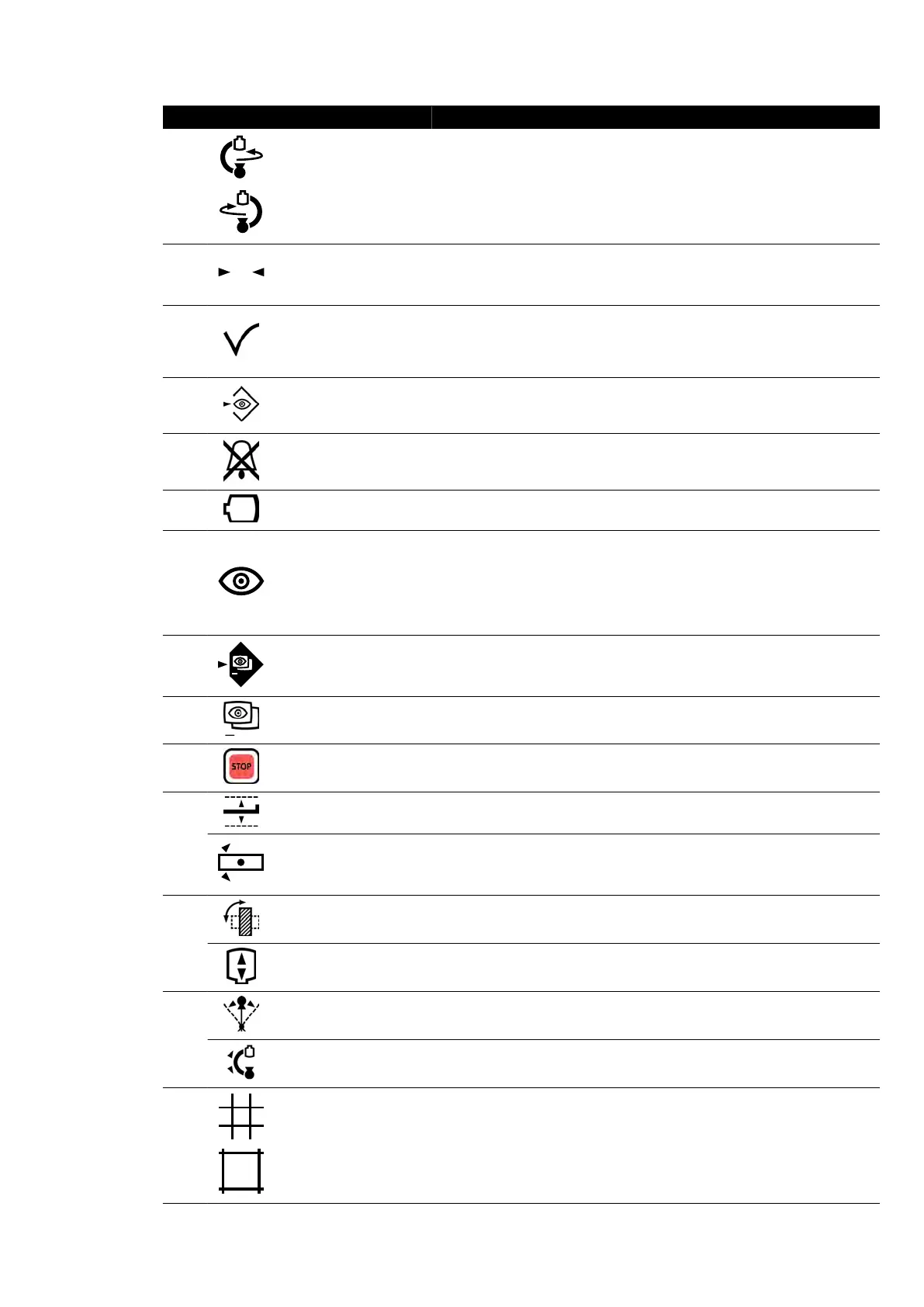
Legend Descripon
4 Rotate stand Rotates (swings) the stand.
5
Reset geometry
Resets the stand and table to a default posion. This funcon is disabled in
the c
ontrol room.
6
Accept
Recalls a selected APC or table posion. The indic
ator light ashes when a
new posion is selected or when the stand is moved away from the selec-
ted posion. The indicator light is on while the posion is being recalled.
The indicator light is o when the selected posion is reached.
7
Store uor
oscopy
Stores uoroscopy images during and aer uoroscopy. If the indicator light
is on during uoroscopy, images are being stored. Aer uoroscopy, the in-
dicator light ashes once to indicate images have been stored.
8
Reset uor
oscopy buz-
zer
Reset the uoroscopy buzzer. The indicator light ashes when the buzzer is
acvated.
9
Field of view Increases and decreases the detector eld of vie
w.
10
Fluoroscopy a
vor
Selects the uoroscopy level to be used. The three indicator lights show the
selected level. When low load-uoroscopy is selected the indicator lights
are o.
• One indicator light: Low (with ClarityIQ (opon): Low)
• Two indicator lights: Normal (with ClarityIQ (opon): Medium)
• Three indicator lights: High (with ClarityIQ (opon): Normal)
11
SmartMask
Selects the current image as the SmartMask image. This funcon is disabled
if the select
ed procedure sengs do not support roadmap.
12
Roadmap
Switches the roadmap funcon on or o
. This funcon is disabled if the se-
lected procedure sengs do not support roadmap.
13
Emergency stop
Stops all geometry movements. For in
formaon about restarng aer an
emergency stop, see Restarng the System (page 45).
14
Table height Adjusts the height of the table.
Table pivot unlock Unlocks the table pivot lock.
15
Detector posion Moves the detector between portrait and landscape posions.
Source-to-image dis-
t
ance
Changes the source-to-image distance.
16
Angulaon Controls the angulaon posion of the s
tand.
Rotaon Controls the r
otaon posion of the stand.
17
Shuers Opens and closes the shuer
s.
Quick Reference Monoplane Control Module
Azurion Release 1.2 Ins
trucons for Use 374 Philips Healthcare 4522 203 52421



 To Next Page