Tool Funcon
Image overlays
Provides di
erent levels of paent informaon that can be displayed on the
image in the main window:
• Full image informaon
• Limited image informaon
• Minimum image informaon (mandatory informaon)
On biplane series, image overlays are displayed for each channel, except for
the paent idencaon, which is displayed on the frontal image only.
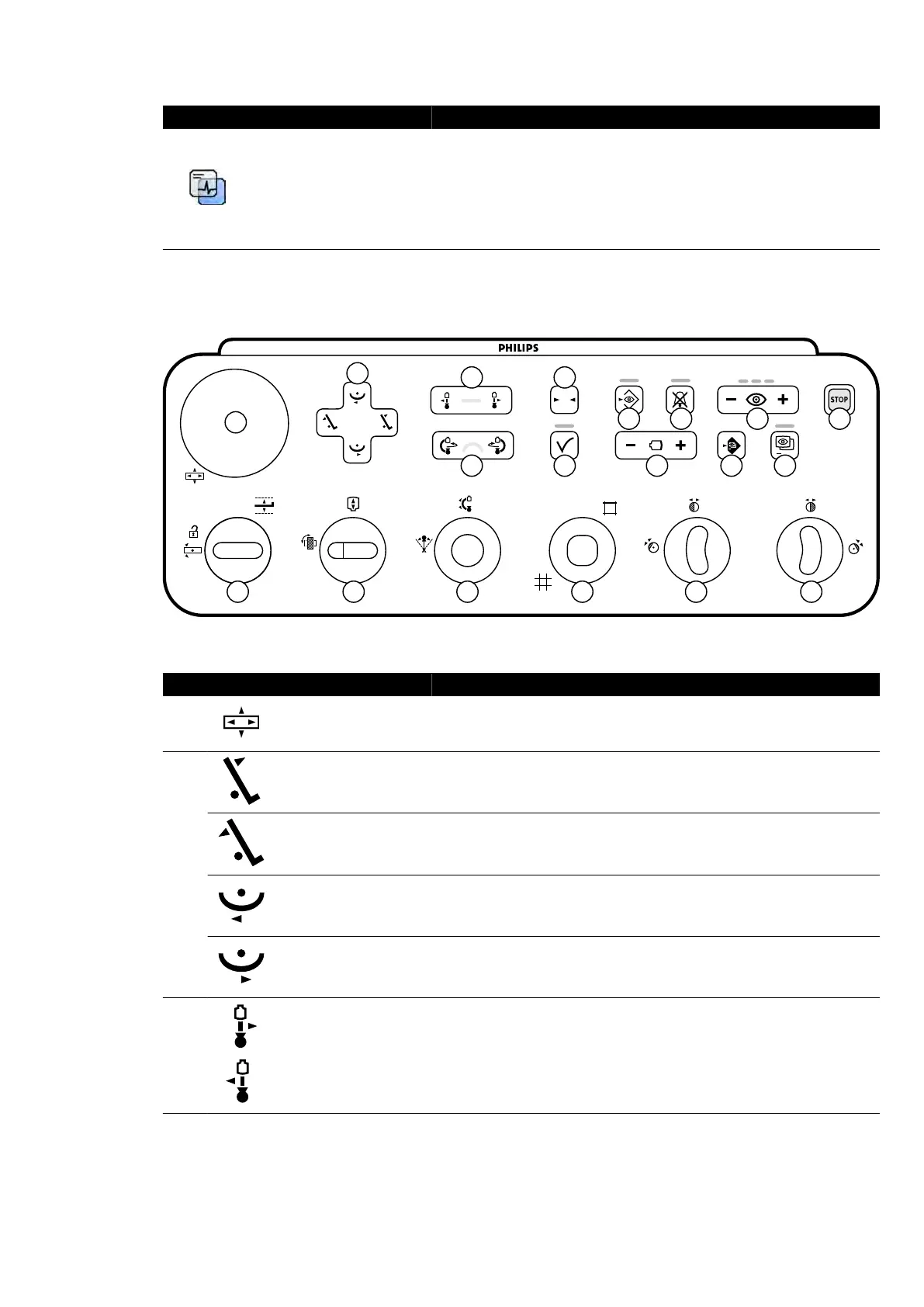
18.8 Monoplane Control Module
0
1
2
3
4
5
6
7
8
9
10
11
12
13
14
15
16
17
18 19
Figure 189 Monoplane c
ontrol module
Legend Descripon
1 Float tabletop
Moves the tabletop in the longitudinal and lateral dir
econs. This funcon
operates only at the table side posion. It is disabled in the control room
and at the pedestal.
2
Tilt table Tilts the table up.
Tilt table Tilts the table down.
Cradle table Cradles the table le.
Cradle table Cradles the table right.
3
Move stand (longitudi-
nal)
Moves the stand longitudinally (ceiling-mounted only).
Quick Reference Monoplane Control Module
Azurion Release 1.2 Ins
trucons for Use 373 Philips Healthcare 4522 203 52421



 To Next Page