Legend Descripon
13 - fps Exposure speed (selected/actual)
14 - Fluoroscopy a
vor The currently selected uoroscopy avor
15 - Dose area product
Displays the cumulav
e dose area product (Gy cm
2
)
16 - Total uoroscopy me Displays the total uoroscopy me
17
System me / s
top-
watch
Displays the system me. If the stopwatch is acve, the stopwatch me is
displayed
1
If a c
ollision is detected, this secon in the status area displays collision detecon warnings and icons.
2
Only displayed if the thorax region is selected.
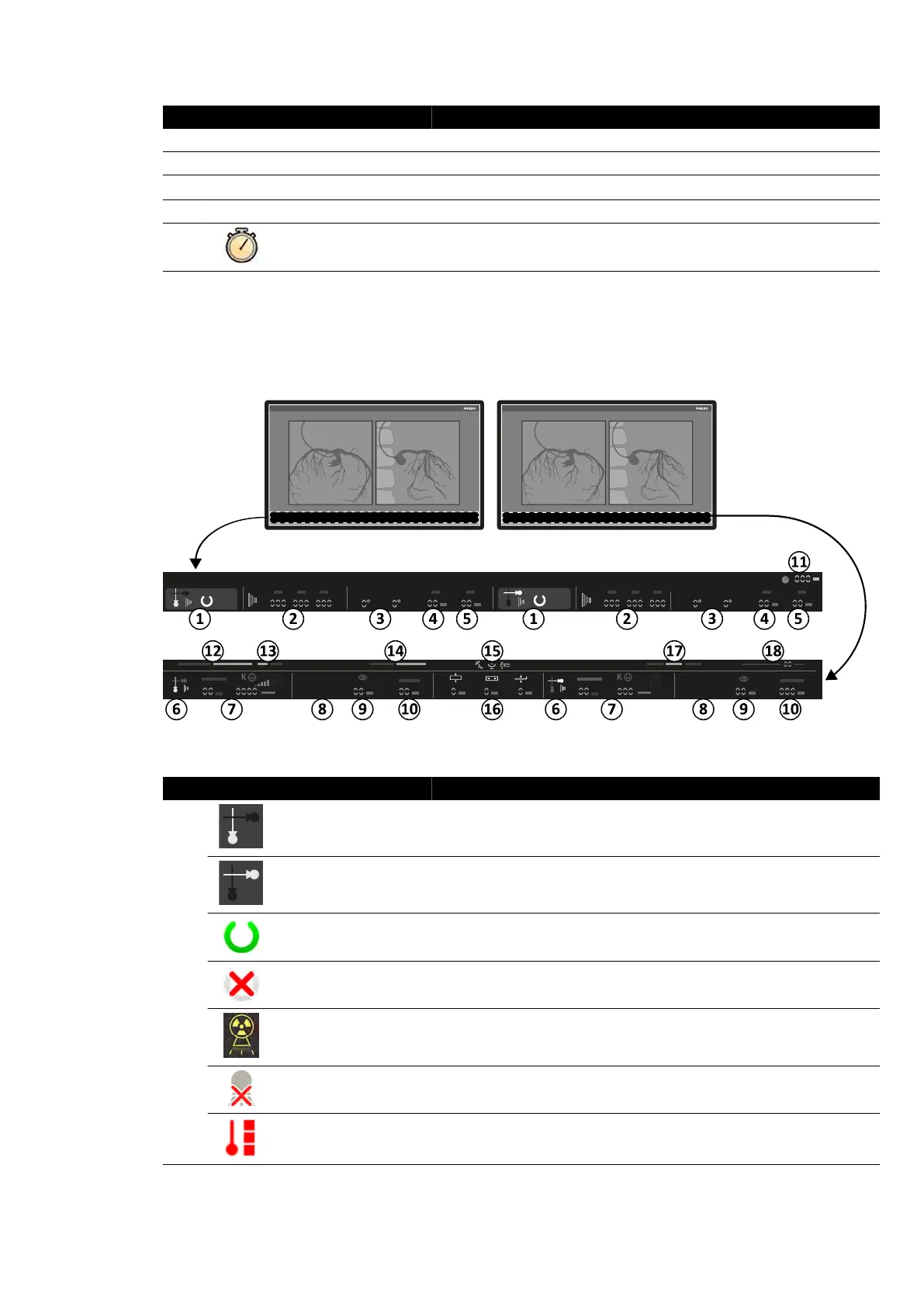
Status Area in the Examinaon Room (Biplane System)
Figure 188 St
atus area in the examinaon room live X-ray window and reference window
Legend Descripon
1
Channel indicator Frontal channel
Channel indicator Lateral channel
System status
The system is ready for exposure (when a channel is selected for exposure,
this secon of the s
tatus area is highlighted)
System status The system is not ready for exposure
X-ray status X-ray is on
X-ray status X-ray is disabled
Tube load The tube is overheated
Quick Reference Status Area
Azurion Release 1.2 Ins
trucons for Use 364 Philips Healthcare 4522 203 52421



 To Next Page