August, 2006 COPIER INPUT/OUTPUT CHECK
5-191
5.6 COPIER INPUT/OUTPUT CHECK
5.6.1 COPIER INPUT CHECK: SP5803
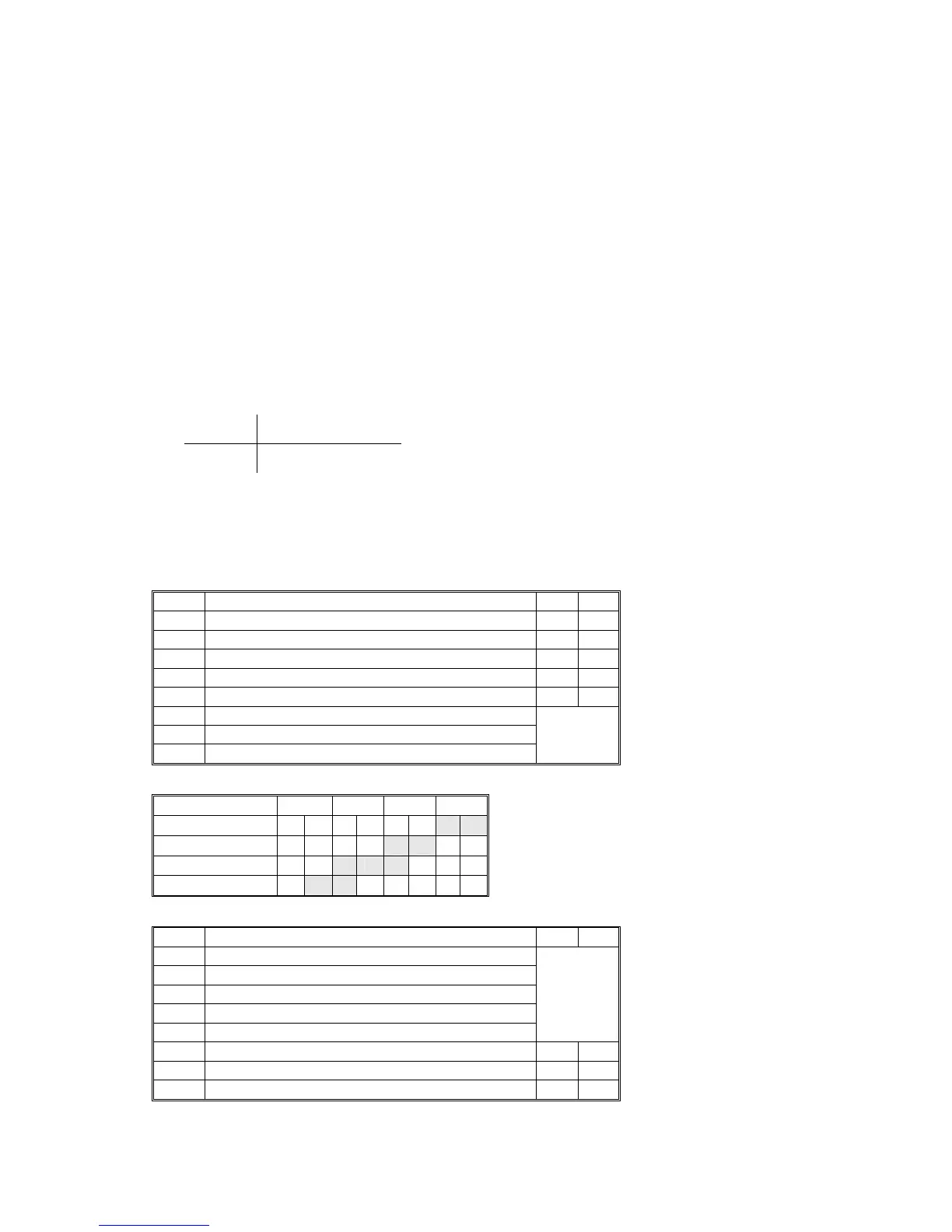
This procedure allows you to test sensors and other components of the machine.
After you select one of the categories below by number, you will see a small 8-bit
table with the number of the bit and its current setting (0 or 1). The bits are
numbered 0 to 7, reading right to left.
1. Enter the SP mode and select SP5803.
2. Enter the number (1 to 13) for the item that you want to check. A small box will
be displayed on the SP mode screen with a series of 0’s and 1’s.
The meaning of the display is as follows.
Bit 7 6 5 4 3 2 1 0
Setting
1 1 0 0 1 0 1 0
3. Check the status of each item against the corresponding bit numbers listed in
the table below.
001 Tray 1
Bit Input 0 1
Bit 7 Rear Side Fence Closed Sensor – Tray 1 Off On
Bit 6 Rear Side Fence Open Sensor – Tray 1 Off On
Bit 5 Front Side Fence Closed Sensor – Tray 1 Off On
Bit 4 Front Side Fence Open Sensor – Tray 1 Off On
Bit 3 Paper Near End Sensor – Tray 1 Off On
Bit 2 Paper Height Sensor 1 – Tray 1
Bit 1 Paper Height Sensor 2 – Tray 1
Bit 0 Paper Height Sensor 3 – Tray 1
See
following
table.
Tandem Tray Paper Height Sensors: 001
100%
002 Paper Feed 1
Bit Input 0 1
Bit 7 Paper Size – Tray 2
Bit 6 Paper Size – Tray 2
Bit 5 Paper Size – Tray 2
Bit 4 Paper Size – Tray 2
Bit 3 Paper Size – Tray 2
See
following
table.
Bit 2
Bit 1
Bit 0



 To Next Page
 Loading...



