August, 2006 IMAGE TRANSFER UNIT
3-79
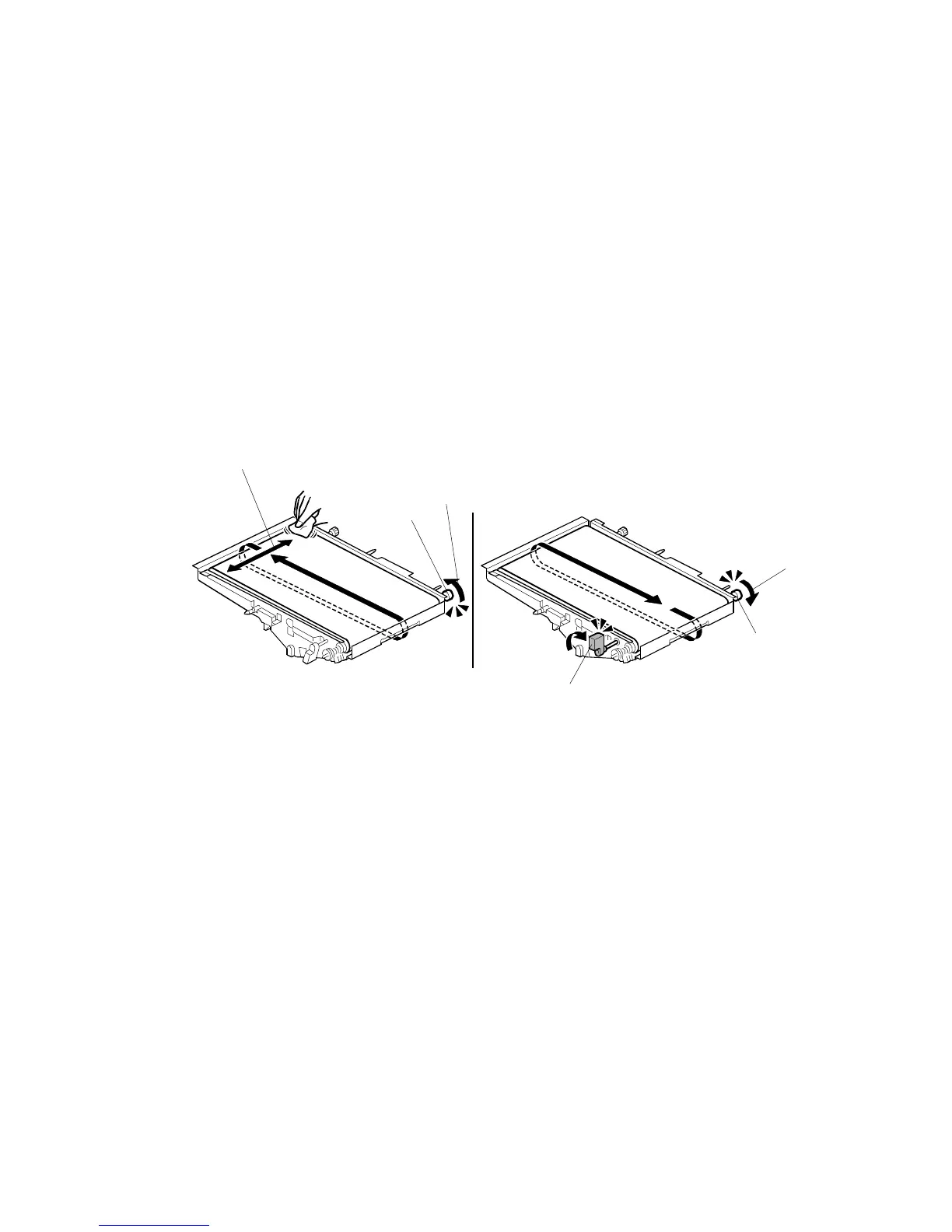
Dusting the ITB with Lubricant Powder
1. Get a pack of Lubricant Powder B1329700.
Important!
• THE ITB MUST BE COATED WITH LUBRICANT POWDER (B1329700) BEFORE INSTALLING
A NEW
ITB.
• T
HE LUBRICANT POWDER (B1329700) (COMPOSED OF ZINC STEARATE) IS SPECIALLY
DESIGNED FOR THIS MACHINE
(e-STUDIO4500c/5500c).
• N
EVER USE SETTING POWDER (54429101) FOR THIS MACHINE, OR YOU MAY DAMAGE
THE DRUM CHARGE ROLLER AND CAUSE PROBLEMS WITH IMAGE QUALITY
.
• N
EVER USE TONER TAKEN FROM THE TONER SUPPLY PORT OF THE YELLOW PCU
BECAUSE THIS TONER HAS DEVELOPER MIXED WITH IT
.
• I
F THE LUBRICANT POWDER (B1329700) IS NOT AVAILABLE, COAT THE ITB WITH THIS
MACHINE
’S YELLOW TONER. DO NOT USE ANOTHER MODEL’S YELLOW TONER.
2. While rotating the knob [A] in the direction indicated by the arrow [B], apply
Lubricant Powder (B1329700) at [C] with a soft dry cloth.
3. Rotate the ITB indicated by the arrow [B] through one full rotation. This allows
the lubricant powder to be spread completely on the ITB.
4. Turn the lever [D] to the ‘up’ position.
5. After the ITB is completely covered with powder, rotate the knob [E] in the
direction indicated by the arrow [F].



 To Next Page
 Loading...



