LH79524/LH79525 User’s Guide Universal Serial Bus Device
Version 1.0 17-11
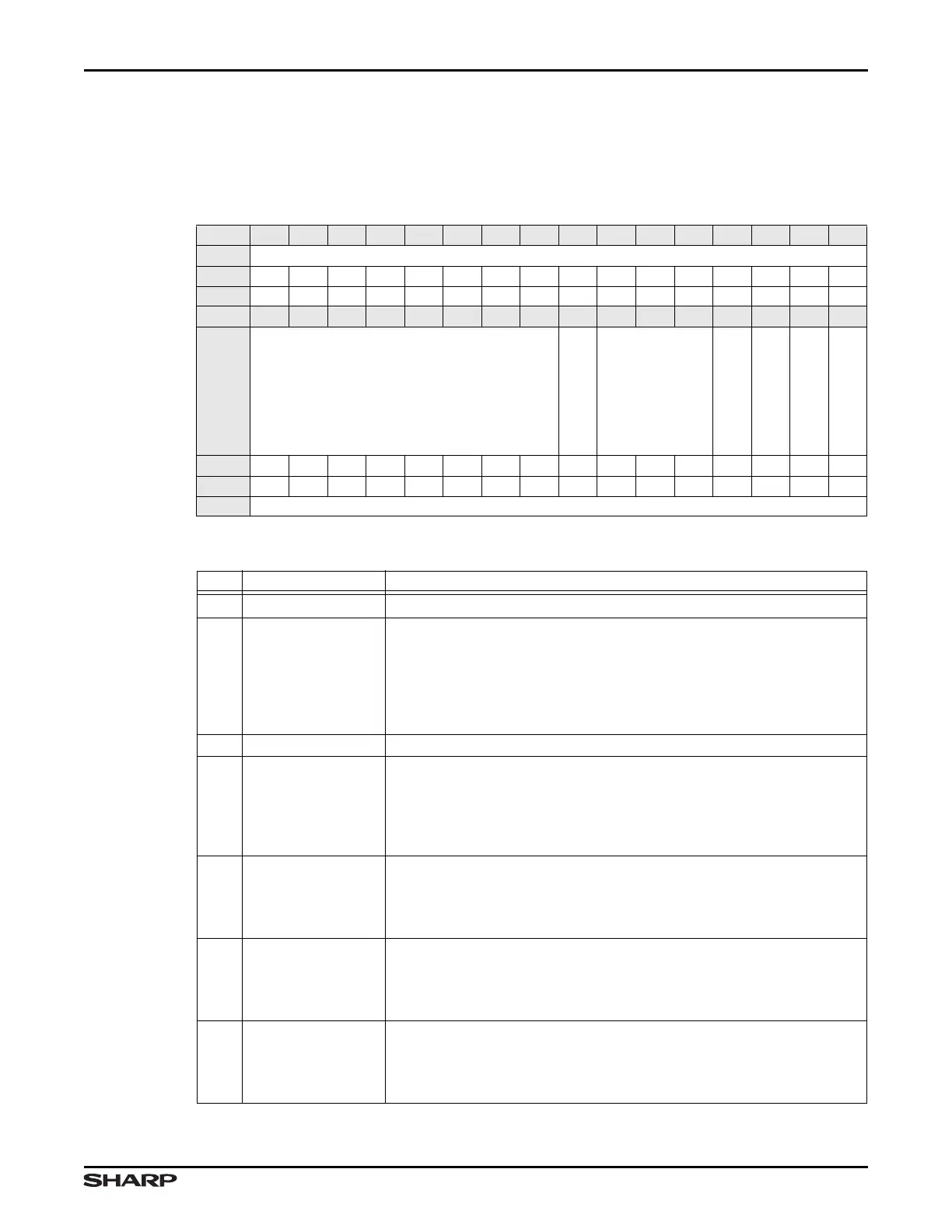
17.2.2.2 Power Management Register (PMR)
This register is used for SUSPEND, RESUME, and RESET signalling, and for monitoring
USB Bus Reset status.
Table 17-6. PMR Register
BIT 31 30 29 28 27 26 25 24 23 22 21 20 19 18 17 16
FIELD ///
RESET 0000000000000000
RW RO RO RO RO RO RO RO RO RO RO RO RO RO RO RO RO
BIT 15 14 13 12 11 10 9 8 7 6 5 4 3 2 1 0
FIELD ///
SOF_UPDATE
///
USB_RESET
UC_RESUME
SUSPEND_MODE
ENABLE_SUSPEND
RESET 0000000000001000
TYPE RO RO RO RO RO RO RO RO RW RO RO RO RO RW RO RW
ADDR 0xFFFF5000 + 0x004
Table 17-7. PMR Fields
BITS NAME FUNCTION
32:8 /// Reserved Reading returns 0. Write the reset value.
7 SOF_UPDATE
Start of Frame Update This bit allows software to instruct the USB Device to
wait for an SOF token from the time IN_PKT_RDY is set before sending the
packet. If an IN token is received before an SOF token, a zero length data pack-
et is sent. This bit is only used by endpoints performing Isochronous transfers.
1 = Wait for SOF token before sending the pending packet
0 = Do not wait for the SOF token before sending packets
6:4 /// Reserved Reading returns 0. Write the reset value.
3 USB_RESET
USB RESET The USB block programs this bit to 1 when RESET signalling
is received from the Host. This bit remains 1 as long as RESET persists on
the USB bus.
1 = A RESET signal is asserted on the USB bus
0 = No RESET signal is asserted
2 UC_RESUME
UC RESUME Software programs a 1 to this bit for not less than 10 ms, nor
more than 15 ms to initiate RESUME signalling.
1 = Initiate RESUME signalling (must be 10 ms to 15 ms)
0 = Normal operation
1 SUSPEND_MODE
SUSPEND Mode The USB block programs this bit to 1 when the Host
sends SUSPEND signalling to the SoC.
1 = USB in SUSPEND mode
0 = USB not in SUSPEND mode
0 ENABLE_SUSPEND
SUSPEND Enable The software programs this bit to 1 to enable the
SUSPEND mode. If this bit is zero, the device will not enter SUSPEND mode.
1 = Enable SUSPEND mode
0 = Disable SUSPEND mode (Default)



 To Next Page