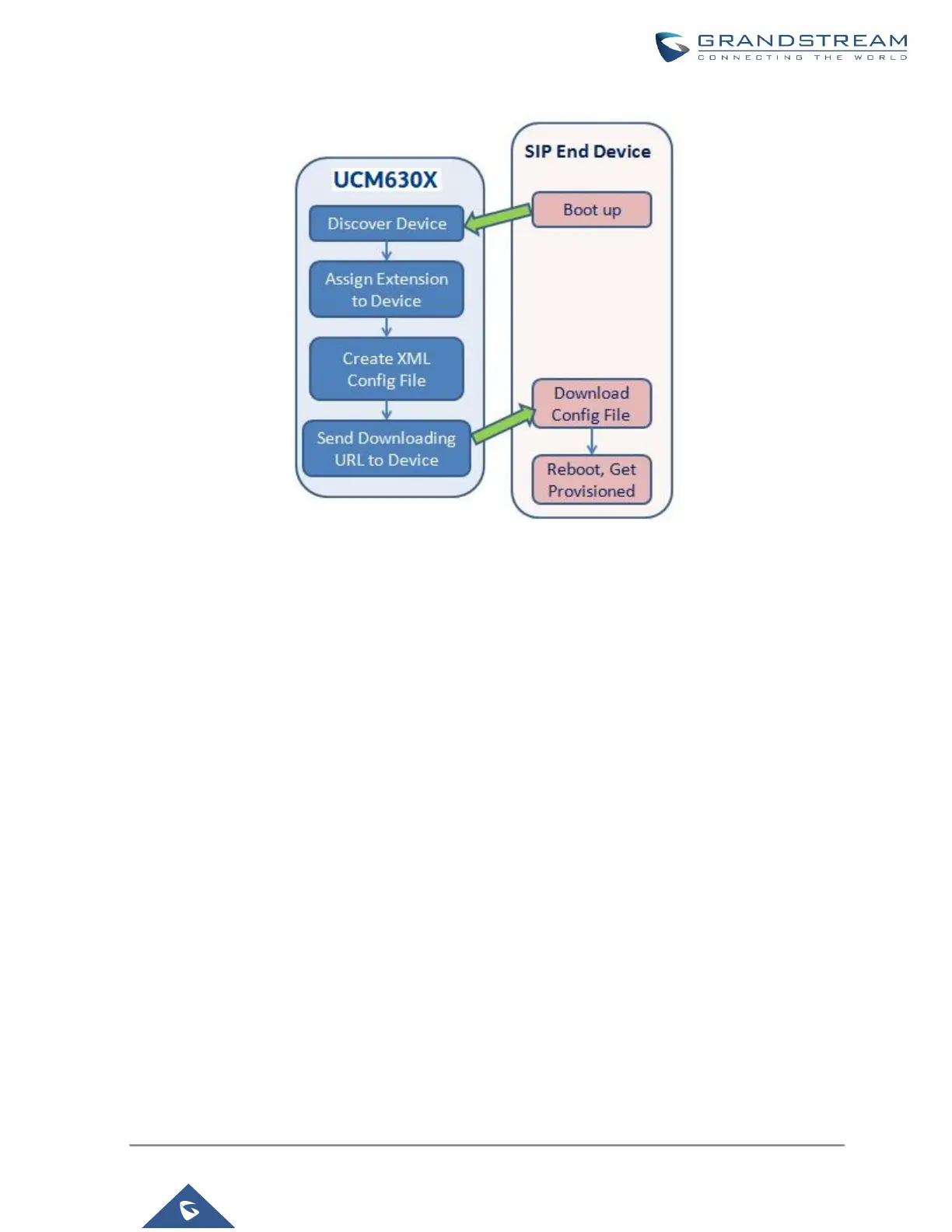
Figure 62: UCM630X Zero Config
• SIP SUBSCRIBE
When the phone boots up, it sends out SUBSCRIBE to a multicast IP address in the LAN. The UCM630X
discovers it and then sends a NOTIFY with the XML config file URL in the message body. The phone will
then use the path to download the config file generated in the UCM630X and take the new configuration.
• DHCP OPTION 66
Route mode needs to be set to use this feature. When the phone restarts (by default DHCP Option 66 is
turned on), it will send out a DHCP DISCOVER request. The UCM630X receives it and returns DHCP
OFFER with the config server path URL in Option 66, for example, https://192.168.2.1:8089/zccgi/. The
phone will then use the path to download the config file generated in the UCM630X.
• mDNS
When the phone boots up, it sends out an mDNS query to get the TFTP server address. The UCM630X will
respond with its address. The phone will then send a TFTP request to download the XML config file from the
UCM630X.


 To Next Page
 Loading...




