The following figure shows a list of discovered phones. The MAC address, IP Address, Extension (if assigned),
Version, Vendor, Model, Connection Status, Create Config, Options (Edit /Delete /Update /Reboot /Access
Device Web GUI) are displayed in the list.
Figure 65: Discovered Devices
Uploading Devices List
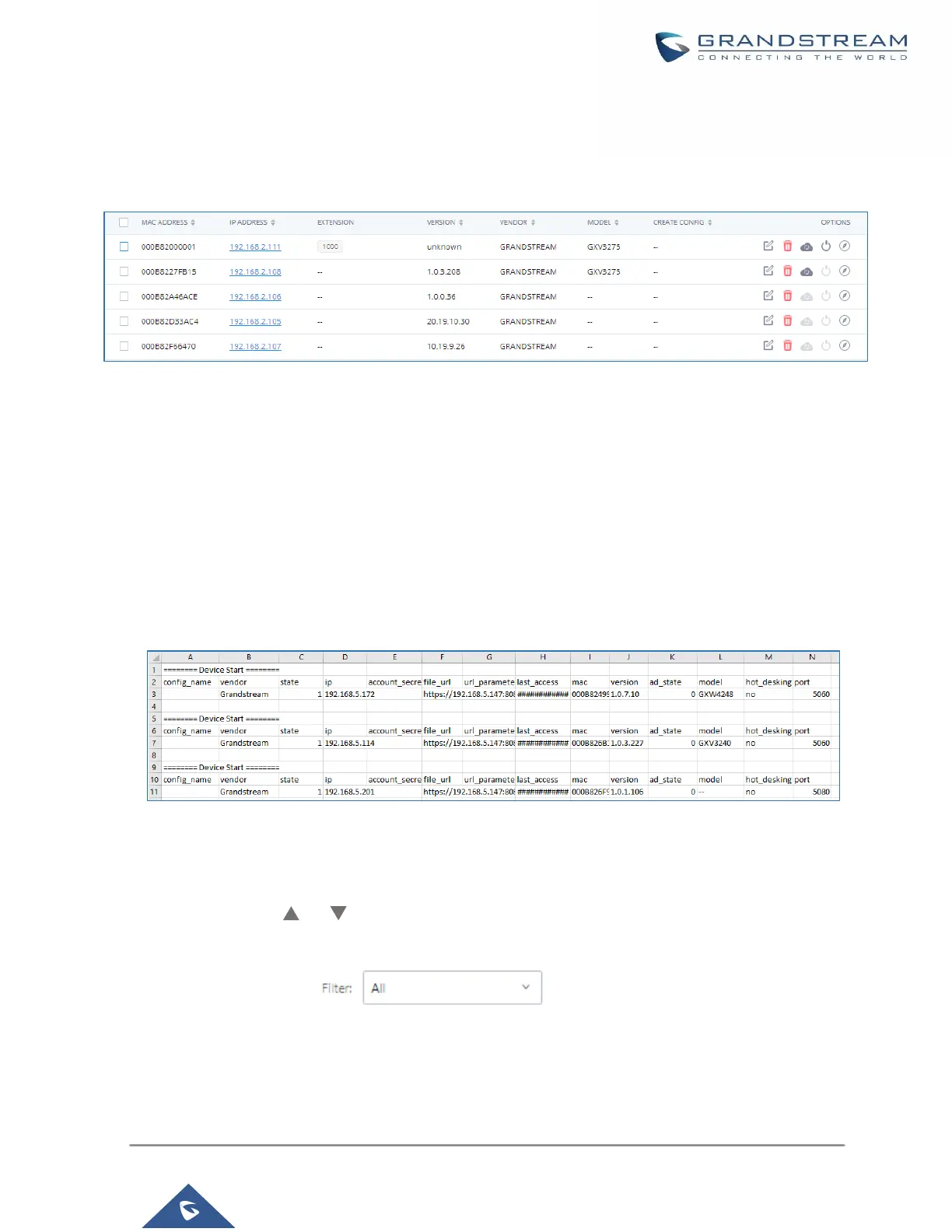
Besides the built-in discovery method on the UCM, users could prepare a list of devices on a .CSV file and
upload it by clicking on the button ”Import”, after which a success message prompt should be displayed.
Users need to make sure that the CSV file respects the format as shown on the following figure and that the
entered information is correct (valid IP address, valid MAC address, device model, and an existing account),
otherwise the UCM will reject the file and the operation will fail:
Figure 66: Device List - CSV file Sample
Managing Discovered Devices
• Sorting: Press or to sort per MAC Address, IP Address, Version, Vendor, Model or Create
Config columns from lower to higher or higher to lower, respectively.
• Filter: Select a filter to display corresponding results.
▪ All: Display all discovered devices.
▪ Scan Results: Display only manually discovered devices. [Discovery]



 To Next Page
 Loading...



