OSPF and OSPFv3
377
M4300 Series and M4300-96X Fully Managed Switches User Manual
The default admin user name is admin and the default admin password is blank, that is,
do not enter a password.
4. Click the Login button.
The System Information page displays.
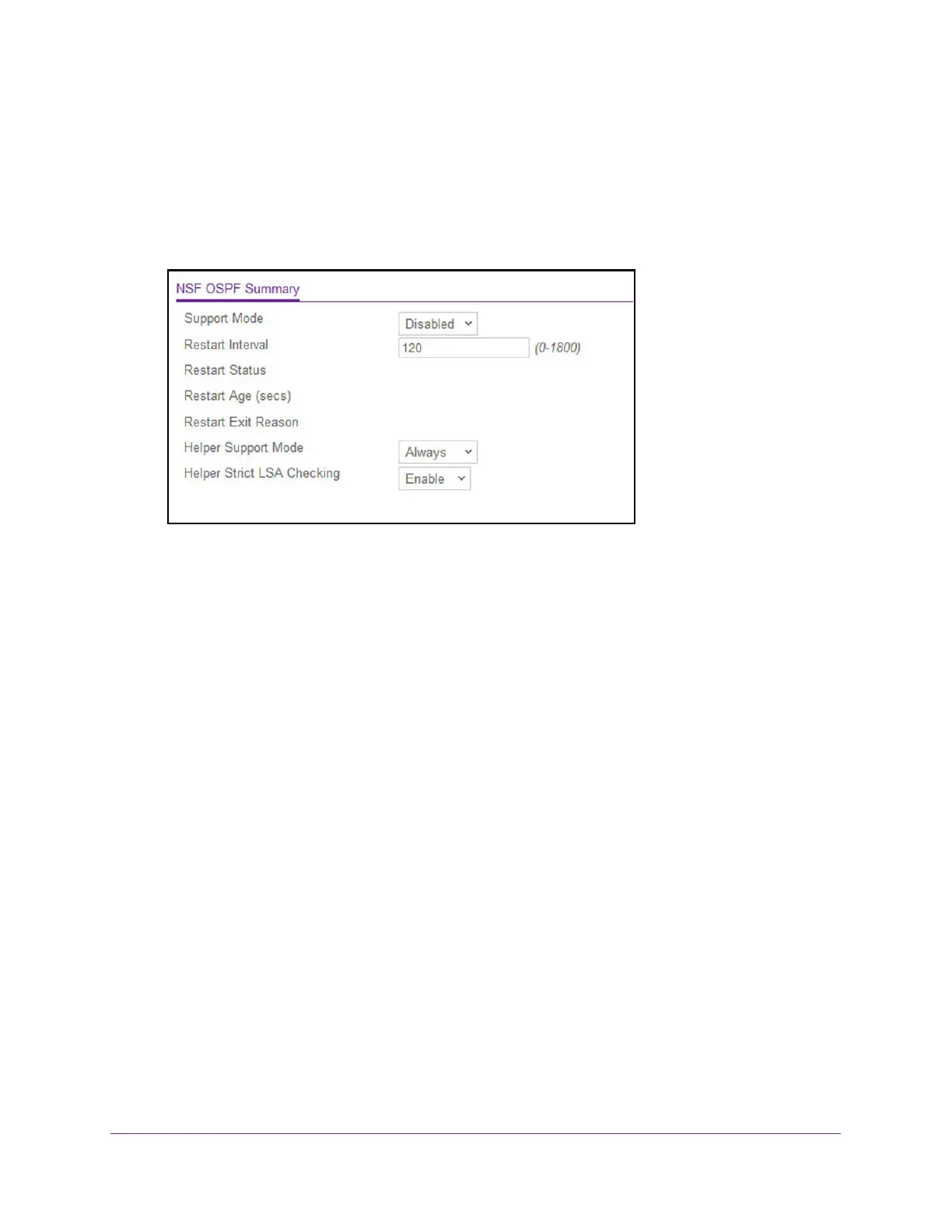
5. Select Routing > OSPF > Advanced > NSF OSPF Summary.
6. From the Support Mode list, configure how the unit performs graceful restarts by selecting
from the following possible values:
• Always. Indicates that OSPF performs a graceful restart for all planned and
unplanned warm restart events.
• Disabled
. Disables OSPF performing graceful restarts.
• Planned. Indicates that OSPF performs a graceful restart only when a restart is
planned (for example, due to an initiate failover command).
The default is Disabled.
7. Configure the Restart Interval. The valid
values are 0 to 1800 in seconds.
The default is 120 seconds.
8. Use the Helper Support Mode field to configure how the unit acts when a neighbor
performs a warm restart.
The possible values are as follows:
• Always. Indicates that OSPF helps a restarting neighbor only during all planned and
unplanned warm restart events.
• Disabled. Disables OSPF acting as a helpful neighbor
.
• Planned
. Indicates that OSPF helps a restarting neighbor only during planned
events.
The default is Always.
9. Configure Helper Strict LSA Checking by selecting Enable or Disable.
When enabled, the unit exits helper mode whenever the topology changes.




 To Next Page