Configure System Information
41
M4300 Series and M4300-96X Fully Managed Switches User Manual
6. To refresh the page, click the Update button.
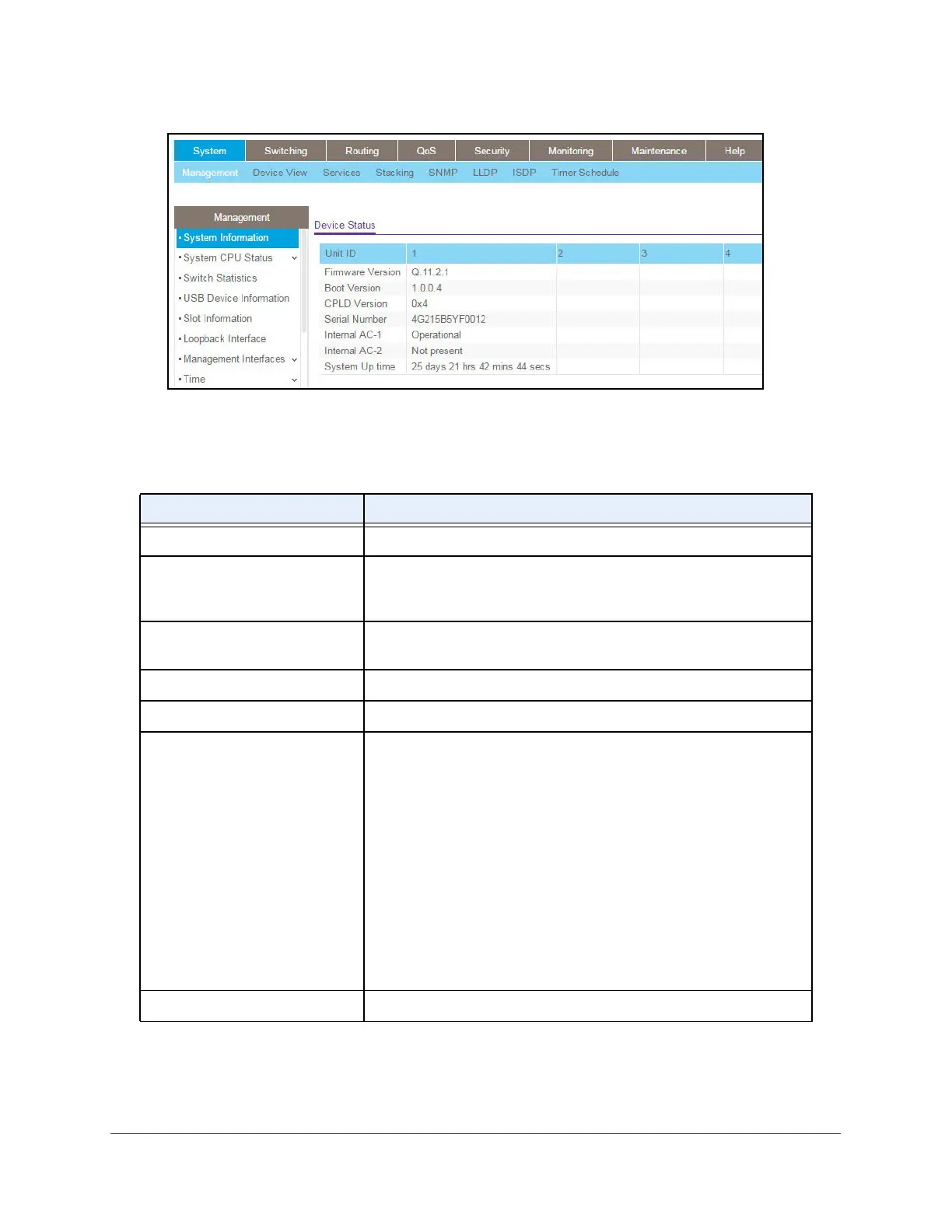
The following table describes the nonconfigurable Device Status information.
Table 9. Device Status
Field Description
Unit ID The unit number in the switch.
Firmware Version The release.version.maintenance number of the code currently running
on the switch. For example, if the release was 1, the version was 2, and
the maintenance number was 4, the format would be 1.2.4.
Boot Version The version of the boot code that is in the flash memory to load the
firmware into the memory
.
CPLD V
ersion The version of the software for CPLD.
Serial Number The serial number of this switch.
Internal AC-1, Internal AC-2, and
so on
Indicates the status of the appropriate power module in each unit.
Status can be any of the following:
• Operational. Power module is present and functioning properly
.
• Powering
. Main power is failed or disconnected but RPS provides
power to the switch.
• Not Present. Power module is not present in the slot.
• Not powered. Power module is present but not connected to the
power source.
• Not powering. Power module is present and connected but the
switch uses another power source.
• Incompatible. Power module is present but incompatible.
• Failed. Power module is present, but power cable is not plugged in
or a bad cable is plugged in.
System Up Time The time in days, hours, and minutes since the last switch reboot.








 To Next Page