Manage Device Security
609
M4300 Series and M4300-96X Fully Managed Switches User Manual
7. Take one of the following actions:
• To add an IPv6 ACL rule, click the Add
button.
• To change an existing rule, click the rule hyperlink in the Sequence Number column
of the IPv6
ACL Rule Table.
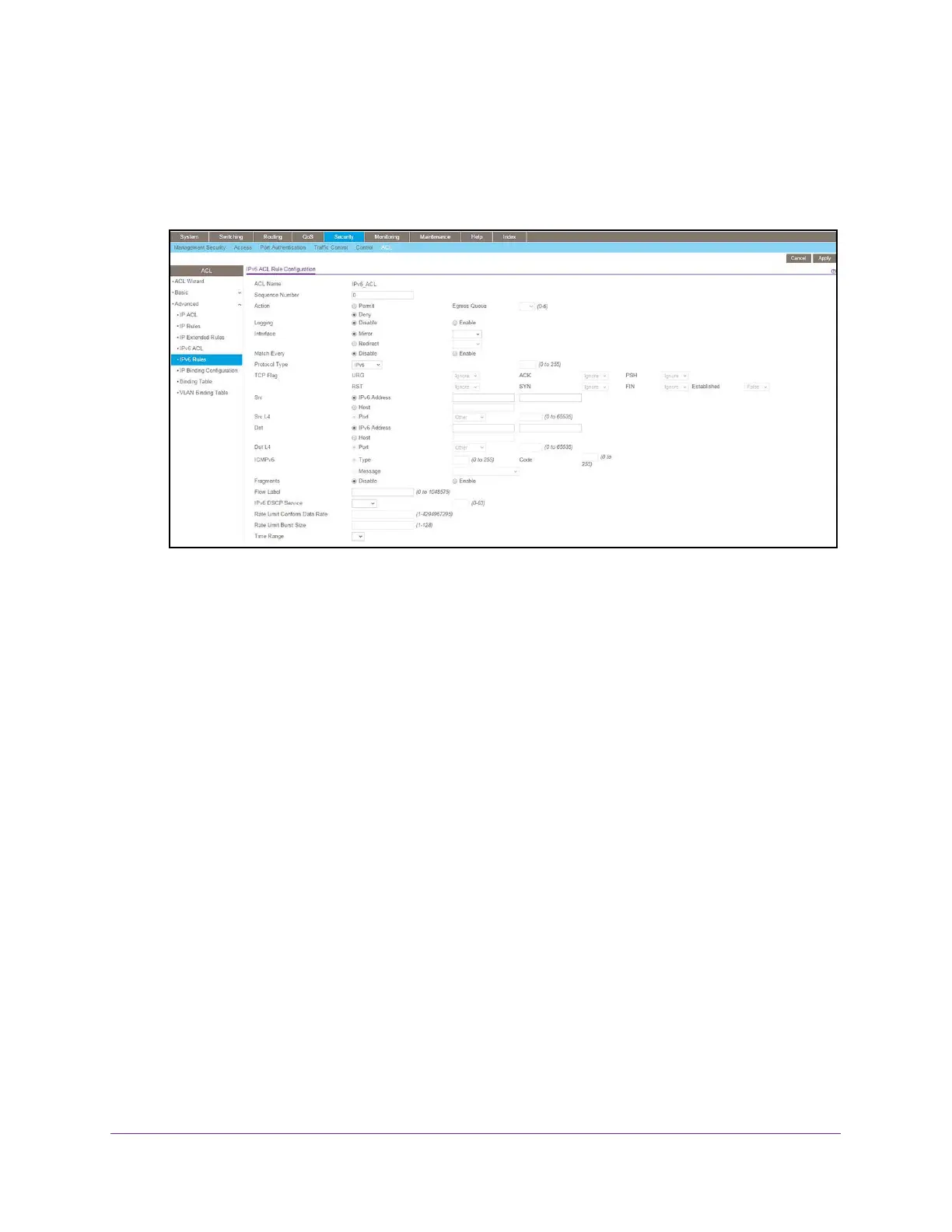
8. Configure the following options for the rule:
• Sequence Number. Enter a whole number in the range of 1 to 2147483647.
This
number is used to identify the rule.
An IPv6 ACL can contain up to 1023 rules.
• Action. Specify what action is taken if a packet matches the rule’s criteria.
The choice
is Permit or Deny.
• Logging. When set to Enable, logging is enabled for this ACL rule (subject to
resource availability in the device). If the access list trap flag is also enabled, this
causes periodic traps to be generated indicating the number of times this rule was hit
during the current report interval.
A fixed 5-minute report interval is used for the entire
system. A trap is not issued if the ACL rule hit count is zero for the current interval.
This field is visible for a Deny action.
• Egress Queue.
The hardware egress queue identifier used to handle all packets
matching this IPv6
ACL rule. Valid range of queue IDs is 0 to 7. This field is visible
when Permit is chosen as the action.
• Interface. For a Permit action, use either a mirror interface or a redirect interface:
- Select the Mirror Interface radio button and use the menu to specify the egress
interface to which the matching traf
fic stream is copied, in addition to being
forwarded normally by the device.
- Select the
Redirect Interface radio button and use the menu to specify the
egress interface to which the matching traffic stream is forced, bypassing any
forwarding decision normally performed by the device.
• Match Every. From the menu, select
True or
False.
True signifies that all packets must match the selected IPv6 ACL and rule and are
either permitted or denied. In this case, because all packets match the rule, the option








 To Next Page