Maintenance and Troubleshooting
671
M4300 Series and M4300-96X Fully Managed Switches User Manual
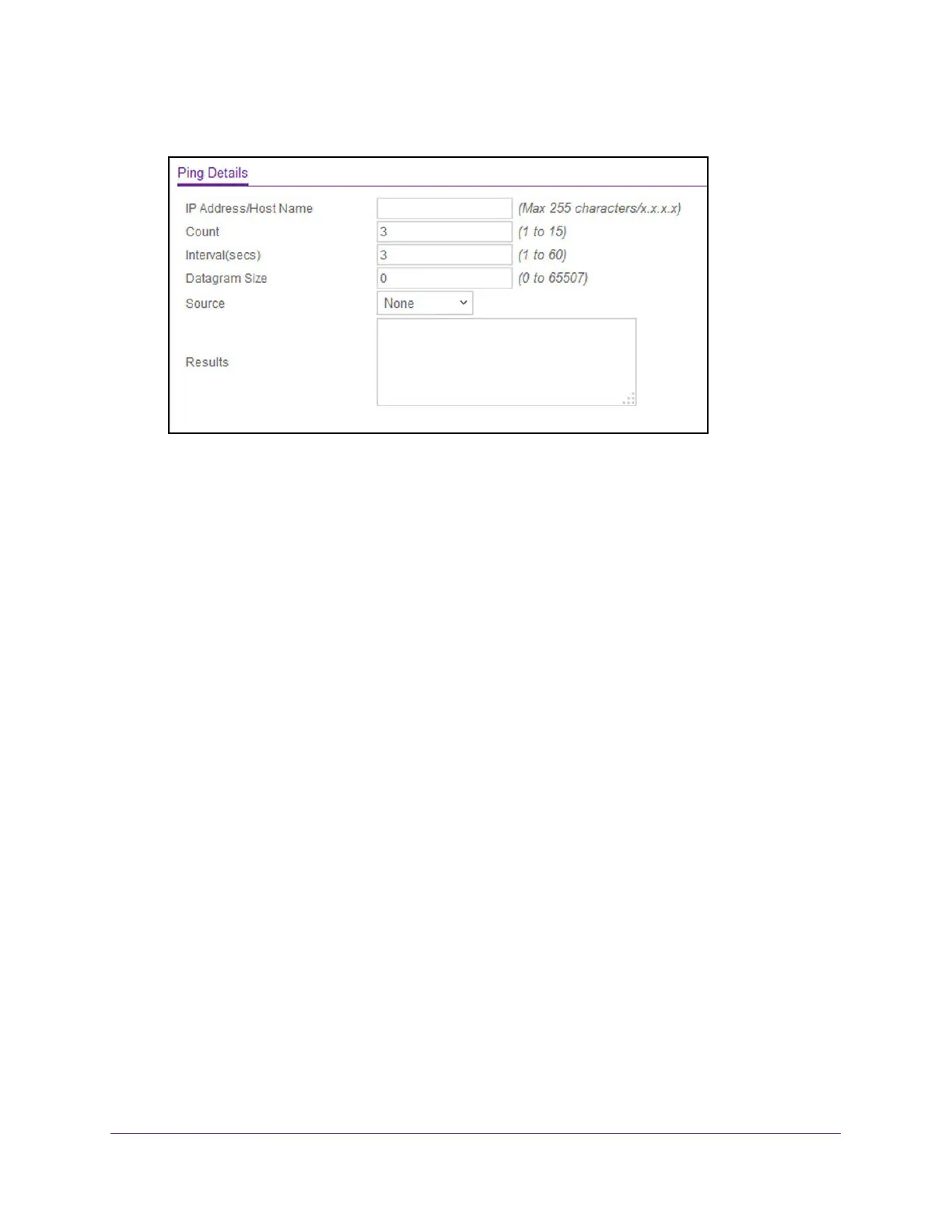
5. Select Maintenance > Troubleshooting > Ping IPv4.
6. Use IP Address/Host Name to enter the IP address or host name of the station for the
switch to ping.
The initial value is blank.
7. In the
Count field, enter the number of echo requests to send.
The default value is 3. The range is 1 to 15.
8. Enter the Interval between ping packets in seconds.
The default value is 3 seconds. The range is 1 to 60.
9. Enter the Datagram Size of ping packet.
The default value is 0 bytes. The range is 0 to 65507.
10. Enter the Source IP address or interface to use when sending the echo request packets.
If source is not required, select None as the source option. Possible values are as
follows:
• None.
The source address of the ping packet would be the address of the default
outgoing interface.
• IP Address. The source IP address to use when sending the echo request packets.
This field is shown when
IP Address is selected as the source option.
• Interface. The interface to use when sending the echo request packets.
This field is
shown when Interface is selected as the source option.
Note: Values configured in the fields on this page are not saved to the switch.
As a result, refreshing the page sets these fields to the default values.
11. Click the Apply button.
The pings are sent to the specified address. The switch sends the number of pings
specified in the Count field, and the results are displayed below the configurable data in
the Results area.








 To Next Page