0142530-000 AB KLA-Tencor Confidential 4-5
3/13/09
KLA-Tencor P-16+ / P-6 User’s Guide XY View Screen - Starting the XY View Application
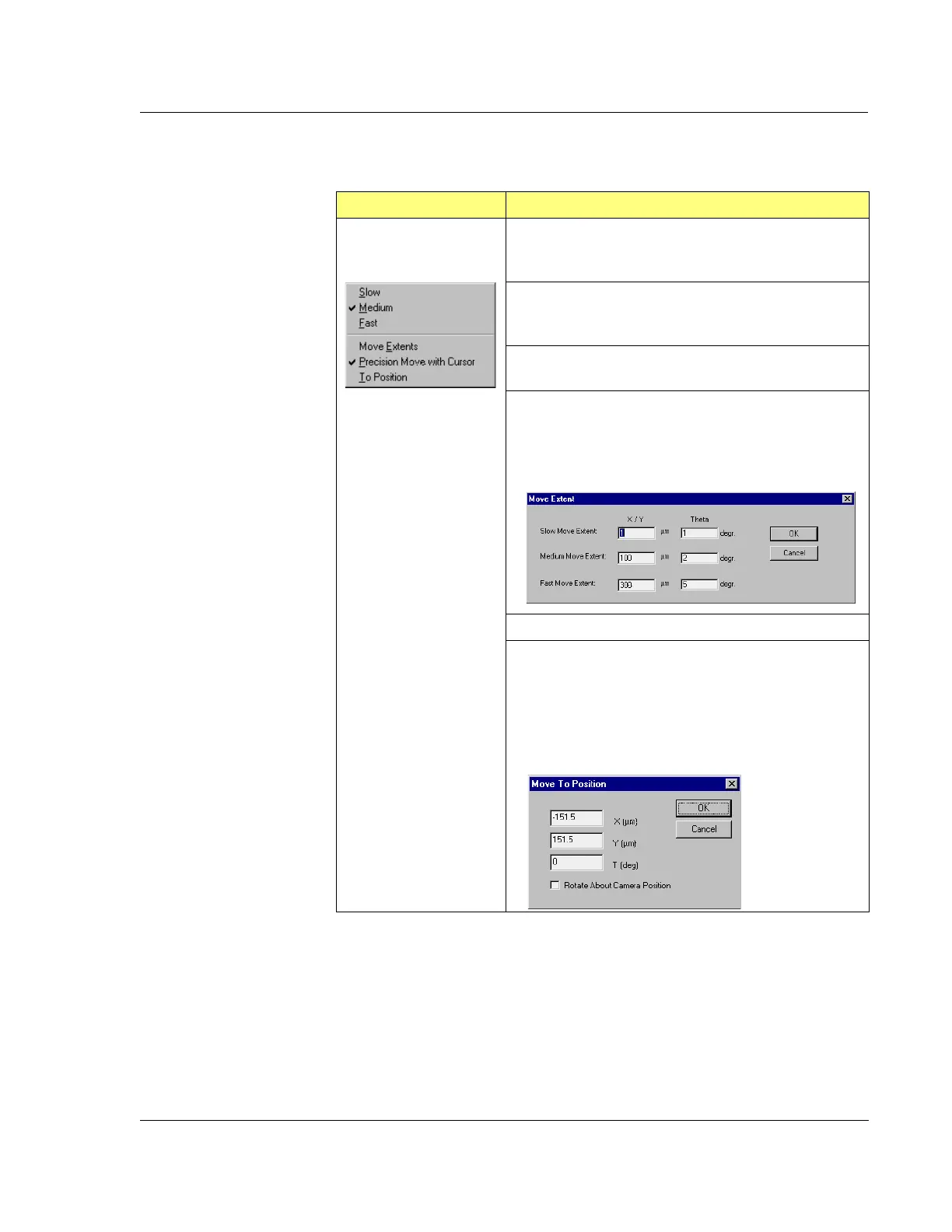
Move Menu
Table 4.3 Move Menu
Move Menu Description
Slow – Sets the XY stage to move in the slowest, or
smallest increment, speed as defined in the Move
Extents
.
Medium – Sets the XY stage to move in medium, or
intermediate increment, speed as defined in the
Move
Extents
.
Fast – Set the XY stage to move in fast, or largest increment,
speed as defined in the Move Extents.
Move Extents – Sets the increment (Slow, Medium, Fast) for
the stage movement. Enter the μm per click distance in each
field for X/Y movement and the degrees in the Theta fields.
Figure 4.2 Move Extents Dialog Box.
Precision Move – Takes out any backlash in the lead screws.
To Position – This displays the
Move To Position dialog box.
Enter the coordinates the stage is to move to. If a rotational
move is used to reorient a feature already in view so it can be
scanned in a different direction, also choose
Rotate About
Camera Position
. Click OK to make the move.
Figure 4.3 Move To Position Dialog Box



 To Next Page