Stylus Change Procedure - Stylus Removal and Replacement KLA-Tencor P-16+ / P-6 User’s Guide
13-20 KLA-Tencor Confidential 0142530-000 AB
3/13/09
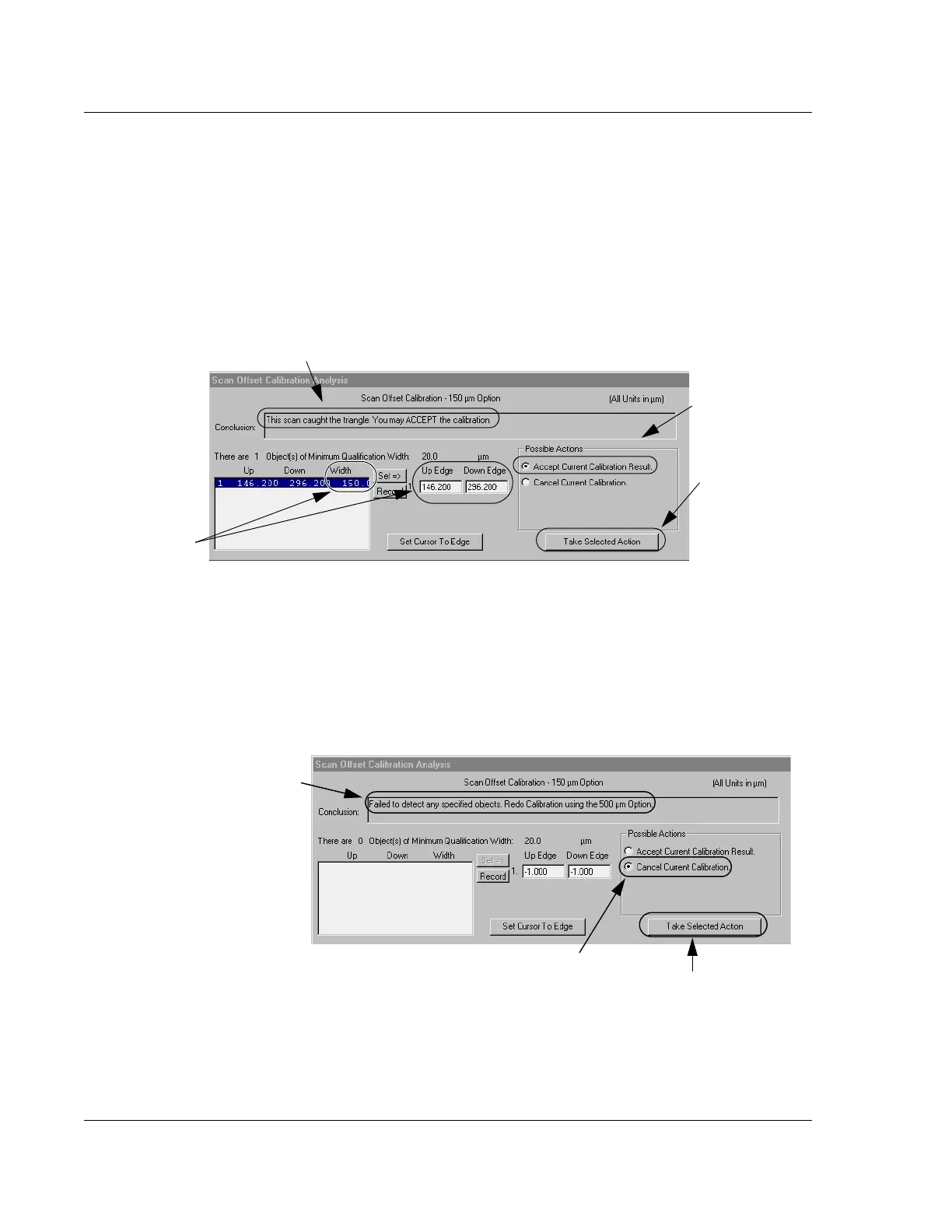
In the bottom half of the window, the Scan Offset Calibration Analysis appears. In
Figure 13.30 the system has subtracted the Up Edge from the Down Edge and
calculated the result to be 150.0
μm. Using this analysis of the scan, the system
makes a recommendation based upon its recognition of the ProCal Wafer
triangle pattern.
18. To accept the recommendation, ensure that
Accept Current Calibration Result is
chosen, then click on
Take Selected Action. (See Figure 13.30.)
If the trace misses the triangle or is unable to identify it, one of several messages
can be displayed. If the message reads, “Unknown situation…” or is otherwise
uncertain, perform the entire scan procedure again, this time using the 1000
μm
(1 mm) triangle and replacing the 150
μm scan recipe with the 500 μm scan
recipe, _OFF500. If the 500
μm scan is acceptable, perform the 150 μm scan
again. The results should be acceptable.
Figure 13.30 Coarse Scan Data Analysis Window
Step 18 To accept
the calibration, click
in the
Accept...
radio button,
then click Take
Selected Action
.
If the scan was recognized by the system, a recommendation
to ACCEPT the calibration is displayed here.
The system
subtracts the
Up Edge from the
Down Edge and
derives the width.
The outcome in this
case is 150.0 μm.
Figure 13.31 “Unknown Situation” Corrective Action
First If the scan is uncertain or the
recommendation is to take a rescan,
click
Cancel Current Calibration.
The conclusion of the
scan is displayed here.
It can either
recommend accepting,
be uncertain, or
recommend rescan.
Second Then click
Take Selected Action.



 To Next Page