0142530-000 AB KLA-Tencor Confidential 5-9
3/13/09
KLA-Tencor P-16+ / P-6 User’s Guide View Scan Window - 3D Screen Function
3D SCREEN FUNCTION 5
The function of the 3D View Scan screen is similar to that of the 2D screen. Some
additions to the screen are made to facilitate 3D analysis and operator monitoring of
the scan process. Some menu items from the Menu bar are not accessible when
operating 3D sequences.
The
View Scan Window for 3D scans appears while a scan is being run. It allows the
user to observe the progress of the scan and to adjust scan parameters in the various
screens for optimum scan results. The scan can be started once the recipe has been
chosen and the sample loaded onto the sample stage. The scan can be started from
several places, similar to the 2D scan.
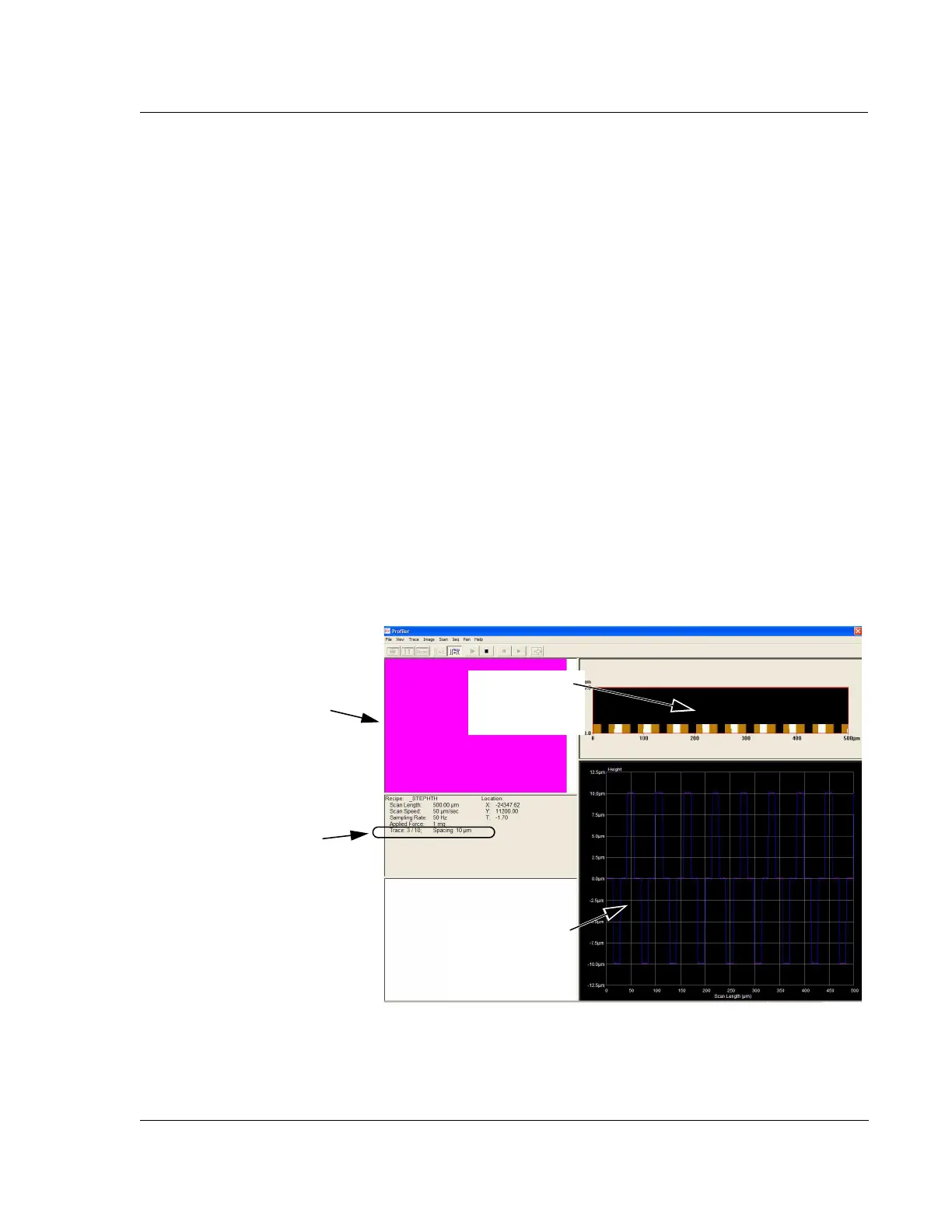
Click
START to begin the scan. (See Figure 5.6.)
The View Scan window appears, switches to side view optics (P-16+) or Top
View (P-6), and the scan begins. The side view video image shows the stylus in
contact with the sample surface during the scan from the side-view perspective.
The top view is offset from the actual scan site by the scan position offset, with
is approximately 2 mm above the scan site. The Real Time Scan graph in the
lower right quadrant displays the data in a real time trace as it is collected. (See
Figure 5.6). After each trace, the data is presented in the 3D Top View window,
with each successive trace being added to the others until all traces are viewed in
the window. When the scan is finished, the system performs calculations on the
data and automatically displays it in the
Analysis window.
Two columns of information are presented in the lower left quadrant of the 3D scan
screen (Figure 5.6) and three columns in the 3D sequence screen (Figure 5.7).
Figure 5.6 3D View Scan Screen During a Single Scan
The Video Display window
shows the sample surface
with the scan area
surrounded by a box.
3D Top View
display, view of
composite traces.
Along with the items found in
the 2D Information filed,
Trace: is added as a strictly
3D element.
2D trace display, of
single trace used
to create 3D
image.



 To Next Page