0142530-000 AB KLA-Tencor Confidential 13-23
3/13/09
KLA-Tencor P-16+ / P-6 User’s Guide Stylus Change Procedure - Stylus Removal and Replacement
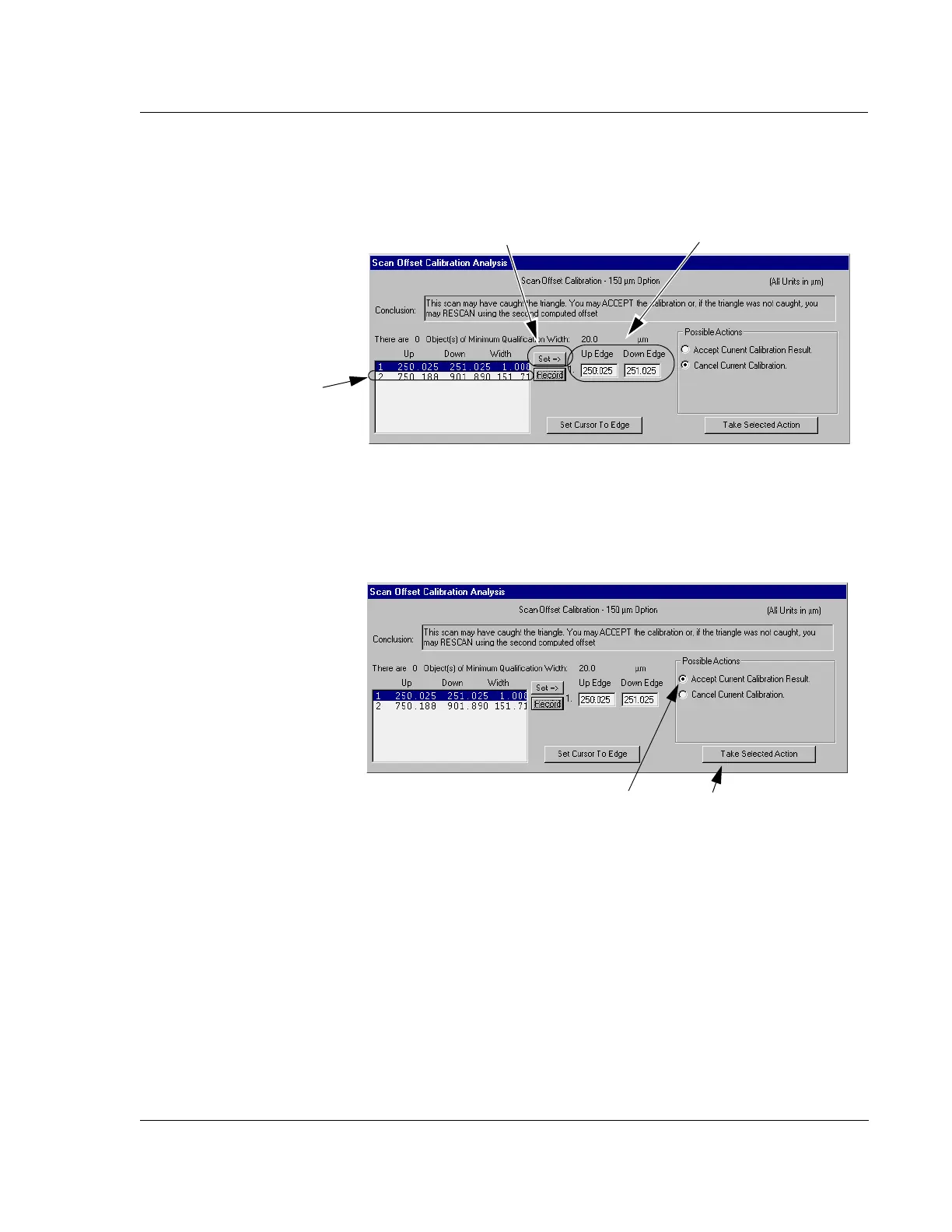
1. Once the feature is chosen, choose Accept Current Calibration Result. (See
Figure 13.36.)
2. Click
Take Selected Action. (See Figure 13.36.)
3. After the scan calibration has been accepted, the
Calibrations screen returns.
Close the Calibration screen.
Figure 13.35 Hand Selecting the Triangle Data in Analysis Screen
First: Click on the
feature that represents
the triangle.
Second: Click
on
Set=>.
The Up and Down parameters are displayed
in the
Up Edge and Down Edge fields
Figure 13.36 Accepting Adjusted Scan Results
Step 1 Choose
Accept Current
Calibration Result
.
Step 2 Click on Take
Selected Action
to accept
the calibration results.



 To Next Page