0142530-000 AB KLA-Tencor Confidential 11-19
3/13/09
KLA-Tencor P-16+ / P-6 User’s Guide System Security - Procedure to Change the Global Settings
PROCEDURE TO CHANGE THE GLOBAL SETTINGS 11
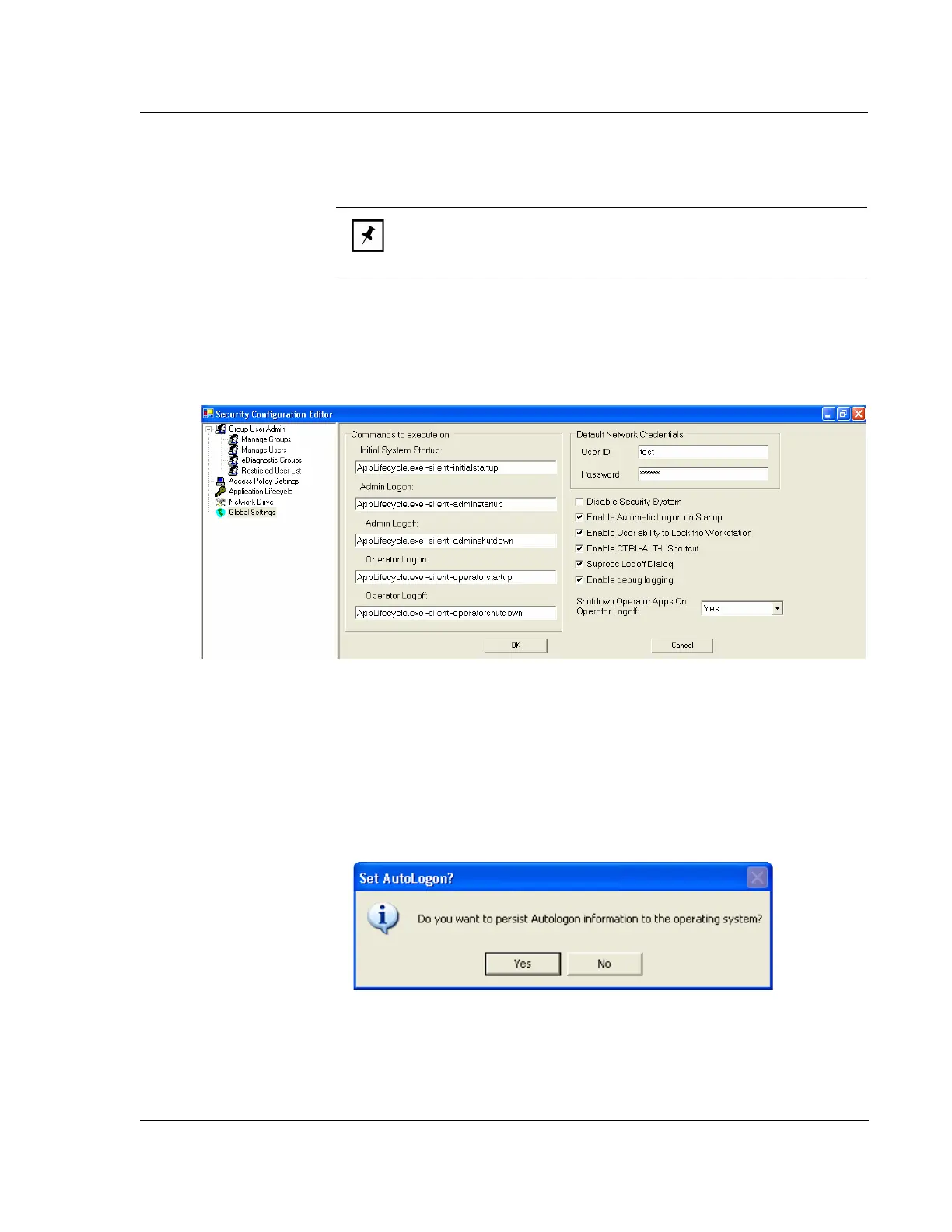
1. Start the Security Configuration Editor and select Global Settings.
2. Select the Edit button,which enables modification of settings as shown in Figure
11.18.
3. To enable automatic logon (default, recommended value), check Enable
Automatic Logon on Startup.
4. To disable automatic logon, uncheck Enable Automatic Logon on Startup.
5. Select Save from the lower, left corner as shown in Figure 11.17.
6. Select Yes to make the appropriate changes to Windows XP to enable
Autologon, as shown in Figure 12.19
7. Close the Security Configuration Editor and restart Windows XP for the changes
to take affect.
NOTE: It is recommended to use automatic logon through the
AutoLogonUser account. This is configured by default on new profiler
systems shipping from KLA-Tencor.
Figure 11.18 Modify Global Settings
Figure 11.19 Persist Autologon to Operating System



 To Next Page