Configuration - Safe Area Configuration KLA-Tencor P-16+ / P-6 User’s Guide
14-14 KLA-Tencor Confidential 0142530-000 AB
3/13/09
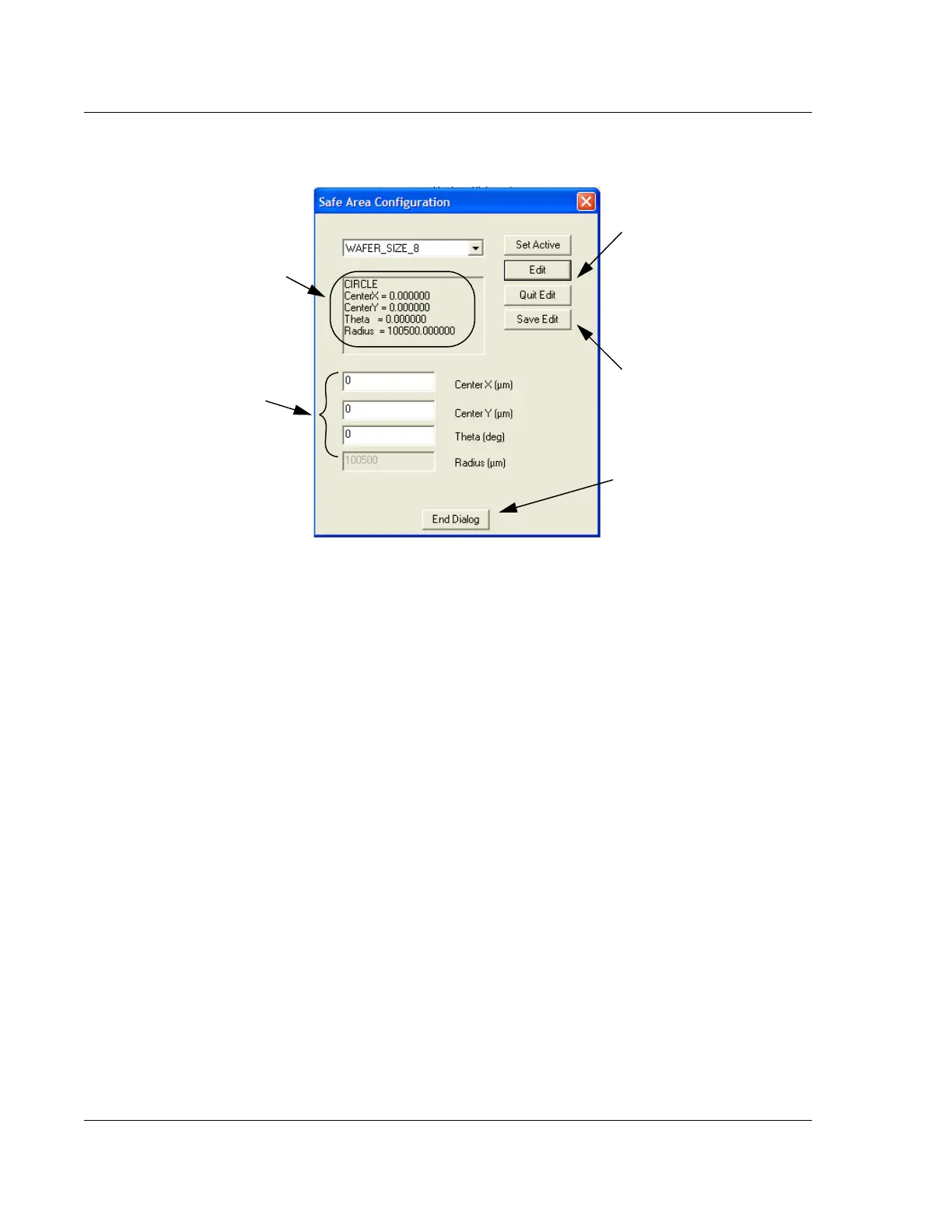
8. After the parameters have been entered, click Save Edit to accept the new safe
area. (See Figure 14.14.)
9. If the edit is to be abandoned without accepting the new parameters, click
Quit
Edit
. (See Figure 14.14.)
10. To exit the Safe Area Configuration dialog box, click
End Dialog. (See
Figure 14.14.)
Figure 14.14 Safe Area Configuration - Edit Safe Area Values
Step 9 Click Quit Edit when
the new values have been
entered and saved, or to
abandon the edit without
changing the values.
Step 7 To change the
parameters, highlight the
parameter to be changed
and enter the new value.
Step 8 When the new values
have been entered in the
variable boxes, click
Save
Edit
to apply the values.
When the Sample
Configuration is chosen and
set to active, the information in
the Safe Area Configuration
display is changed to match
the chosen configuration.
Step 10 To exit the Safe
Area Configuration dialog
box, click
End Dialog.



 To Next Page