Sequence Recipe and Data - Creating a Sequence Recipe KLA-Tencor P-16+ / P-6 User’s Guide
6-10 KLA-Tencor Confidential 0142530-000 AB
3/13/09
Begin: Setting Deskew
Options
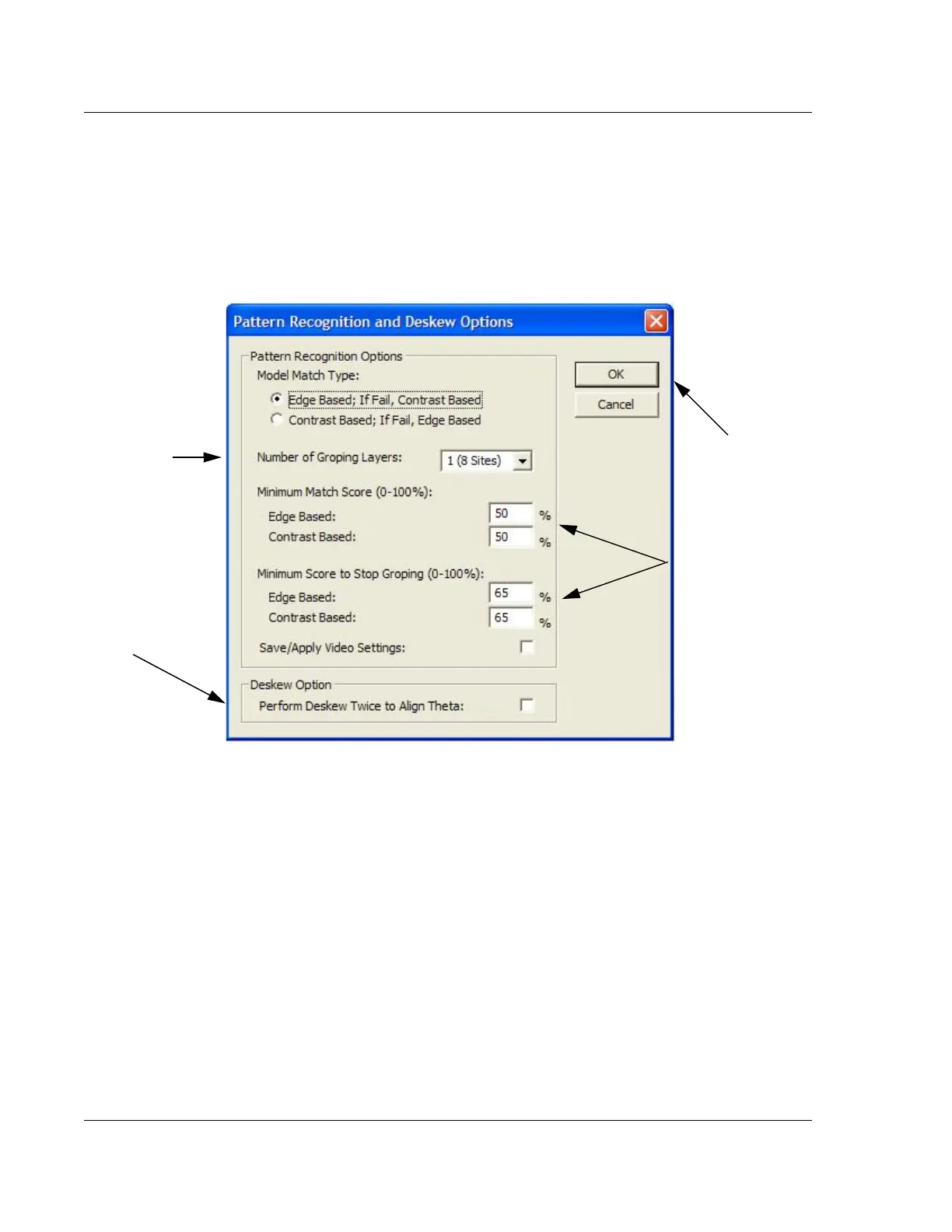
18. Deskew Options set the number of groping Layers, set the maximum and
minimum percentage match for identification of a feature, and offer the ability
to turn on or off Deskew Twice and Image Processing options. (See Groping
with Pattern Recognition (P-16+ Only) on page 6-44.)
Click
Deskew in the menu bar and then on Options... to display the dialog box.
(See Figure 6.11.)
19. To enable
Edge Based Pattern Rec., click to put a check in the check box. (See
“Edge Based Pattern Rec.” in Table 6.12 on page 6-45.)
20. Set the
Number of Groping Layers by clicking on the down-arrow and then
clicking on the desired number of layers and sites. (See Groping with Pattern
Recognition (P-16+ Only) on page 6-44 for more information on groping
layers.)
21. Set the
Minimum Match Score by double-clicking in the variable box and typing
in the new percentage. (See Figure 6.11.)
22. Set the
Minimum Score to Stop Groping by double-clicking in the variable box
and typing in the new percentage. (See Figure 6.11.)
23. To enable
Save/Apply Video Settings, click to put a check in the check box. (See
“Save/Apply Video Settings” in Table 6.12 on page 6-45.)
Figure 6.11 Deskew Options Dialog Box
Step 20 Click the
menu arrow and click
the desired groping
layers (sites).
Double-click in the
variable box and
enter the percentage.
Step 25 Click OK
when all settings
have been set and
confirmed.
Step 24 Click to
enable the Deskew
Option checkbox.



 To Next Page