Analyzing 3D Scan Data - 3D Analysis Screen Features KLA-Tencor P-16+ / P-6 User’s Guide
7-10 KLA-Tencor Confidential 0142530-000 AB
3/13/09
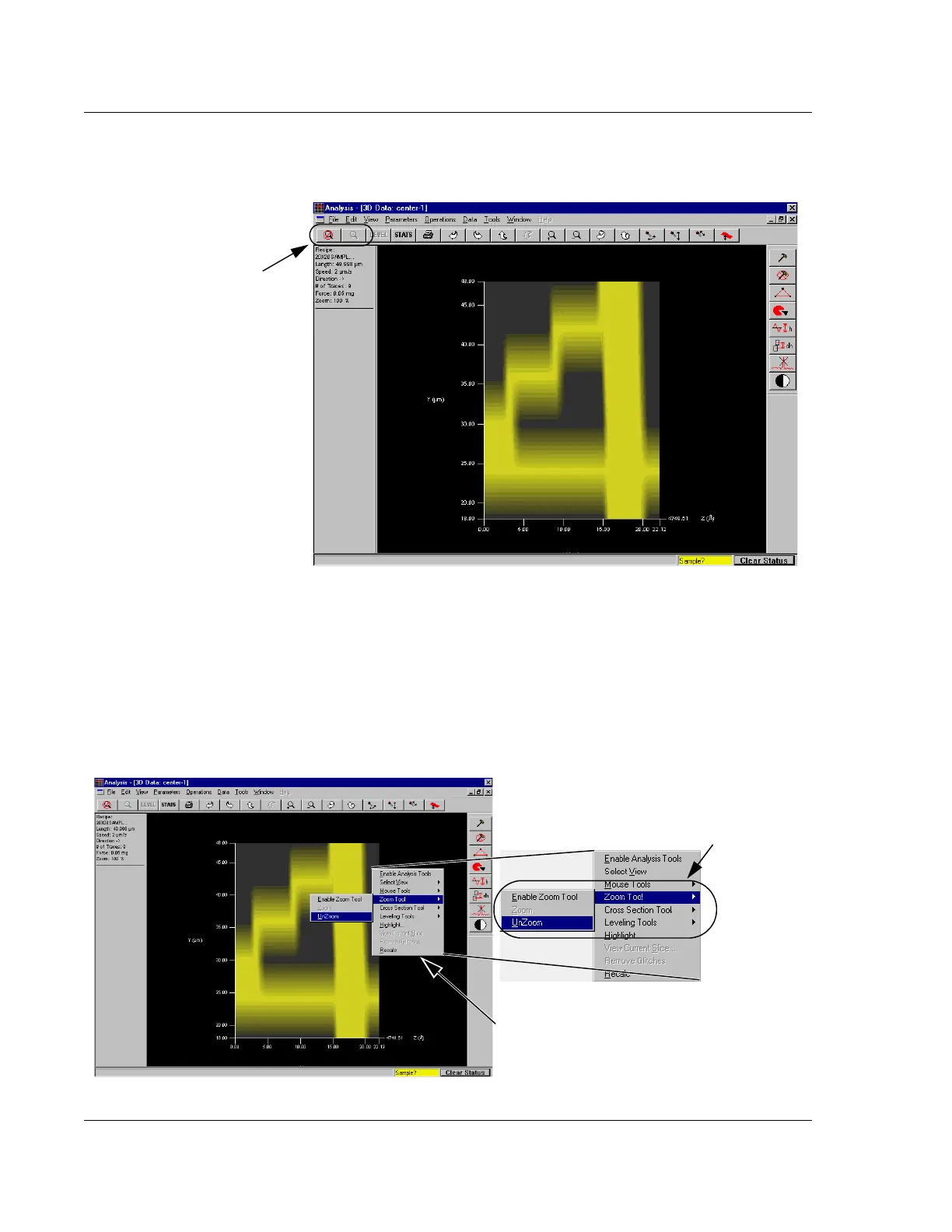
8. To return to the pre-zoom image, click the Zoom Out icon. The image returns to
the prior display. (See Figure 7.12.)
ALTERNATIVE: (See Figure 7.13.)
a. Right-click the graphic display area to display its menu.
b. Move the cursor to
Zoom Tools, to display its menu.
c. Choose
Unzoom and click. The image returns to the prior display.
Figure 7.12 Analysis Screen – Zoomed In Area
Step 8 When the Zoom In
procedure is complete, the
Zoom Out icon is activated to
allow the user to return to the
pre-zoom image. The Zoom
In icon is deactivated.
Figure 7.13 Analysis Screen – Unzoom Using Right-Click Menu
Step 8a. Right-click to display
the Right-Click menu.
Step 8b. Move the cursor to Zoom Tools to
display its menu.
Step 8c. Click
UnZoom.



 To Next Page