Scan Recipes - Creating and Editing a Scan Recipe KLA-Tencor P-16+ / P-6 User’s Guide
3-46 KLA-Tencor Confidential 0142530-000 AB
3/13/09
The median filter is a major component of the Glitch Removal process used on data in
the Analysis screen for both 2D and 3D data.
The available filter sizes (kernels) for 2D data are: 1 x 3, 1 x 5, and 1 x 7 points.
The available filter sizes (kernels) for 3D data are: 3 x 3, 5 x 5, and 7 x 7 points.
To add a filter or change the filter size on existing data, use the following procedure:
1. From the Analysis screen, click
Edit to display its menu.
2. Select
Recipe. This opens the recipe used to generate the data.
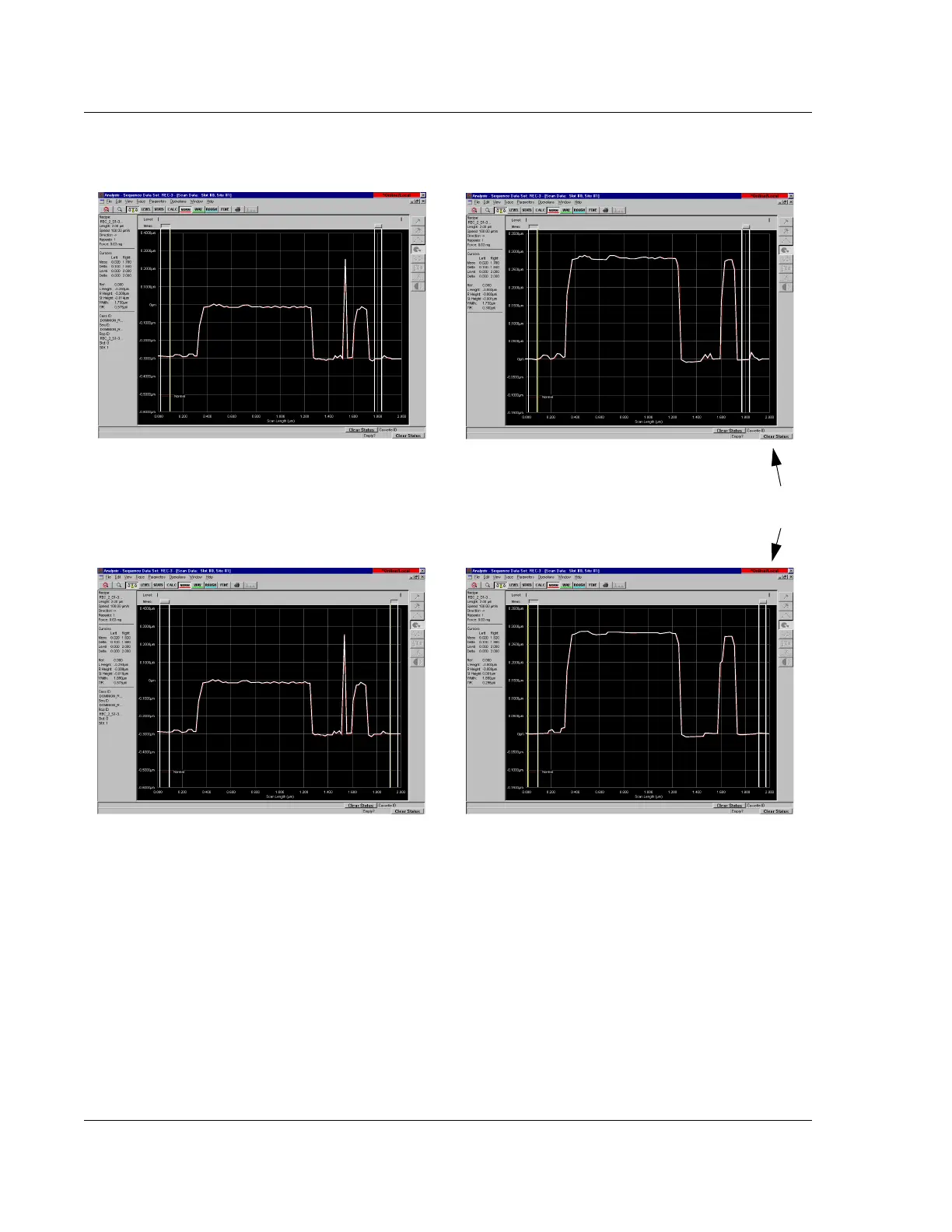
Figure 3.36 Median Filter Application in Glitch Removal
1 x 3 point median filter
before and after application
BEFORE APPLICATION AFTER APPLICATION
1 x 7 point median filter
before and after application
BEFORE APPLICATION AFTER APPLICATION
Notice how much smoother the 1 x 7
filter (below) made the scan than that of
the 1 x 3 filter (above).



 To Next Page