Calibrations - Applied Force Calibration KLA-Tencor P-16+ / P-6 User’s Guide
12-2 KLA-Tencor Confidential 0142530-000 AB
3/13/09
Applied Force Calibration Procedure 12
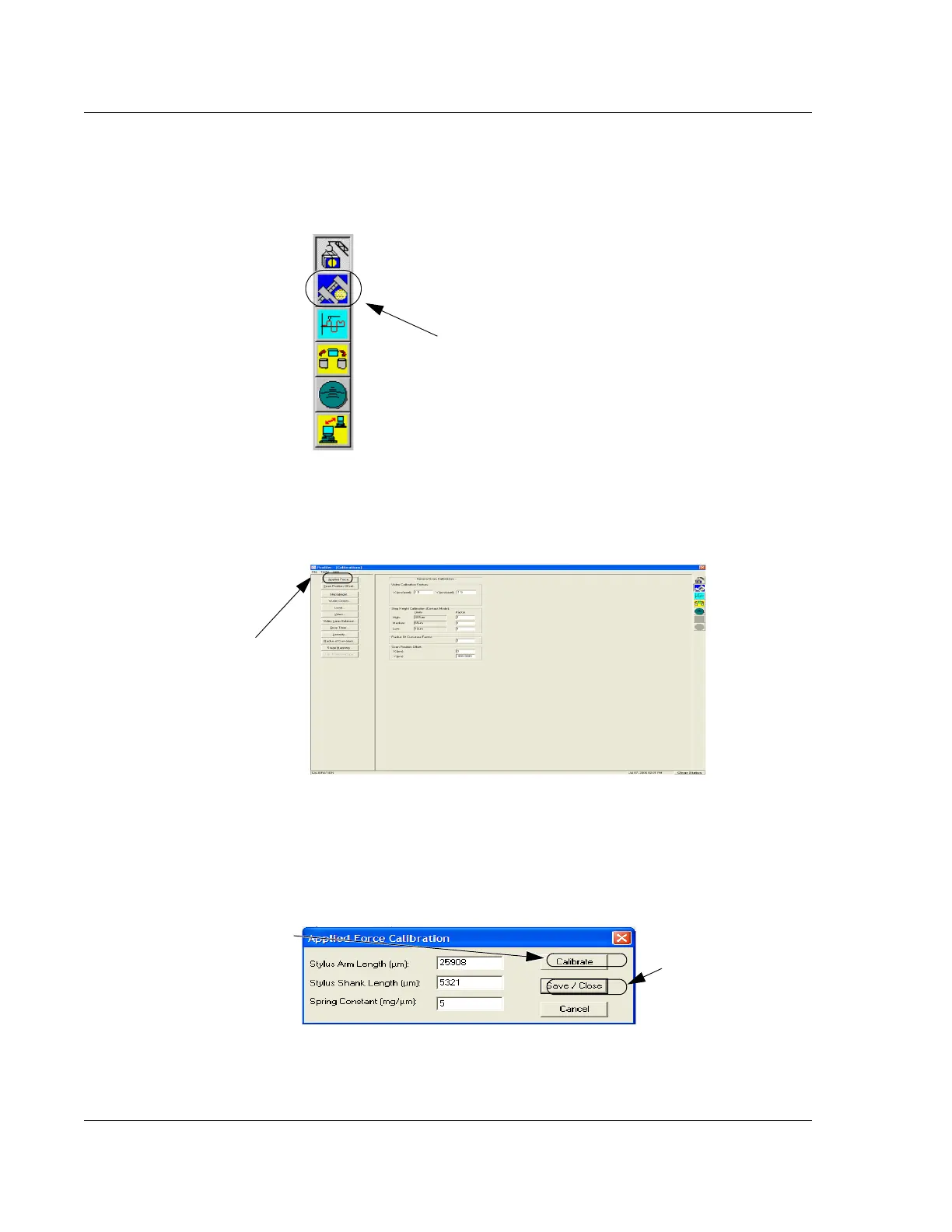
1. Double-click the Calibration icon. (See Figure 12.1.)
2. Click the
Applied Force button in the Calibration screen. (See Figure 12.2.) The
Applied Force Calibration dialog box is displayed. (See Figure 12.3.)
3. Click
Calibrate to begin the calibration procedure.
The system performs the calibration and displays the results in the three fields of
the Applied Force Calibration dialog box. (See Figure 12.3.)
Figure 12.1 Catalog Screen - Choose Calibration
Step 1 Double-click the
Calibrations icon to open
the
Calibrations screen.
Figure 12.2 Calibrations Screen
Step 2 Click Applied Force
to display the Applied Force
Calibration window.
Figure 12.3 Applied Force Calibration Window
Step 3 Click Calibrate to
begin the Applied Force
Calibration.
Step 4 When the
calibration is complete,
click
Save/Close to
save the calibration
results of the Applied
Force Calibration.



 To Next Page