0142530-000 AB KLA-Tencor Confidential 6-23
3/13/09
KLA-Tencor P-16+ / P-6 User’s Guide Sequence Recipe and Data - Editing the Options Field in the Sequence Editor
3. Click in the Comments field, or press TAB← or TAB→ until the Comments text
box is highlighted.
4. Enter the text of the information which needs to be passed from one operator to
the other.
EDITING THE OPTIONS FIELD IN THE SEQUENCE EDITOR 6
In the Options variable fields, sequence mode (deskew options) and data transfer
options can be defined for the sequence displayed in the editor.
Semi-Automatic 6
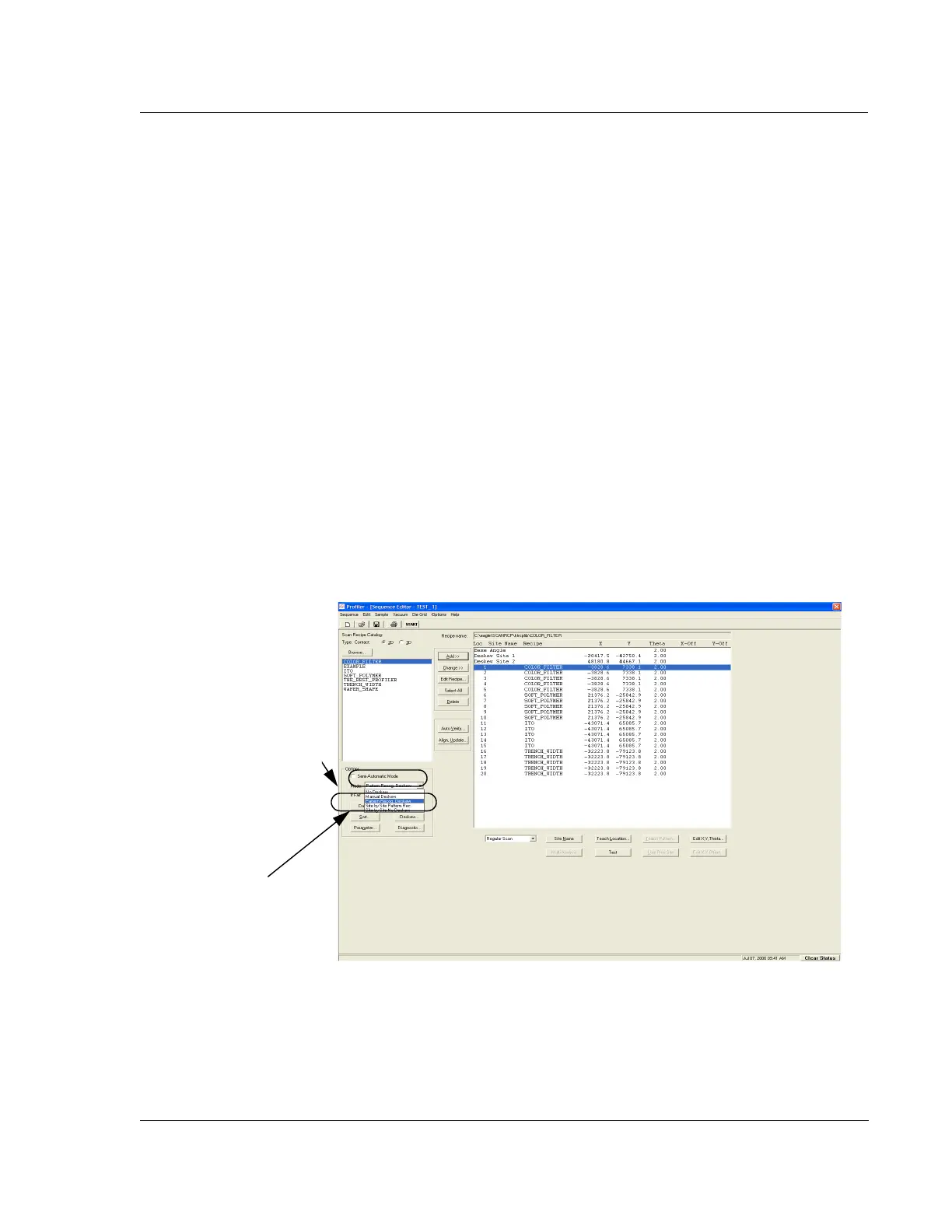
In the Sequence Editor, put a check in the Semi-Automatic check box to enable the
mode. (See Figure 6.23)
For 2D scans, the Semi-Automatic mode causes a sequence to display the trace
data after each scan and pause before proceeding to the next step. Each step can
be verified and, if needed, the scan sites can be adjusted and the scan performed
again before proceeding to the next step.
For 3D scans, the Semi-Automatic mode does not halt the sequence between
steps.
Figure 6.23 Sequence Editor – Mode Menu
Click in the Semi-Automatic
check box to enable the
mode.
Click the
Mode down-arrow
to display its menu. Select
from the available modes.



 To Next Page