0142530-000 AB KLA-Tencor Confidential 6-3
3/13/09
KLA-Tencor P-16+ / P-6 User’s Guide Sequence Recipe and Data - Creating a Sequence Recipe
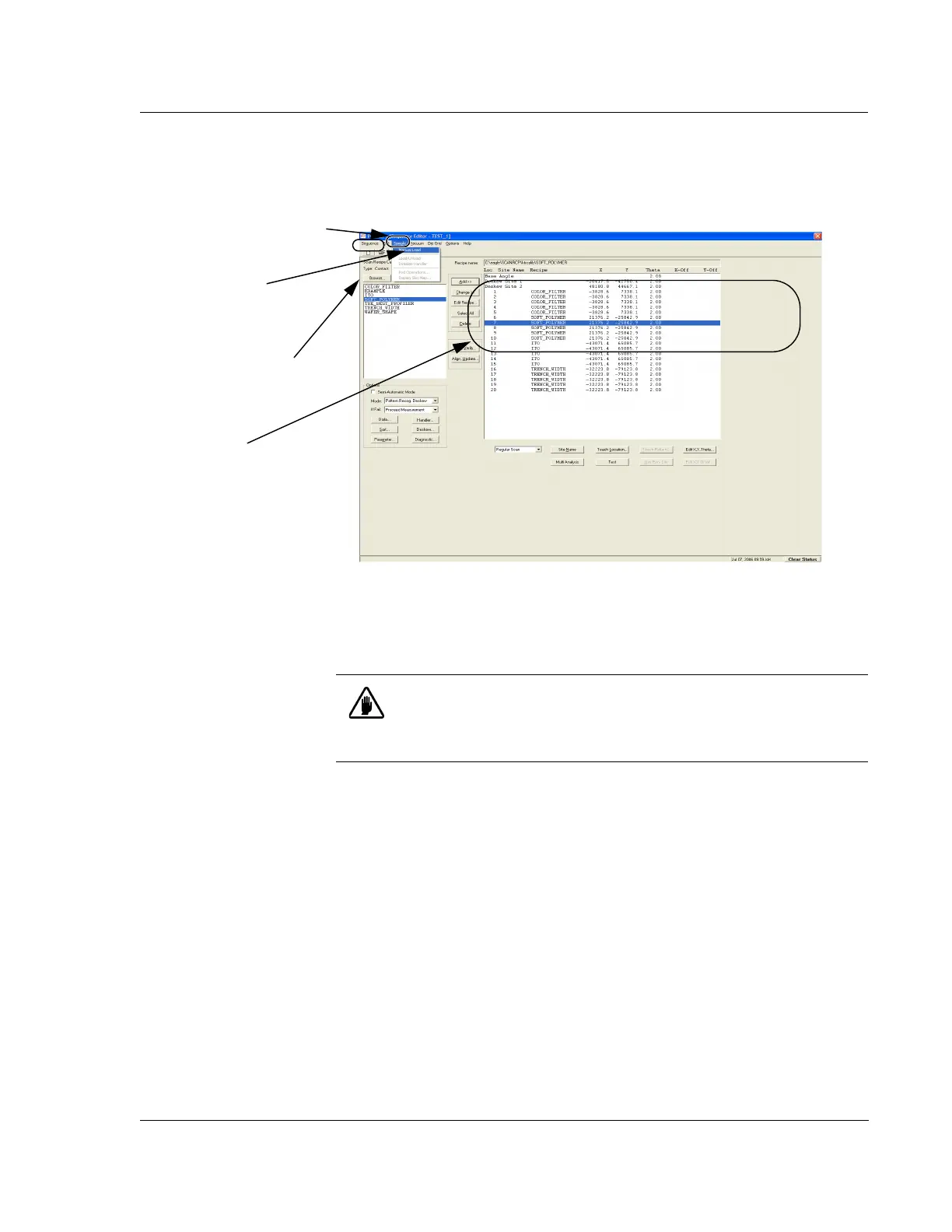
2. To load a sample, click Sample in the menu bar at the top of the screen to display
its menu. (See Figure 6.2.)
3. Choose
Manual Load from the Sample menu. The sample stage moves to the
stage door.
4. After the stage stops, open the stage door.
5. Place the patterned wafer on the stage paying close attention to the orientation of
the wafer. The die grid should be as square with the stage X-Y-axis as possible.
It is best to use a precision locator to place the wafer securely and squarely on
the stage. Otherwise, if the system has to deskew the wafer very much,
measurements and pattern recognition could fail later.
6. Turn the vacuum on using the switch on the upper left door frame.
7. Close the measurement chamber door.
Figure 6.2 Sequence Recipe Catalog Screen
Step 1 Click the Sequence
Recipe
type to display related
recipes in the Scan Recipe
Catalog.
Step 2 Click
Sample in the
menu bar to display its menu.
Step 3 Click
Manual Load to
bring the stage to the stage
door.
CAUTION: Wait until the stage has completely stopped moving before
attempting to open the measurement chamber door. If it is open when
the system is in movement, the profiler software does not operate
because the interlock switch stops all the stage and elevator motors.



 To Next Page