0142530-000 AB KLA-Tencor Confidential 4-19
3/13/09
KLA-Tencor P-16+ / P-6 User’s Guide XY View Screen - Using Die Grid Navigation (Optional Feature, P-16+ only)
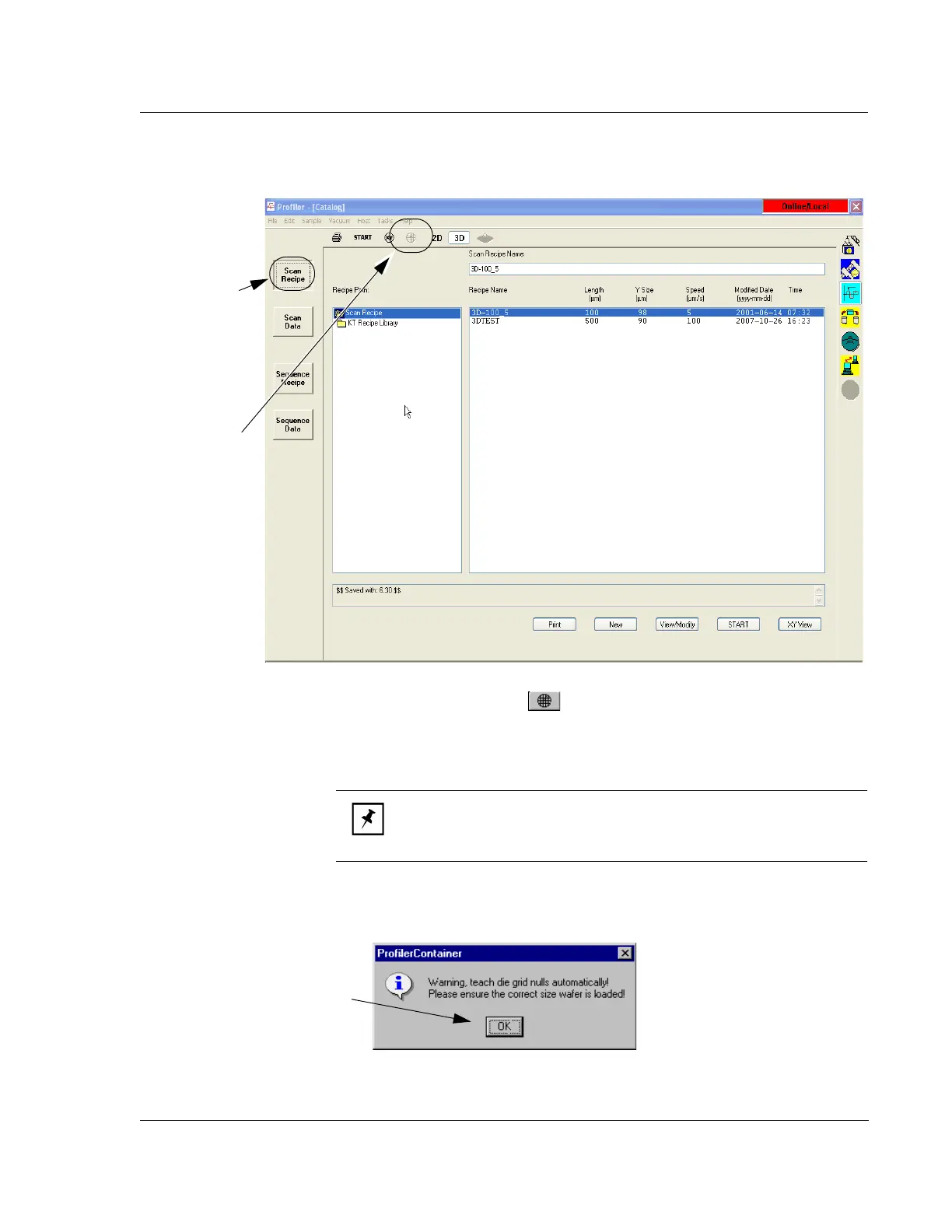
2. Click the Die Grid button in the tool bar, or select Teach Die Grid from the
File menu. (See Figure 4.13.)
The
Teach Die Grid window appears with a warning about the automatic null
feature of the Teach Die Grid procedure. (See Figure 4.14.)
Figure 4.13 Scan Catalog Screen
Step 2 Click the
Die Grid icon to
initiate the
Teach
Die Grid
procedure.
Step 1 Click the
Scan Recipe
button to open the
list of available
NOTE: The die grid button maybe grayed out unless the following is
true: A recipe exists in the current scan recipe path; The pattern
recognition option is enabled; Safe Area is properly set.
Figure 4.14 Warning – Automatic Null
Step 3 Click OK to continue.



 To Next Page