0142530-000 AB KLA-Tencor Confidential 6-11
3/13/09
KLA-Tencor P-16+ / P-6 User’s Guide Sequence Recipe and Data - Creating a Sequence Recipe
24. If desired, click to put a check in the check box for Perform Deskew Twice to
Align Theta
to enable it. (See “Perform Deskew Twice to Align Theta” in Table
6.12 on page 6-45.)
End: Set Deskew Options 25. Click OK when all the parameters have been set.
Begin: Set Data Options 26. Data Options are explained in detail beginning in Step 2. on page 6-25, in
Editing the Options Field in the Sequence Editor.
Click
Data... in the Options section in the lower left corner of the Sequence
Editor. This displays the
Data Options dialog box.
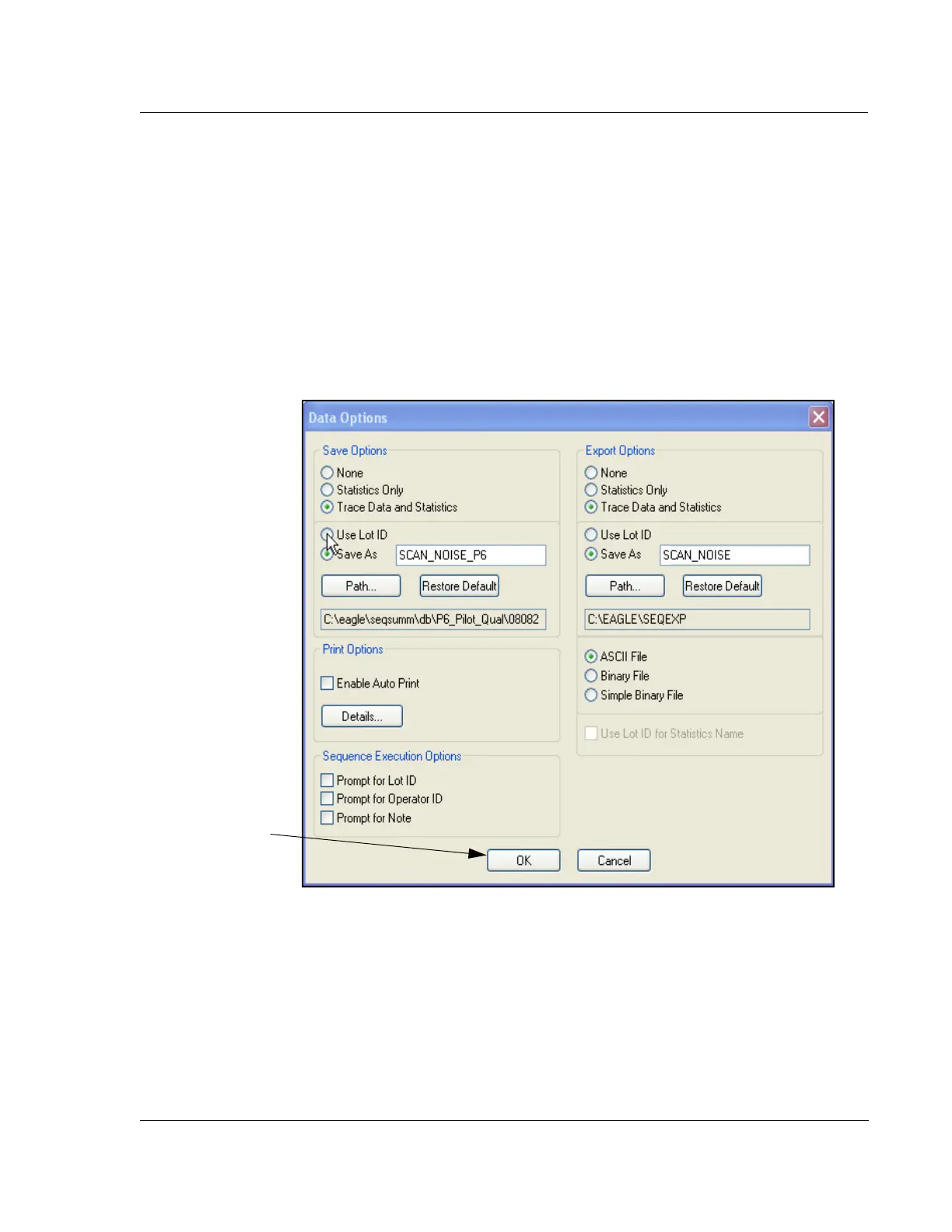
The
Data Options dialog box appears. (See Figure 6.12.) Once set, the Profiler
automatically either exports, saves, or prints the file data.
1. Set the options according to the scan sequence requirements. (See Step 2 on
page -25 through Step 2 on page -26, in Editing the Options Field in the
Sequence Editor.)
End: Set Data Options 2. Click OK when options have be set.
Figure 6.12 Data Options
Step 28 - When the
Options have been
chosen, Click OK



 To Next Page