Sequence Recipe and Data - Sequence Editor Window Features KLA-Tencor P-16+ / P-6 User’s Guide
6-22 KLA-Tencor Confidential 0142530-000 AB
3/13/09
Displaying the Sequence Information Dialog Box 6
The Sequence Information dialog box displays the title, author, date and time of
creation (or modification) of the sequence. It also provides a text box for annotations.
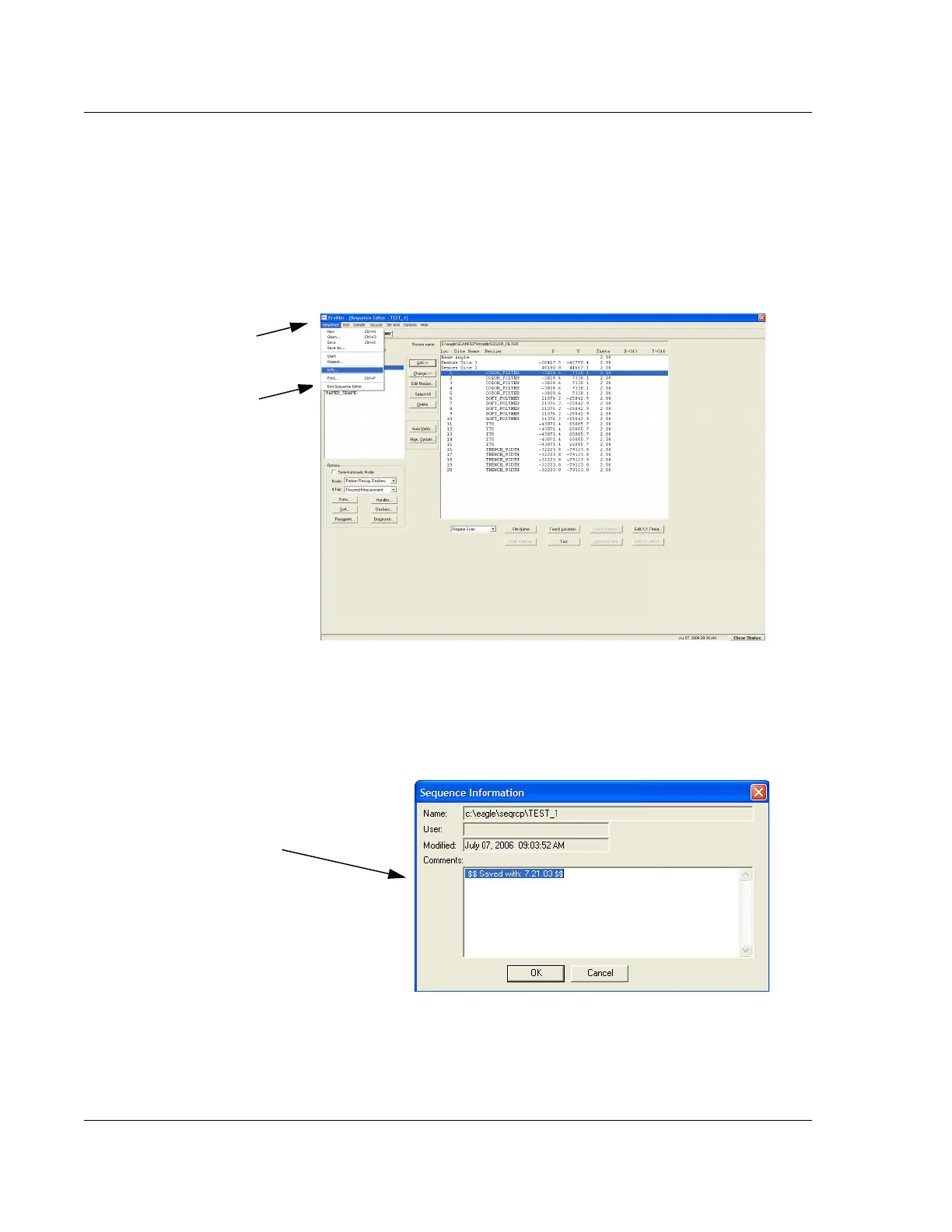
1. In the Sequence Editor, click the
Sequence menu to display its menu.
(See Figure 6.21).
2. From the Sequence Menu, select
Info… (See Figure 6.21)
The Sequence Information dialog box is displayed. The Name, User, and
Modified fields cannot be edited.
Figure 6.21 Sequence Editor – Sequence Menu
Step 1 Click Sequence to
display its menu.
Step 2 Click Info… to display
its dialog box.
Figure 6.22 Sequence Information Dialog Box
Step 4 This field, the
Comments: text box, can be
used to record messages or
information on the sequence
listed in the dialog box heading.


 To Next Page